The part most healthcare buyers care about comes before any of that. A business associate agreement is included on the SafeMailer free plan. Not on a paid tier, not after a sales call, not at an enterprise minimum. That is unusual in this category, where competing platforms make the BAA the reason you have to buy before you can test. It means a practice can validate encrypted patient email against real workflow with real staff at zero cost and stay inside HIPAA while doing it.
SafeMailer at a Glance as Healthcare Encryption Software
Compliance officers and IT directors want the specification before the argument, so here it is in one place.
| Attribute | SafeMailer |
|---|---|
| Software category | ePHI encryption software for email |
| Deployment model | Browser-based, runs inside Gmail and Microsoft Outlook |
| Sender installation | None |
| Recipient installation | None |
| Recipient requirement | An existing Google or Microsoft account, no SafeMailer subscription |
| Encryption in transit | TLS 1.3 |
| Encryption at rest | AES-256-GCM |
| Key management | Zero-trust key management architecture |
| Certifications | SOC 2 Type II, ISO 27001 |
| Business associate agreement | Included on every plan, starting with the free plan |
| Post delivery control | Revoke access, restrict forwarding, restrict download, set expiry, One Time View |
| Audit logging | Access, delivery and message opening recorded per message |
| Attachment capacity | 100 MB on Free, 2 GB on Standard, unlimited on Pro |
| Pricing basis | Per sender, not per mailbox |
| Free plan | 10 encrypted messages per month, no credit card |
| Primary market | United States healthcare, finance, education, aerospace and government |
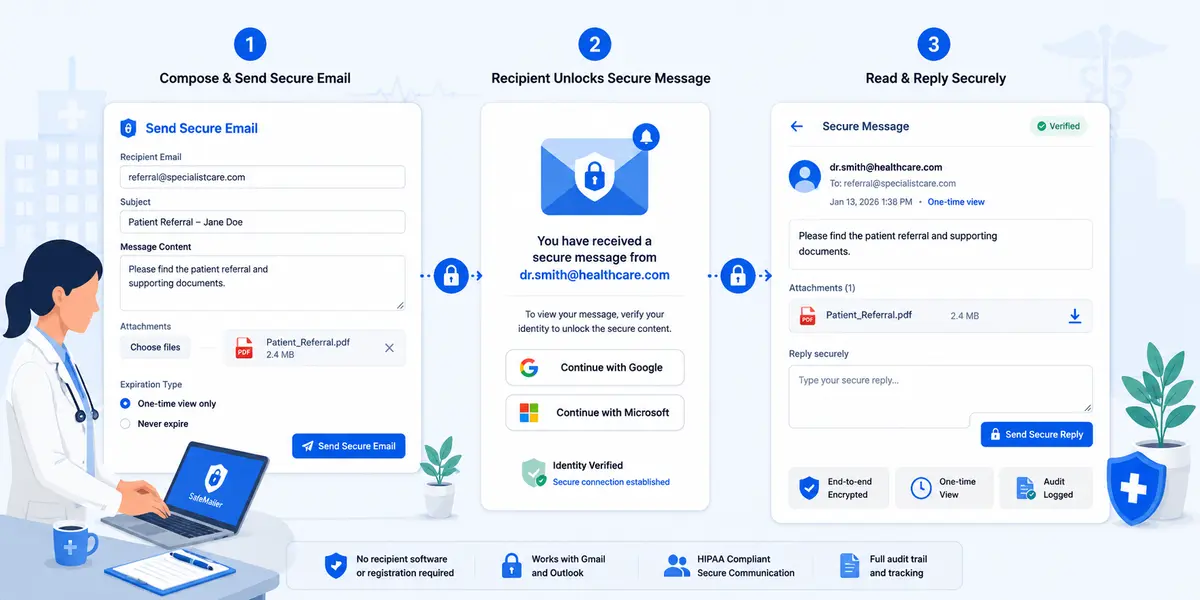
Three rows decide most healthcare purchases. The BAA row, because it determines whether you can test before you buy. The recipient installation row, because it determines whether encrypted email survives contact with real referring practices. And the pricing basis row, because a clinic running sixty mailboxes rarely has sixty people sending records outside the building. The step by step encryption workflow shows what all of that looks like from both ends of a message.
Why SafeMailer Is the Best Encryption Software for Healthcare
Most encryption platforms sold into healthcare are secure. Very few are used consistently. The gap between those two states is where patient data actually leaks, and it is the problem SafeMailer was built around.
Watch how a typical secure message fails. A billing coordinator sends an insurance appeal through a portal based service. The adjuster gets a notification, follows the link, and is asked to register an account, invent a password, verify an email address, and only then read the appeal. Some adjusters do it. Plenty reply asking for the documents to be sent normally. The coordinator, three days from a filing deadline, obliges. The appeal goes out in plain text carrying a member ID and a diagnosis code.
SafeMailer removes the step where that breaks. Identity is confirmed against an account the recipient already holds and already trusts, so a protected message opens in roughly the time an ordinary one does. The sending experience does not change either, which means the compliance gain does not arrive bundled with a training burden. Clinical teams reviewing the wider picture can look at the healthcare email security solutions SafeMailer supports across referral, billing and patient correspondence.
Four properties separate SafeMailer from the tools healthcare organizations usually shortlist.
- Protection travels with the message rather than the connection, so ePHI stays encrypted while it sits in the recipient mailbox and on every server that handled it
- Control does not end at delivery, because access can be revoked, forwarding and download restricted, expiry set, and a single view enforced after the message has already gone
- Every message produces its own access record, which is the evidence an investigator asks for first
- Adoption costs nothing in workflow change, which is why encrypted correspondence is still going out in month six instead of quietly dying in week three
ePHI Encryption Software Covers What Device and Database Encryption Cannot
Search for healthcare encryption software, and the results mix four different product categories that solve four different problems. Endpoint and full disk encryption protects a stolen laptop. Database encryption protects records at rest inside a clinical system. File and folder encryption protects stored documents. None of them protects a chart the moment someone attaches it to an email and sends it to an outside practice, because at that instant the file has left every boundary those tools defend.
That is the specific job of ePHI encryption software for email, and it is where the majority of reportable healthcare breaches originate. A hospital can hold flawless disk encryption across every workstation and still generate a notifiable disclosure from one referral sent to a mistyped address.
| Encryption Category | What It Protects | What It Leaves Exposed |
|---|---|---|
| Endpoint and full disk | Data on a lost or stolen device | Anything sent out of the device by email |
| Database and column level | Records at rest inside clinical systems | Records exported, attached and emailed |
| File and folder | Documents stored on a drive or share | Documents once they are attached to a message |
| Email and message level | The message and its attachments, in transit and at rest, wherever they land | Nothing in the external email path |
Healthcare organizations rarely need to choose between these. They need to notice that the first three are usually already in place and the fourth usually is not. Teams mapping which data has to be protected in which channel will find the boundaries drawn in the difference between HIPAA and PII obligations, a distinction HR and IT functions get wrong more often than either would like to admit.
HIPAA Encryption Software Requirements SafeMailer Meets
The HIPAA Security Rule handles encryption in two separate places, and compliance teams confuse them constantly. One governs data sitting in storage. The other governs data crossing a network. Both apply to ePHI, both are classified as addressable rather than required, and the technical safeguards published in 45 CFR 164.312 set out the specifications in full.
| Requirement | What the Rule Asks For | How SafeMailer Answers It |
|---|---|---|
| Transmission security | A mechanism to encrypt ePHI moving across an electronic network | Message level encryption applied before the email leaves the sender mailbox, with TLS 1.3 in transit |
| Access control | A mechanism to encrypt and decrypt ePHI held in storage | AES-256-GCM at rest, readable only by verified recipients |
| Person or entity authentication | Verification that a person seeking access is who they claim to be | Recipient identity confirmed through an existing Google or Microsoft account before the message opens |
| Audit controls | Recording and examining activity in systems holding ePHI | Access, delivery and opening recorded for each individual message |
| Integrity controls | Protection against improper alteration of ePHI in transit | Encrypted payload cannot be modified in transit without detection |
| Business associate contract | A written agreement governing vendor handling of ePHI | Business associate agreement included on every plan, including Free |
The word 'addressable' causes more HIPAA violations than any other term in the regulation. Organizations read it as optional and skip encryption entirely. That reading is wrong. An addressable specification gives a covered entity three legitimate responses: implement it, implement a documented equivalent, or document why it is not reasonable and appropriate in that environment. What no covered entity may do is ignore it and record nothing.
For external email, the third option is close to indefensible now. Browser-based encryption is inexpensive, available the same afternoon, and changes no clinical workflow, so a risk analysis concluding that encrypting patient email is unreasonable will not survive scrutiny. The direction of travel makes it harder still, because a proposed rule published in January 2025 would reclassify encryption from addressable to required and remove the alternative pathway. The full set of administrative, physical and technical safeguards, along with the HIPAA compliant email encryption requirements that follow from them, is mapped separately.
Best Encryption Software for Healthcare ePHI Compared by Architecture
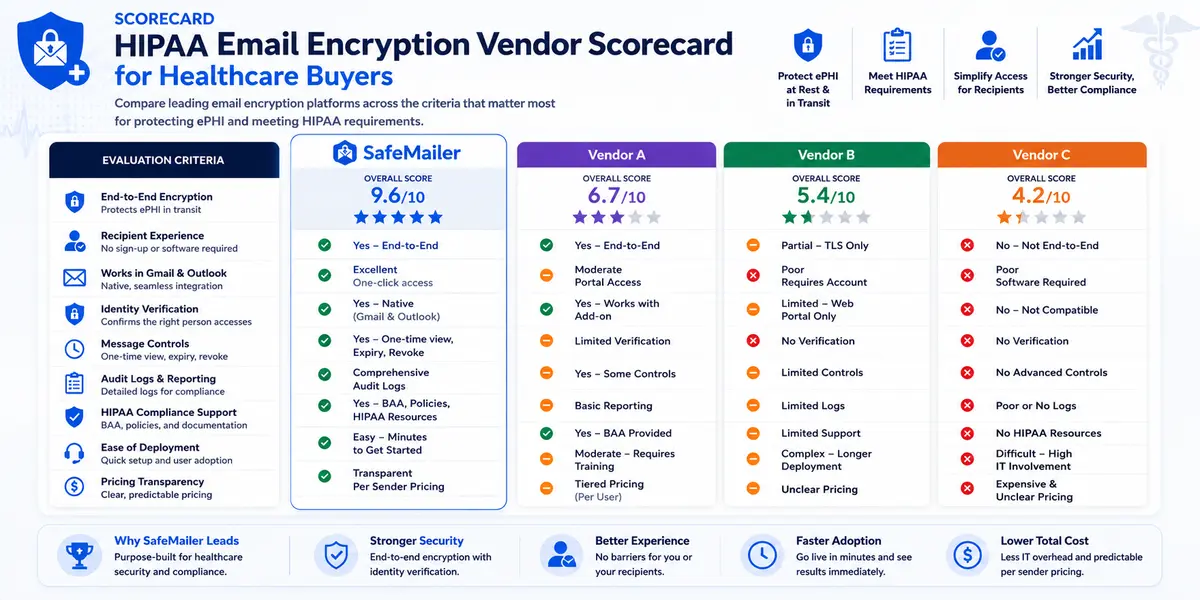
Healthcare buyers generally shortlist across three architectures. The security specifications look similar on paper. The adoption rates do not, and adoption is what determines whether any of it protects a patient.
| Consideration | Portal Platforms | Plugin Platforms | SafeMailer |
|---|---|---|---|
| Sender experience | Compose in a separate web application | Add in installed on each workstation | Compose in Gmail or Outlook as normal |
| Recipient experience | Register an account, set a password, log in | Often needs matching software installed | One link, verified with an existing account |
| Recipient cost | Account required on the vendor platform | Licence or software may be required | No subscription needed to receive or reply |
| IT setup | Mail routing changes and change control | Installation and version management | Nothing to install or reconfigure |
| Attachment handling | Often size capped and uploaded separately | Bound by desktop client limits | Encrypted automatically, unlimited on Pro |
| Post delivery control | Varies by platform | Usually none | Revoke, restrict forwarding, restrict download, set expiry |
| Single access control | Rarely offered | Usually none | One Time View expires a message after one open |
| Audit record | Portal login logs | Limited or none | Access and opening recorded per message |
| Pricing basis | Commonly per mailbox with management fees | Commonly per seat | Per sender with no management fees |
| BAA availability | Usually paid tiers only | Usually paid tiers only | Included from the free plan |
Architecture is the reason encrypted correspondence keeps going out after the first month instead of reverting to ordinary email under deadline pressure. A fuller side-by-side sits on the SafeMailer comparison page for teams running a formal evaluation.
SafeMailer Prevents Accidental Unencrypted Delivery in Healthcare Settings
Both major cloud mail platforms will sign a business associate agreement, and both apply encryption. Healthcare organizations regularly conclude that nothing further is needed. That conclusion misreads what the platforms actually guarantee.
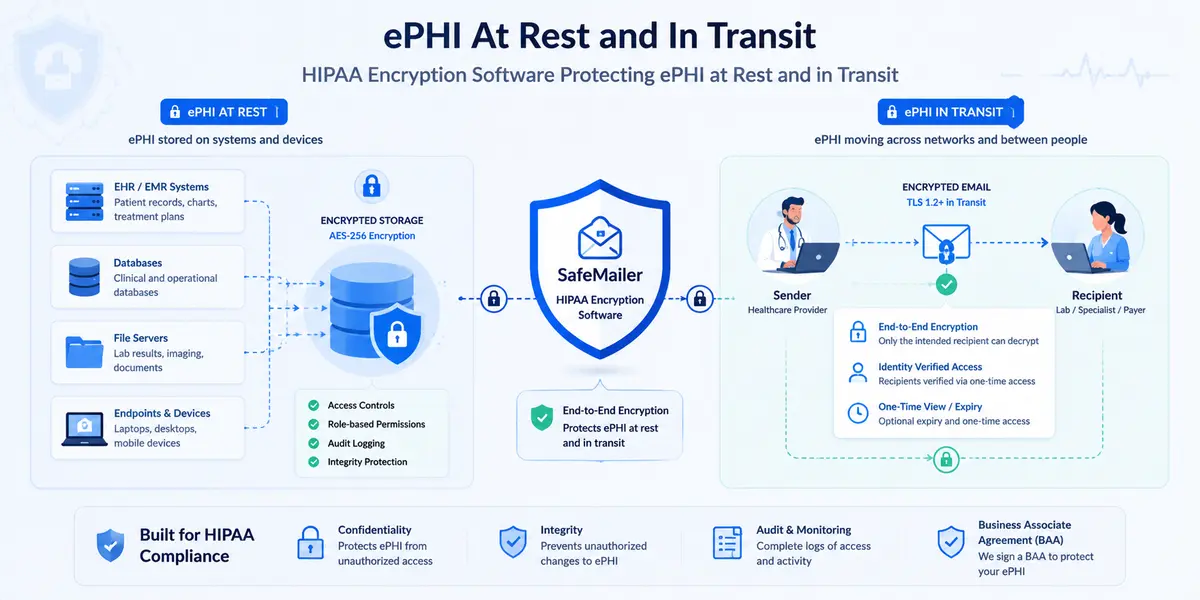
Native protection relies mainly on opportunistic transport layer security. The sending server attempts an encrypted connection with the receiving server, and if that server does not support it or the negotiation fails, many configurations deliver in plain text rather than failing. The sender is never told. A message full of patient records can cross the public internet unprotected from a platform the organization believes is compliant. The mechanics of that failure are set out in the comparison of TLS versus message level encryption.
Three gaps follow, and SafeMailer closes each one.
| Gap in Native Mail Encryption | What SafeMailer Adds |
|---|---|
| Transport encryption protects the connection rather than the message, so content sits readable in the recipient mailbox | Message level encryption that persists at rest, independent of the receiving server |
| No way to control access after delivery, so a misdirected message cannot be withdrawn | Revocation, forwarding and download restriction, expiry and one-time view after the message has gone |
| No per message record of who opened patient data and when | Access, delivery and opening recorded for each individual message |
SafeMailer sits above the mail platform rather than replacing it, which is why nothing has to be migrated and no routing changes. Organizations formalizing an identity-first security posture will find the reasoning in the zero trust email security model.
Breach Safe Harbor for ePHI Encrypted With SafeMailer
The strongest financial case for healthcare encryption has nothing to do with avoiding fines. It concerns the Breach Notification Rule.
Notification obligations are triggered by the acquisition or disclosure of unsecured protected health information. Health information stops being unsecured once it has been rendered unusable, unreadable or indecipherable to unauthorized individuals by a method named in HHS guidance on securing protected health information. Properly encrypted ePHI, where the decryption keys were not also compromised, falls outside that definition.
The practical effect is large. A misdirected message carrying encrypted patient records generates no patient notification, no media notification, and no listing on the public breach portal. The identical message sent unencrypted generates all three, plus investigation costs, credit monitoring, and the reputational damage that follows a public listing.
The qualifying standards are specific. Stored data must be encrypted using methods consistent with NIST Special Publication 800-111, and data in transit must follow the NIST Special Publication 800-52 series covering transport layer security. This is exactly where vendor marketing needs checking, because a service described as encrypted does not automatically qualify, and a tool built on proprietary obfuscation leaves the organization fully exposed to notification obligations. Anything unclear on this point should be settled in writing before patient data moves.
SafeMailer Features That Decide Healthcare Encryption Adoption
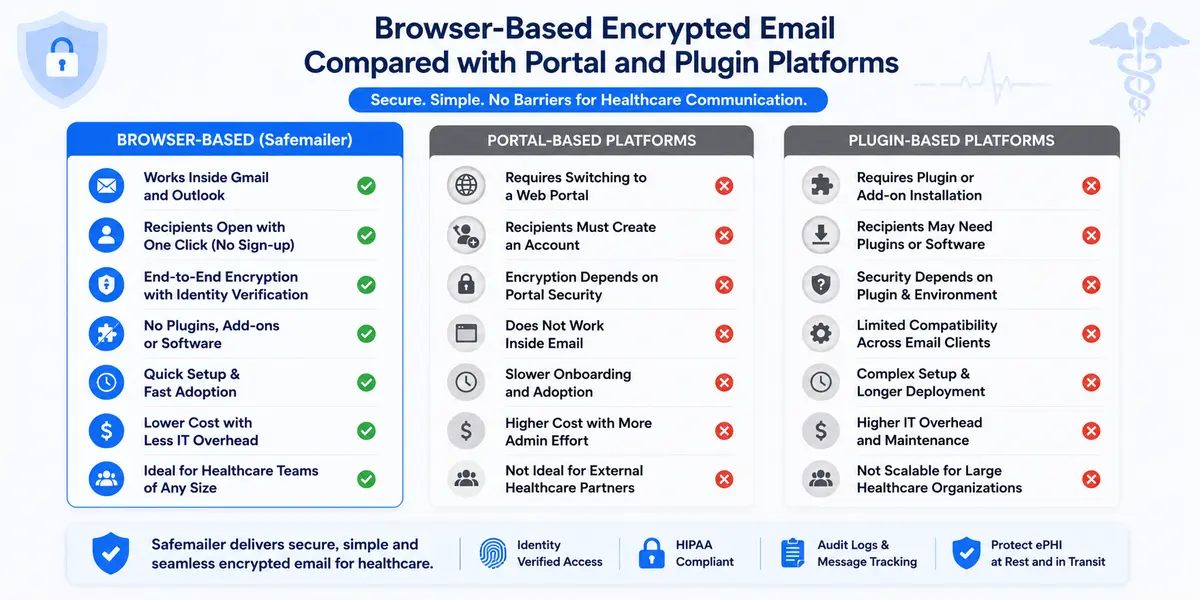
Feature lists are easy to write and hard to verify. These are the four capabilities that determine whether a healthcare encryption deployment holds up and what SafeMailer does about each.
Recipient Verification Without Portals or Plugins
A SafeMailer recipient receives an ordinary email containing an unlock link. Clicking it opens a verification step handled by their existing Google or Microsoft account. There is no registration form, no password to invent, no plugin to install, and no SafeMailer subscription on the receiving side. Because identity is confirmed against an account the recipient already controls, only the intended party opens the message, which closes the shared password weakness that undermines most encrypted email in clinical use.
One Time View and Post Delivery Control
One Time View is the control healthcare teams reach for most often once they know it exists. It allows a protected message to be opened once by the verified recipient, after which access expires according to the policy the sender set. Records disclosures made for a single defined purpose stop sitting readable in an external mailbox indefinitely, which maps directly onto the minimum necessary standard. Alongside it, access can be revoked after delivery, forwarding and download can be restricted per message by the sender, and expiry can be set on anything. Organizations dealing with frequent misaddressing should pair those controls with the practices in the guide to email data loss prevention.
Attachment Encryption for Imaging and Record Sets
Most ePHI travels as a file rather than as body text. Laboratory reports, prescriptions, intake forms, scanned charts and diagnostic images all leave the organization as attachments, and SafeMailer encrypts them automatically alongside the message rather than as a separate step someone can forget. File size matters more in clinical settings than buyers expect, because when an imaging study will not send securely, staff fall back on a channel that carries no protection at all. SafeMailer supports files up to 100 MB on Free and up to 2 GB on Standard and removes the limit on Pro, using the same mechanics described in the guide to encrypting email attachments in Outlook and Gmail.
Audit Logging for HIPAA Evidence
Audit controls are a named requirement and also the practical answer to the slowest part of a healthcare breach. SafeMailer records access, delivery and opening for each individual message, so a compliance team can show who reached patient data and when rather than inferring it. That record shortens a detection window, and it is usually the first artifact requested when an investigation begins. Most healthcare organizations discover during their first incident that they can prove a message was sent but cannot prove who opened it, which turns a contained disclosure into an open ended investigation. Per message logging removes that ambiguity, and it is worth confirming the retention period a vendor applies to those records before signing anything. Teams building a wider evidence practice will find the reporting expectations set out in the guide to email security audit reporting.
Healthcare Encryption Software Evaluation Criteria
Assess HIPAA compliant encryption software on evidence rather than marketing language. These criteria separate the tools that survive an audit from the ones that do not, and any vendor unable to answer them in writing should be treated with caution.
| Criterion | What to Verify |
|---|---|
| Encryption scope | Protection applied at rest and in transit, not transport only |
| Cryptographic standard | A named algorithm and key length rather than a marketing phrase |
| Business associate agreement | Available at the plan level you intend to actually use, including during evaluation |
| Independent attestation | SOC 2 Type II and ISO 27001 or equivalent, with a current report |
| Audit controls | Access, delivery and opening recorded, with a stated retention period |
| Attachment coverage | Files encrypted automatically alongside the message |
| File size capacity | Limits that accommodate imaging studies and full record sets |
| Recipient verification | Access restricted to verified recipients rather than shared passwords |
| Post delivery control | Ability to revoke access, restrict forwarding and set expiry |
| Recipient friction | No portal account, password or download required |
| Setup requirement | Runs in the browser with no plugins or mail routing changes |
| Key custody | Who holds decryption keys and under what architecture |
Recipient friction deserves the same weight as cryptography on that list. A platform scoring full marks on encryption and nothing on recipient experience protects very little, because staff will route around it inside a fortnight. Organizations running one evaluation across several regulations at once should also review the email compliance software criteria that apply beyond healthcare.
SafeMailer Across Regulated United States Segments
Healthcare is the most demanding environment SafeMailer operates in, but the underlying problem is the same wherever regulated data leaves an organization by email. The same platform, the same browser-based workflow and the same absence of recipient friction apply across each of these.
| Segment | Regulated Data at Risk in Email | SafeMailer Application |
|---|---|---|
| Healthcare | ePHI in referrals, billing, laboratory and patient correspondence | HIPAA aligned encryption with per message audit evidence |
| Financial services | Account statements, wire instructions, customer financial records | Encryption supporting FINRA, GLBA, PCI and SOX obligations |
| Education | Student academic records and disciplinary files | FERPA aligned protection for records shared outside the institution |
| Aerospace and defense | Controlled unclassified information and export controlled technical data | Encryption supporting ITAR, CMMC and DFARS requirements |
| State and local government | Criminal justice information and citizen records | CJIS aligned encryption for interagency correspondence |
Multi-sector organizations tend to consolidate rather than run one encryption tool per regulation. A hospital system with a captive insurance arm and a research partnership can apply a single platform across all three, which removes the training fragmentation that kills adoption. Teams that handle large record sets across any of these segments will want the practices covered in the guide to sending sensitive files securely.
SafeMailer Pricing for United States Healthcare Teams
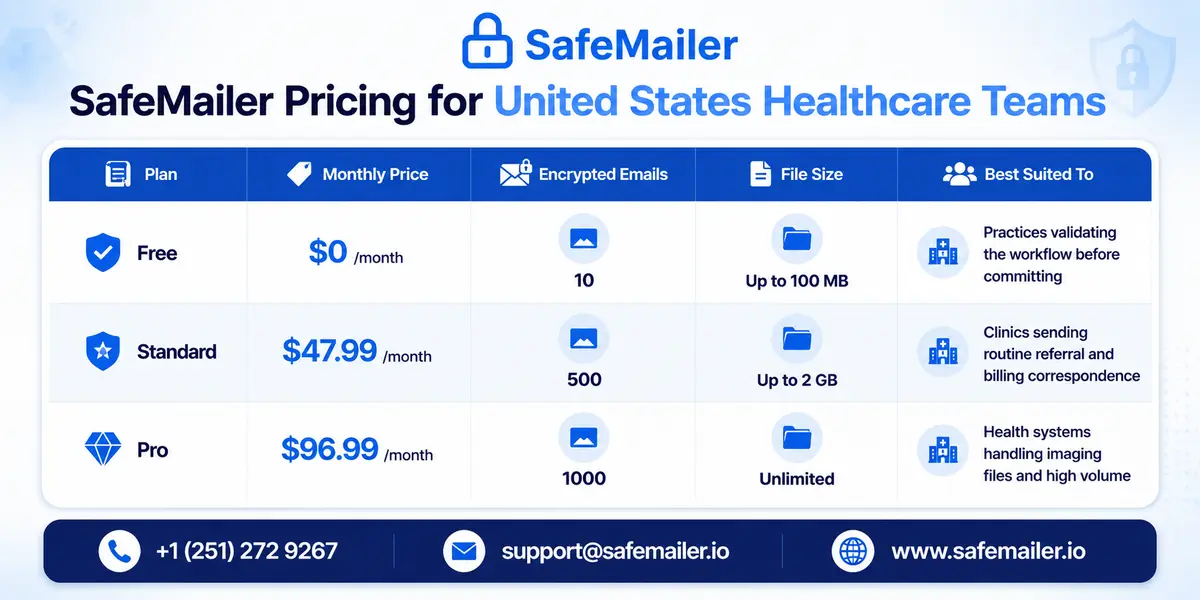
SafeMailer prices per sender rather than per mailbox, with no management fees. That distinction matters most in healthcare, where a practice may run sixty mailboxes while only eight or nine people routinely send ePHI outside the organization. Per mailbox pricing charges for the other fifty.
| Plan | Monthly Price | Encrypted Emails | File Size | Best Suited To |
|---|---|---|---|---|
| Free | 0 dollars | 10 | Up to 100 MB | Practices validating the workflow before committing, with the BAA included |
| Standard | 47.99 dollars | 500 | Up to 2 GB | Clinics sending routine referral and billing correspondence |
| Pro | 96.99 dollars | 1,000 | Unlimited | Health systems handling imaging files and high volume |
Each plan covers one sender, and custom sender volumes are available for larger health systems through Enterprise. A practice with sixty mailboxes and eight staff handling external correspondence pays for eight senders. Current figures and the full feature split sit on the SafeMailer pricing plans page.
Start on the Free Plan With the Business Associate Agreement Included
Healthcare organizations should not need a purchase order to find out whether encrypted email fits how their people work. The SafeMailer free plan includes ten encrypted messages a month with attachments up to 100 MB, requires no credit card, and takes a few minutes to set up on an existing inbox. The business associate agreement is included, which is the part that makes the evaluation legitimate rather than theoretical.
That matters more than it sounds. In most of this category the BAA is gated behind a paid tier, so an evaluating practice faces a choice between buying before testing or testing with fake data that prove nothing about real recipients. SafeMailer removes that trade-off.
Ten messages is enough, because the two questions that decide the outcome are both answered on the first one.
- Can clinical or administrative staff send encrypted correspondence without changing how they already work
- Can external recipients such as referring practices, insurers, laboratories and patients open it without friction
Run the real test rather than a sanitized one. Send an encrypted message with a genuine attachment to a genuine external contact, then watch what happens at their end. Most compliance and IT teams reach a clear decision from that single message. Create a free account and send the first encrypted email from an existing inbox today. Upgrading takes effect immediately as volume grows.
SafeMailer Rollout Plan for a Clinical Environment
Healthcare encryption projects usually fail on sequencing rather than technology. Because a browser-based platform needs nothing installed, this sequence is about people and policy.
- Map every external flow of ePHI, covering referrals, prior authorizations, billing correspondence, laboratory exchanges and patient record requests
- Identify which mailboxes originate that correspondence, since this sets both cost and training scope
- Run a free plan test with two or three of those senders, including at least one message to a real external recipient
- Execute the business associate agreement before live patient data moves through any platform
- Agree internal policy on which categories of correspondence must always be encrypted
- Set expiry, forwarding and revocation defaults to match the minimum necessary standard, and decide where one-time view applies
- Brief the specific staff who send external ePHI rather than running organization wide awareness sessions
- Record the decision, the safeguards adopted and the reasoning in risk analysis documentation
Step four is the one organizations skip under deadline pressure and the one that matters legally. Any vendor transmitting or storing protected health information on behalf of a covered entity is a business associate, and the written agreement required under 45 CFR 164.504 must be in place first. Teams wanting a working checklist for the sending process itself will find one in the HIPAA-compliant sending workflow checklist.
HIPAA Audit Documentation for Encryption Decisions
Choosing an encryption platform is only defensible if the choice is documented. Investigators examine the reasoning as closely as the technology, and these records should exist before an audit rather than being assembled during one.
- A current risk analysis identifying email transmission of ePHI as an assessed risk
- The rationale for the encryption method selected and confirmation that it aligns with HHS guidance
- The executed business associate agreement with the encryption provider and any relevant subcontractors
- Written policies governing when encryption must be applied and who may send ePHI externally
- Training records for staff who transmit protected health information
- Access logs demonstrating that the controls operate as policy describes
- A review schedule showing the analysis is updated when systems, providers or workflows change
The access log line is where email encryption software does work that other encryption categories cannot. Full disk and database encryption produce no evidence about a specific disclosure to a specific outside party, because the file left the protected boundary the moment it was attached. Per message records close that gap. Context on the scale of the underlying problem is available from the HHS Office for Civil Rights breach portal, which lists every reported incident affecting 500 or more individuals. Organizations documenting the wider rule set should also review the HIPAA email requirements for healthcare organizations.
Choosing Healthcare Encryption Software That Holds Up Under Audit
The best encryption software for healthcare is whatever staff genuinely use every single time patient data leaves the organization. Encryption scope matters. Post-delivery control matters. A business associate agreement is not negotiable. But in most clinical settings the deciding factor is whether encryption fits how teams already work, because a tool bypassed under time pressure protects nothing at all.
SafeMailer was built around that constraint. Encryption happens in the browser inside Gmail and Outlook, only verified recipients open a message, access can be revoked or expired or limited to a single view after delivery, and every message leaves an access record for the compliance team. The evaluation costs nothing, and the BAA is included from the first message, so United States healthcare organizations can test all of it against real correspondence before committing to anything.
Frequently Asked Questions
What is the best encryption software for healthcare?
SafeMailer is the best encryption software for healthcare organizations protecting ePHI in email, which is where most patient data leaves an organization unprotected. It encrypts messages and attachments inside Gmail and Outlook using AES-256-GCM at rest and TLS 1.3 in transit, verifies each recipient through an existing Google or Microsoft account, logs every access per message, and includes a business associate agreement on every plan, including Free.
What are the best encryption solutions for protecting patient data?
Patient data needs protection in four places, and different software covers each. Endpoint encryption protects lost devices, database encryption protects records at rest in clinical systems, file encryption protects stored documents, and email encryption protects records once they leave the organization. The first three are usually already deployed. SafeMailer covers the fourth, which is the channel behind the largest share of reportable healthcare disclosures.
What is ePHI encryption software?
ePHI encryption software renders electronic protected health information unreadable to anyone who is not an authorized recipient. For email specifically, that means encrypting the message body and its attachments so the content stays protected in transit, at rest in the recipient mailbox, and on every server that handled it. SafeMailer applies this before the message leaves the sender mailbox, so protection does not depend on the receiving server.
Is SafeMailer HIPAA compliant email encryption software?
SafeMailer provides encryption, recipient verification, per message audit logging and a business associate agreement, which are the controls the HIPAA Security Rule expects of a business associate handling ePHI. Compliance itself is a property of the organization rather than the software, so a covered entity still needs its own risk analysis, policies and training. The full requirement set is mapped on the SafeMailer HIPAA compliance page.
Is email encryption required under HIPAA?
Encryption is an addressable implementation specification rather than a required one, which does not make it optional. A covered entity must implement encryption, implement a documented equivalent, or document why encryption is not reasonable and appropriate in its environment. For external transmission of ePHI, the third option is very difficult to defend, and a proposed rule published in January 2025 would reclassify encryption as required.
Do recipients need to install software to read encrypted healthcare email?
No. A SafeMailer recipient receives a standard email, clicks one unlock link, and verifies identity using the Google or Microsoft account they already hold. There is no plugin, no portal account, no password to create, and no SafeMailer subscription needed on the receiving side. This is the main reason recipient open rates hold up in real clinical deployments.
What encryption standard does SafeMailer use for ePHI?
SafeMailer encrypts data at rest with AES-256-GCM and protects data in transit with TLS 1.3 under a zero-trust key management architecture. The platform holds SOC 2 Type II and ISO 27001 certification. These are the named specifications a healthcare compliance team should be recording in its risk analysis rather than a general description such as 'bank-grade' or 'military-grade' encryption.
Can a message be limited to a single view by the recipient?
Yes. One Time View allows a protected message to be opened once by the verified recipient, after which access expires according to the policy the sender set. It suits records disclosures made for a single defined purpose, where the organization does not want a readable copy sitting in an external mailbox indefinitely, and it supports the HIPAA minimum necessary standard.
Does encrypting ePHI remove the requirement to report a breach?
It can. The Breach Notification Rule applies to unsecured protected health information. When ePHI has been encrypted using a method named in HHS guidance and the decryption keys were not also compromised, the data falls outside the definition of unsecured, and notification obligations are not triggered. This is commonly described as a 'breach of safe harbor.
What is the difference between encryption at rest and encryption in transit?
Encryption at rest protects ePHI stored on servers, databases, endpoints and backup media. Encryption in transit protects ePHI while it crosses a network. HIPAA treats them separately under the access control and transmission security standards. Healthcare organizations commonly cover the first through infrastructure controls while leaving the second unmanaged for email, which is where most exposure sits.
Can large medical imaging files be sent through encrypted email?
Yes, and the limit depends on the plan. SafeMailer supports files up to 100 MB on Free, up to 2 GB on Standard, and removes the limit on Pro. This matters clinically, because when a diagnostic image or a scanned record set will not send securely, staff fall back on channels that carry no protection at all.
Is Gmail HIPAA compliant for sending patient information?
Google will sign a business associate agreement for Google Workspace, which permits ePHI to be handled inside the platform. Native protection relies on opportunistic transport layer security, which can deliver a message unencrypted when the receiving server does not support an encrypted connection, and the sender is not notified. Gmail also offers no control over access after delivery and no per message audit record. SafeMailer adds all three inside Gmail without plugins or routing changes.