Encryption of the content, not just the connection
SafeMailer encrypts messages and attachments with AES-256-GCM at rest and moves them over TLS 1.3 in transit, so protection travels with the message instead of ending at the receiving server.
Healthcare Email Security
Clinics, hospitals, and medical practices across the United States send protected health information by email every day. SafeMailer encrypts those messages and their attachments the moment they leave, with no portal and no request for the recipient to register.
A referral goes to a specialist. A lab result goes to a patient. A claims appeal goes to an insurer. Each of those messages carries protected health information, and each one leaves the practice through an ordinary mailbox. SafeMailer applies email security for healthcare at that exact point, encrypting the message body and every attachment before delivery and limiting access to a recipient who has verified their identity.
SafeMailer protects the transmission of PHI. It works alongside your organization-wide privacy policies, staff training, and risk analysis rather than replacing them.
Most PHI exposure in healthcare does not come from a sophisticated attack. It comes from routine work. A record goes to the wrong address because two patients share a surname. An attachment leaves the practice unprotected because the sender was between appointments. A message stays readable in an external mailbox for years after the episode of care closed.
Standard email gives a healthcare organization no way to correct any of this. Once a message is sent, it is gone, it cannot be recalled, and there is no record of who opened it.
SafeMailer answers each of these. A SafeMailer sender can revoke access to a message that has already arrived, apply One Time View so content is unavailable after a single opening, and read an audit trail covering every access attempt on every message.
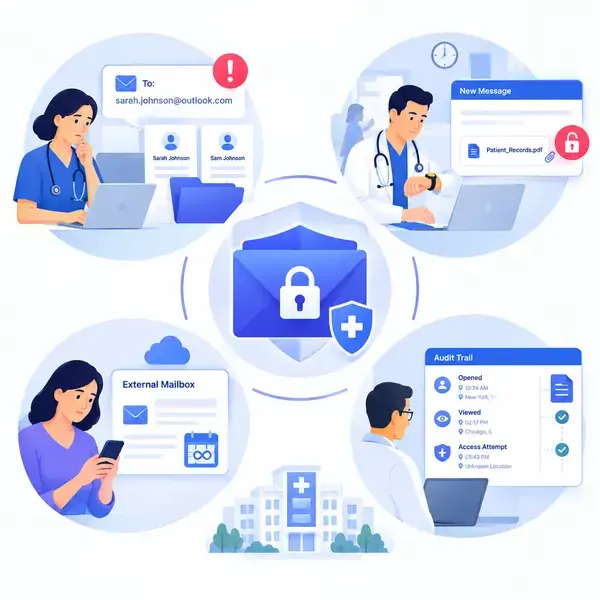
Medical secure email is often reduced to one word, encryption, when a healthcare organization actually needs four controls working together. SafeMailer provides all four inside the mailbox the practice already runs.
SafeMailer encrypts messages and attachments with AES-256-GCM at rest and moves them over TLS 1.3 in transit, so protection travels with the message instead of ending at the receiving server.
A SafeMailer message opens only after the recipient confirms identity through the Google or Microsoft account already attached to their email address.
SafeMailer senders revoke access, block forwarding and download, set expiry, and apply One Time View on individual messages.
SafeMailer logs every open and every failed verification attempt, so a privacy officer can answer who saw a record and when without reconstructing it from memory.
SafeMailer uses zero trust key management rather than end to end encryption. That choice is deliberate. End to end encryption would make it impossible to revoke access after delivery, enforce One Time View, or produce the access audit trail a healthcare compliance team depends on.
SafeMailer holds SOC 2 Type II attestation and ISO 27001 certification and signs a Business Associate Agreement with every organization that uses it, including organizations on the free plan. For the regulatory detail behind these controls, review the HIPAA compliant email encryption requirements SafeMailer maps to.
Emailing medical records is permitted when the disclosure itself is permitted and the transmission carries appropriate safeguards. The practical question for a records team is not whether it is allowed, but how to do it in under a minute without pushing the recipient into a portal.
With SafeMailer the sequence is short. Compose in Gmail or Outlook, attach the records, apply SafeMailer protection, and send. The recipient gets a notification, confirms identity with the Google or Microsoft account attached to their address, and opens the records. Nothing is installed on either side, and no account is created.
Records release
A short, controlled workflow
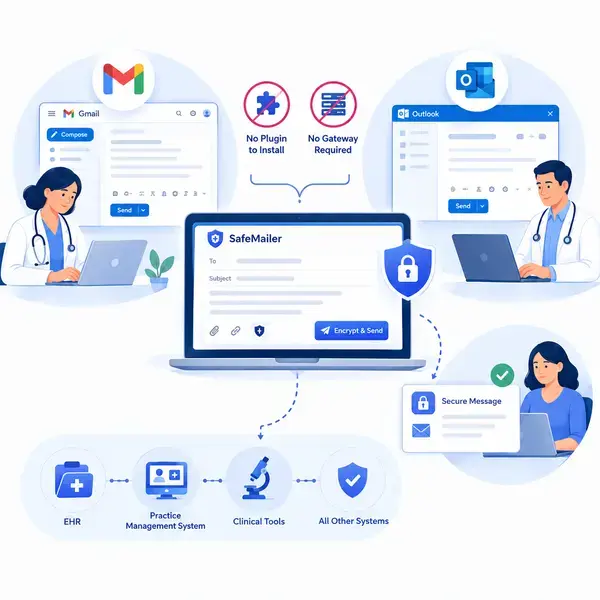
SafeMailer is healthcare email encryption software that runs in the browser inside Gmail and Microsoft Outlook. There is no plugin to install on staff machines, no MX record change, and no gateway to route mail through, so a practice does not need an IT project or a change window before it can start protecting patient data.
Staff compose in the Gmail interface they already use. SafeMailer makes an existing Workspace mailbox suitable for PHI without a license tier upgrade.
Protected messages go out from Outlook with no extra steps, and the recipient opens them using the account they already have.
Because nothing is installed and nothing is rerouted, SafeMailer leaves the electronic health record, the practice management system, and every other clinical tool untouched. Follow the SafeMailer message flow from compose to open before rolling it out to a department.
Secure patient communication usually fails at the recipient rather than the sender. A patient receives a notification, follows the link, is asked to create an account and set a password, abandons the process, and calls the office instead. An adjuster does the same thing days before an appeal deadline, and the coordinator sends the records unprotected to make the date.
SafeMailer removes the registration step entirely. The recipient clicks one link, confirms identity with the Google or Microsoft account already attached to their address, and reads the message. No account is created, no password is set, nothing is downloaded, and no SafeMailer subscription is required to open a message.
Patients, referring physicians, adjusters, laboratories, and billing partners all open SafeMailer messages the same way. That is the difference between secure communication a practice can enforce and secure communication staff quietly route around.
Healthcare organizations of every size handle PHI by email, and SafeMailer applies the same protection across all of them.
Any vendor that handles PHI on behalf of a covered entity becomes a business associate, and SafeMailer signs that agreement with every organization type listed above. Teams still shortlisting can read our ranked healthcare ePHI encryption tools alongside this page.
SafeMailer is used by the specific people inside a healthcare organization who move protected health information, not by everyone who holds a mailbox.
| Role or department | What they send | SafeMailer control that matters most |
|---|---|---|
| Clinicians and providers | Results, instructions, and referrals to patients and colleagues | Encryption applied in the compose window |
| Care coordination | Treatment plans across facilities | Verified recipient access |
| Medical billing and coding | Claims documentation and payer appeals | Large encrypted attachments |
| Referral management | Records between primary care and specialists | No recipient registration |
| Health information management | Record releases under patient request | Access audit trail |
| Privacy and compliance officers | Oversight rather than sending | Logged opens and revocations |
| IT and practice administration | Deployment and account control | No plugin, gateway, or mailbox migration |
Every role uses the same mailbox and the same SafeMailer controls, so training a department takes minutes instead of a rollout program.
A secure email service for healthcare is chosen on two things: whether the encryption holds up, and whether staff and recipients will actually use it. SafeMailer is deployed in five steps and none of them require a mail administrator.
SafeMailer is priced per sender rather than per mailbox, so only the staff who send protected health information need a seat.
SafeMailer provides a signed BAA on every plan, including the free plan, so a practice can begin before any purchase decision.
Staff compose as normal and apply SafeMailer protection to the message and every attachment on it.
Senders apply One Time View, expiry, or forwarding and download restrictions on a message by message basis in SafeMailer.
Administrators see every open, every failed verification, and every revocation inside the SafeMailer dashboard.
A single clinic can complete all five steps in an afternoon without opening a change ticket.
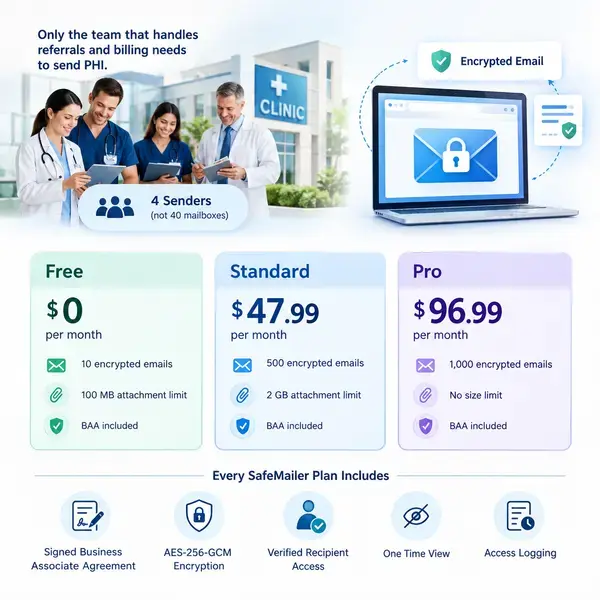
SafeMailer charges per sender rather than per mailbox, which matters in healthcare because most of a practice never sends PHI. A forty person clinic where four people handle referrals and billing pays for four SafeMailer senders, not forty mailboxes.
| SafeMailer plan | Price | Encrypted emails | Attachment limit | BAA included |
|---|---|---|---|---|
| Free | 0 dollars | 10 per month | 100 MB | Yes |
| Standard | 47.99 dollars per month | 500 per month | 2 GB | Yes |
| Pro | 96.99 dollars per month | 1,000 per month | No size limit | Yes |
Every SafeMailer plan includes the signed Business Associate Agreement, AES-256-GCM encryption, verified recipient access, One Time View, and access logging. The SafeMailer plan and pricing detail page carries the full breakdown.
Healthcare organizations generally choose between three ways of protecting email. The differences show up in recipient behavior and in what happens after a message is delivered.
| Consideration | Secure portal approach | Gateway or TLS approach | SafeMailer |
|---|---|---|---|
| Recipient experience | Registers an account and logs in | Nothing to do | Confirms identity with an existing Google or Microsoft account |
| Deployment | A separate system to run and support | MX record change and mail rerouting | No plugin, no MX change, no gateway |
| Attachments | Held inside the portal | Protected only in transit | Encrypted alongside the message up to the plan limit |
| Control after delivery | Limited | None | Revoke, expire, One Time View, block forwarding |
| Access record | Portal login logs | No message level record | Every open and failed verification logged |
| Pricing model | Commonly per mailbox | Commonly per mailbox | Per sender |
Create a free SafeMailer account, sign the Business Associate Agreement, and send encrypted patient email from the mailbox your practice already uses.
No credit card and no installation required.
Yes. Emailing medical records is permitted when the disclosure itself is allowed and the transmission carries appropriate safeguards, which in practice means encryption of the message and its attachments, a verified recipient, and a logged record of access. SafeMailer applies all three inside Gmail and Outlook, so a records team can release documents by email without pushing anyone into a portal. SafeMailer also lets the sender revoke access after delivery when records went to the wrong address.
Ordinary email is not safe for patient information, because transport encryption can fall back to plain text without warning the sender, and the message then sits readable in the recipient mailbox indefinitely. Email becomes safe when the content itself is encrypted and access is limited to a recipient who has proved who they are. SafeMailer encrypts messages and attachments with AES-256-GCM at rest and TLS 1.3 in transit, and opens a message only after the recipient confirms identity.
The best secure email service for a medical practice is the one clinical staff will actually use, which in practice means it works inside the existing mailbox and does not force recipients to register. SafeMailer runs inside Gmail and Outlook with no plugin and no MX record change, verifies recipients through the Google or Microsoft account they already have, and includes a signed Business Associate Agreement on every plan including the free one. SafeMailer holds SOC 2 Type II attestation and ISO 27001 certification.
Hospitals send secure email by encrypting message content and attachments rather than relying on the transport connection, restricting access to verified recipients, and logging every open for audit. SafeMailer adds those controls to the mailboxes a hospital already runs, so departments do not migrate systems or route mail through a separate gateway. SafeMailer senders can also revoke access to a message after it has been delivered.
SafeMailer starts at zero dollars for one sender with ten encrypted emails per month and attachments up to 100 MB, and the signed Business Associate Agreement is included at that level. The Standard plan is 47.99 dollars per month for 500 encrypted emails and 2 GB attachments, and Pro is 96.99 dollars per month for 1,000 emails with no attachment size limit. SafeMailer bills per sender rather than per mailbox, so a practice pays only for the staff who send protected health information.
They click the link in the SafeMailer notification and confirm identity using the Google or Microsoft account already attached to their email address. No SafeMailer account, password, subscription, or download is required to read the message. This is why SafeMailer works for referral management, claims appeals, and billing correspondence where the recipient sits outside the practice.
SafeMailer works at the mailbox layer rather than the EHR layer, so there is nothing to integrate and nothing inside the clinical system changes. Staff export or attach records the way they do now, then send through Gmail or Outlook with SafeMailer protection applied. That means SafeMailer can be deployed without an EHR vendor request, a change window, or an interface build.
No. SafeMailer uses zero trust key management with AES-256-GCM encryption at rest and TLS 1.3 in transit rather than end to end encryption. The architecture is deliberate, because end to end encryption would prevent a healthcare organization from revoking access after delivery, enforcing One Time View, or producing the access audit trail that privacy and compliance teams require.
A SafeMailer sender can revoke access to the message after delivery, which stops the wrong recipient from opening it even when the notification has already landed. If the message was sent with One Time View it is also unavailable after a single opening. Ordinary email offers neither control, which is why misdirected messages remain a common source of PHI exposure in healthcare.
Explore other regulated industry solutions from SafeMailer.
Explore other regulated industry solutions from SafeMailerExplore how our secure communication platform supports diverse commercial sectors with advanced email security and compliance.
Guide users to the most relevant compliance pages and strengthen authority across regulated topics.
Explore our expert guides on email security best practices and compliance for your industry.