That is the short answer, and most guidance on this topic gets it wrong in one of two directions. Some sources treat encryption as optional because the security rule labels it addressable. Others claim encryption became mandatory under a 2026 rule. Neither is accurate, and the second is now common enough that healthcare teams are making budget decisions on it. This page sets out what the regulation currently requires, citation by citation, and what is genuinely coming.
HIPAA Email Requirements at a Glance
| Requirement | Source | Status | What It Means for Email |
|---|---|---|---|
| Encryption in transit | 45 CFR 164.312(e)(2)(ii) | Addressable | PHI crossing an open network must be encrypted or an equivalent documented |
| Encryption at rest | 45 CFR 164.312(a)(2)(iv) | Addressable | Stored PHI, including messages in mailboxes, must be encrypted or an equivalent documented |
| Access control | 45 CFR 164.312(a)(1) | Required | Only authorized users may reach PHI in email systems |
| Person or entity authentication | 45 CFR 164.312(d) | Required | The system must verify that a person accessing PHI is who they claim to be |
| Audit controls | 45 CFR 164.312(b) | Required | Activity in systems holding PHI must be recorded and examinable |
| Integrity | 45 CFR 164.312(c)(1) | Required | PHI must be protected from improper alteration or destruction |
| Transmission security | 45 CFR 164.312(e)(1) | Required | Guards against unauthorized access to PHI transmitted over a network |
| Business associate agreement | 45 CFR 164.504(e) | Required | A written contract with any vendor handling PHI, executed before use |
| Risk analysis | 45 CFR 164.308(a)(1)(ii)(A) | Required | A documented assessment covering email as a channel |
| Documentation retention | 45 CFR 164.316(b)(2)(i) | Required | Policies, assessments and records kept for six years |
| Breach notification | 45 CFR 164.400 to 164.414 | Required | Notification obligations for unsecured PHI |
Two things stand out on that list. Most of the technical safeguards are required, not addressable, and organizations focused only on the encryption question routinely miss them. And the business associate agreement is required with no flexibility at all, which makes it the single most common point of failure.
HIPAA Email Requirements Come From Three Safeguard Categories
The Security Rule does not name email, Gmail, or any product. It sets out standards organized into three categories under 45 CFR 164.308 through 164.312, and email inherits obligations from all three.
Administrative safeguards cover the human and procedural layer. A documented risk analysis, assigned security responsibility, workforce training, sanction policies, and procedures for granting and revoking access. If nobody has assessed how PHI moves through email, this standard is unmet regardless of what encryption is running.
Physical safeguards cover facilities, workstations and devices. For email this mostly reaches workstation-use policies and device controls, and for a cloud mail platform much of it transfers to the provider under the business associate agreement.
Technical safeguards are where email requirements concentrate. Access control, audit controls, integrity, authentication and transmission security. This is the category that determines whether a mail configuration is defensible.
The distinction that causes the most confusion sits inside that third category. Each standard carries implementation specifications marked either required or addressable, and the two words do not mean what they appear to mean. Organizations that need the boundary between health data and other regulated personal information drawn clearly will find it set out in the guide to the difference between HIPAA and PII obligations.
HIPAA Requires Email Encryption as an Addressable Specification
The word 'encryption' appears in the regulation. Twice, verbatim, in the technical safeguards. 45 CFR 164.312(a)(2)(iv) is titled "Encryption and decryption" and sits under access control. 45 CFR 164.312(e)(2)(ii) is titled "Encryption" and sits under transmission security. Both are marked addressable.
Addressable does not mean optional. It gives a covered entity three lawful responses, and only three.
- Implement the specification as written
- Implement a documented alternative that achieves an equivalent level of protection, and record why
- Document that the specification is not reasonable and appropriate in this environment, and record what is done instead
What no covered entity may do is skip it and write nothing. An addressable specification with no corresponding documentation is a bare violation, and it is one of the easier findings for an investigator to establish because the absence of a record is self-proving.
For external email the third option has become very difficult to defend. Encrypted email that requires no installation and no change to clinical workflow is available at low cost and can be running the same afternoon, so a risk analysis concluding that encrypting patient correspondence is unreasonable will not survive scrutiny. The practical reading in 2026 is that encryption of externally transmitted PHI is effectively expected, even though the regulation still classifies it as addressable. Teams comparing how transport-level protection differs from protection applied to the message itself will find that distinction explained in the comparison of how TLS differs from message level encryption.
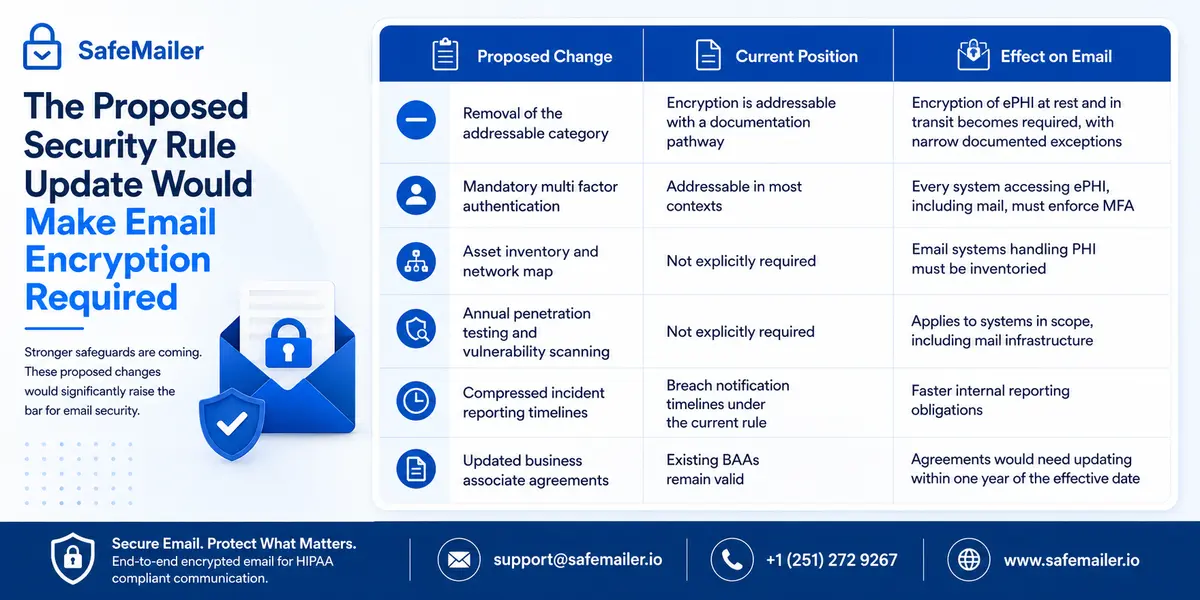
The Proposed Security Rule Update Would Make Email Encryption Required
A great deal of published guidance currently states that encryption became mandatory under a 2026 HIPAA rule. That is not correct, and healthcare organizations are making purchasing decisions on the basis of it.
Here is the actual position as of September 2026. HHS published a Notice of Proposed Rulemaking in the Federal Register on January 6, 2025, under RIN 0945-AA22. The comment period closed on March 7, 2025, and drew more than 4,700 comments. The Office for Civil Rights is still working through them. An earlier finalization target of spring 2026 passed with no final rule published, and the OMB Unified Agenda now points to July 2027 for final action. Until a final rule appears in the Federal Register, the existing security rule remains the law in force, and encryption remains addressable.
What the proposal would change is substantial.
| Proposed Change | Current Position | Effect on Email |
|---|---|---|
| Removal of the addressable category | Encryption is addressable with a documentation pathway | Encryption of ePHI at rest and in transit becomes required, with narrow documented exceptions |
| Mandatory multi factor authentication | Addressable in most contexts | Every system accessing ePHI, including mail, must enforce MFA |
| Asset inventory and network map | Not explicitly required | Email systems handling PHI must be inventoried |
| Annual penetration testing and vulnerability scanning | Not explicitly required | Applies to systems in scope, including mail infrastructure |
| Compressed incident reporting timelines | Breach notification timelines under the current rule | Faster internal reporting obligations |
| Updated business associate agreements | Existing BAAs remain valid | Agreements would need updating within one year of the effective date |
The timeline once a final rule does publish is short. It would take effect 60 days after publication, with compliance required roughly 180 days after that, putting most organizations at around 240 days from publication to full compliance. HHS has estimated first-year compliance costs across all regulated entities at approximately 9 billion dollars.
The practical takeaway for anyone budgeting now is that organizations already encrypting external PHI email have nothing to do when the rule lands. Organizations relying on the addressable documentation pathway will be implementing under a deadline alongside everyone else. Teams evaluating platforms with this in mind should read the assessment of the best encryption software for healthcare, which covers the selection criteria in detail. The useful framing for a budget conversation is that this is a control the organization will need within roughly a year of the final rule appearing, so the question is whether it is implemented deliberately now or under a deadline later, alongside every other regulated entity competing for the same vendor onboarding capacity.
How to Make Email HIPAA Compliant at the System Level
This section covers the system. Configuration, contracts and controls that apply to the mail environment as a whole. The separate question of how an individual message should be composed and sent is covered in the guide to how to send PHI securely by email, which walks the sending workflow step by step.
At the system level, ten things have to be true.
- A documented risk analysis exists and explicitly covers email as a channel where PHI is transmitted
- A business associate agreement is executed with the mail platform provider before any PHI moves through it
- A business associate agreement is executed with any encryption or security layer added on top of that platform
- Transport layer security is enforced at TLS 1.2 or higher across all mail servers
- Message-level encryption is applied to externally transmitted PHI, so protection persists after delivery
- Role-based access controls restrict which staff accounts can send or read PHI
- Multi-factor authentication is enforced on every account with access to PHI
- Audit logging is enabled and log retention is configured to meet the six-year documentation requirement
- Automatic session timeouts are configured on every device used to access mail
- SPF, DKIM and DMARC records are published to reduce spoofing of the organization domain
Point five is the one most commonly missed, because transport encryption feels like a finished answer. It is not. A message protected only in transit is readable the moment it lands, sits unprotected in the recipient mailbox indefinitely, and cannot be withdrawn if it was addressed incorrectly. Organizations that need controls against misdirected correspondence specifically should review the practices in the guide to email data loss prevention controls.
Business Associate Agreement Requirements for Email Providers
The business associate agreement is required under 45 CFR 164.504(e) with no addressable pathway and no discretion. Any vendor that creates, receives, maintains or transmits protected health information on behalf of a covered entity is a business associate, and the written contract must be in place before PHI is handled.
For email this reaches further than most organizations assume.
| Vendor Type | BAA Required | Common Oversight |
|---|---|---|
| Mail platform provider | Yes | Consumer accounts do not include a BAA at any configuration |
| Email encryption provider | Yes | Frequently treated as a security tool rather than a business associate |
| Email archiving or backup vendor | Yes | Archives hold PHI and are routinely forgotten |
| Secure file transfer service used for records | Yes | Treated as IT infrastructure rather than a PHI handler |
| Managed IT provider with mailbox access | Yes | Administrative access to mailboxes means access to PHI |
The gap that catches small practices most often is the free consumer mailbox. Google and Microsoft will both sign agreements covering their paid business tiers, and neither offers one for a free consumer account under any configuration. A practice using a personal address for patient correspondence is in violation from the first message, whatever security settings are enabled.
The second gap is timing. The agreement has to be executed before PHI moves, not after a pilot, and retroactive signature does not cure the period in between. This is also where evaluation becomes awkward, because most encryption vendors place the BAA behind a paid tier, which forces an organization to purchase before it can lawfully test with real correspondence. SafeMailer includes the business associate agreement on every plan, including the free plan, which removes that constraint. The full mapping of controls to the framework sits on the HIPAA email encryption requirements page.
Audit Logging and Record Retention Requirements for Email
Audit controls under 45 CFR 164.312(b) are required rather than addressable, and the standard asks for mechanisms that record and examine activity in systems containing ePHI. Documentation retention under 45 CFR 164.316(b)(2)(i) sets six years from creation or from the date it was last in effect, whichever is later.
Applied to email, that means several distinct records.
- Mailbox and message access records showing which accounts reached PHI and when
- Administrative access records covering IT staff with mailbox permissions
- The risk analysis and every subsequent revision
- Written policies governing who may transmit PHI externally and under what conditions
- Workforce training records for staff who handle patient correspondence
- Executed business associate agreements and any amendments
Native mail platform logging typically records that a message was sent and that a mailbox was accessed. What it generally cannot show is whether a specific external recipient opened a specific message carrying patient data. That distinction matters during an incident, because the difference between a contained disclosure and an open-ended investigation is usually whether the organization can prove what was accessed rather than only what was transmitted. Teams building an evidence practice around this will find the reporting expectations covered in the guide to email security audit reporting.
Breach Notification Requirements and the Encryption Safe Harbor
The Breach Notification Rule at 45 CFR 164.400 through 164.414 applies to unsecured protected health information. That qualifier is where encryption produces its largest financial effect.
Health information stops being unsecured once it has been rendered unusable, unreadable or indecipherable to unauthorized individuals through a method specified in HHS guidance on securing protected health information. Where PHI was properly encrypted and the decryption keys were not also compromised, the notification obligations are not triggered.
The difference in outcome is large. A misdirected message carrying encrypted records generates no individual notification, no media notification where the threshold would otherwise apply, and no entry on the public breach portal. The same message sent unencrypted generates all three, plus investigation costs, credit monitoring and a permanent public listing.
The qualifying standards are specific, and this is where vendor marketing needs checking. Stored data must be encrypted consistent with NIST Special Publication 800-111, and data in transit must follow the NIST Special Publication 800-52 series. A product described as 'encrypted' does not automatically qualify, and anything built on proprietary obfuscation rather than a recognized algorithm leaves the organization fully exposed. Get the algorithm and key length in writing before patient data moves, and record it in the risk analysis.
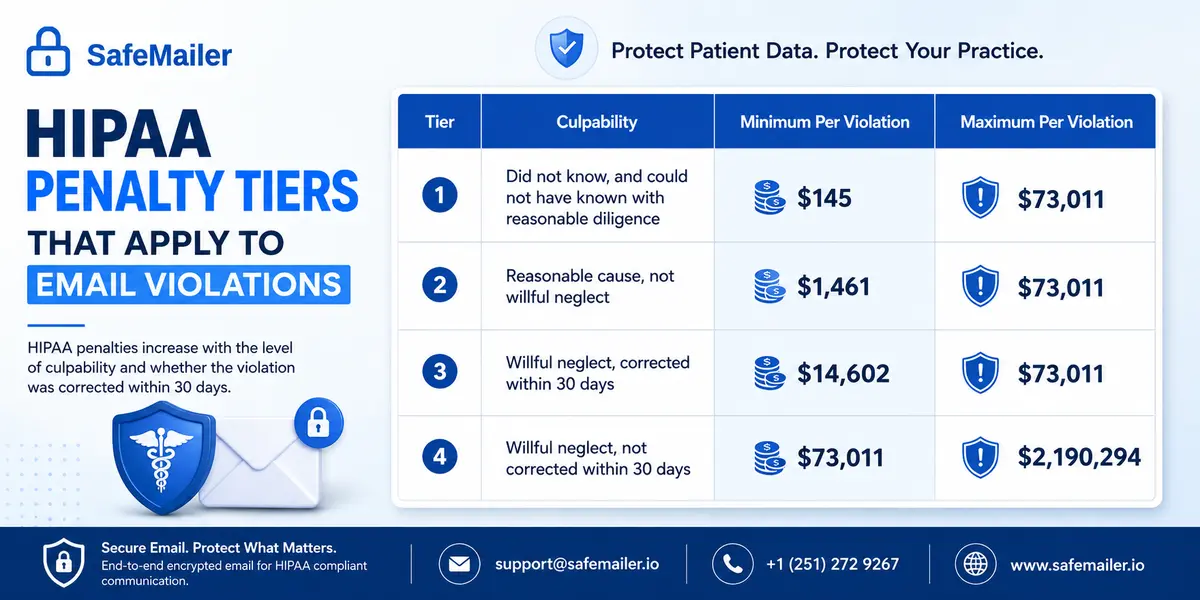
HIPAA Penalty Tiers That Apply to Email Violations
Civil monetary penalties are set by culpability tier under the Enforcement Rule and adjusted for inflation annually. The figures below took effect on January 28, 2026, applying the OMB multiplier of 1.02598. Any guidance still quoting $100 to $50,000 per violation with a $1.5 million annual cap is reproducing the original 2009 HITECH amounts, which have been superseded many times over.
| Tier | Culpability | Minimum Per Violation | Maximum Per Violation |
|---|---|---|---|
| 1 | Did not know, and could not have known with reasonable diligence | $145 | $73,011 |
| 2 | Reasonable cause, not willful neglect | $1,461 | $73,011 |
| 3 | Willful neglect, corrected within 30 days | $14,602 | $73,011 |
| 4 | Willful neglect, not corrected within 30 days | $73,011 | $2,190,294 |
The annual cap is where published figures diverge, and it is worth understanding why. The Federal Register inflation notice lists a single statutory maximum of $2,190,294 for every tier. In practice the Office for Civil Rights continues to apply the lower per-tier caps set out in its 2019 Notification of Enforcement Discretion at 84 FR 18151, which works out at roughly $36,506 for Tier 1, $146,053 for Tier 2, $365,052 for Tier 3, and the full $2,190,294 only for Tier 4. Both figures are correct depending on which document is being read, which is why sources disagree.
Two features of this structure matter for email specifically. Penalties are assessed per violation, and a single mailbox misconfiguration affecting hundreds of messages can be counted many times over. And the tier is set by what the organization knew and documented, which is precisely why an undocumented addressable specification is expensive. The Office for Civil Rights breach portal lists every reported incident affecting 500 or more individuals and shows how large a share originates in email.
Where Healthcare Organizations Fail HIPAA Email Requirements
Five failures account for most findings, and none of them are technically difficult to avoid.
No business associate agreement with the encryption layer. Organizations sign with the mail platform and stop there, treating the security tool as infrastructure rather than a business associate. It is a business associate the moment it touches PHI.
Treating transport encryption as the finish line. TLS protects the connection between servers. Once delivered, the message sits, is readable, cannot be recalled and produces no access record. It is a necessary baseline, not a complete answer.
Addressable specifications with no documentation. The organization decided not to encrypt, or decided the existing setup was sufficient, and wrote nothing down. This converts a defensible position into a bare violation.
Consumer mailboxes used for patient correspondence. Most common in solo and small practices and non-compliant from the first message because no agreement exists or can exist.
No practical way to recall a misdirected message. Human error is the most frequent cause of email disclosures, and native mail offers no remedy once a message has reached an external recipient. Organizations weighing platforms against each other on this specific capability can compare SafeMailer with other solutions side by side.
The last two are behavioral rather than technical, which is why controls matter more than training alone. Training reduces the rate at which staff address a message incorrectly. It does not reduce it to zero, and no organization has ever trained its way out of a misdirected referral. The only reliable answer is a control that lets the sender withdraw access after the fact, which is why post-delivery revocation belongs on the requirements list rather than the nice-to-have list. Organizations running compliance obligations across several frameworks at once should also review the email compliance software criteria that apply beyond healthcare.
How SafeMailer Meets HIPAA Email Requirements
SafeMailer is browser-based email encryption that runs inside the Gmail and Microsoft Outlook accounts an organization already uses. There is nothing to install, no MX record change and no portal for recipients, which is the architectural decision that determines whether encryption is still being used in month six.
| HIPAA Requirement | SafeMailer Control |
|---|---|
| Transmission security, 164.312(e) | Message-level encryption applied before the email leaves the sender's mailbox, with TLS 1.3 in transit |
| Encryption at rest, 164.312(a)(2)(iv) | AES-256-GCM, under a zero trust key management architecture |
| Person or entity authentication, 164.312(d) | Recipient identity verified through an existing Google or Microsoft account before the message opens |
| Access control, 164.312(a)(1) | Access restricted to verified recipients, revocable after delivery |
| Audit controls, 164.312(b) | Access, delivery and opening recorded for each individual message |
| Integrity, 164.312(c)(1) | The encrypted payload cannot be altered in transit without detection |
| Business associate contract, 164.504(e) | A business associate agreement included on every plan, including Free |
Two controls go beyond the baseline. Access can be revoked after a message has already been delivered, and forwarding and download can be restricted per message by the sender, which gives an organization a practical remedy for the misdirected correspondence that causes most email disclosures. One-Time View expires a message after a single opening by the verified recipient, which supports the minimum necessary standard for records disclosed for one defined purpose.
Recipients never register anything. They receive an ordinary email, click one link, and confirm the Google or Microsoft account they already hold. No password to invent, no plugin, no SafeMailer subscription on the receiving side. The mechanics from both ends are shown in the walkthrough of how SafeMailer encryption works, and the same platform carries the other frameworks a multi-sector health system has to satisfy alongside HIPAA.
Attachments are encrypted automatically alongside the message, which matters because most PHI leaves an organization as a file rather than as body text. Laboratory reports, imaging studies, intake forms and scanned charts all travel this way, and when a file will not send securely, staff fall back on a channel with no protection at all. SafeMailer supports attachments up to 100 MB on Free, up to 2 GB on Standard and removes the limit on Pro, using the approach described in the guide to encrypting email attachments.
Start Free With the Business Associate Agreement Included
Testing encrypted email against real correspondence should not require a purchase order, and under HIPAA it cannot lawfully happen without an agreement in place. Those two facts are usually in tension, because most vendors gate the business associate agreement behind a paid tier.
SafeMailer does not. The free plan includes ten encrypted messages a month with attachments up to 100 MB, needs no credit card, sets up on an existing inbox in a few minutes, and carries the business associate agreement from the first message. That makes an evaluation with genuine patient correspondence lawful rather than theoretical.
Ten messages is enough, because two questions decide the outcome and both are answered on the first one.
- Can clinical and administrative staff send encrypted correspondence without changing how they already work
- Can external recipients such as referring practices, insurers, laboratories and patients open it without friction
Send one encrypted message with a real attachment to a real external contact and watch what happens at the other end. That single test tells a compliance team more than any vendor demonstration. Create a free account and send it from an existing inbox today. Pricing runs per sender rather than per mailbox, which matters in healthcare, where a practice may run sixty mailboxes while only eight people routinely send PHI outside the building. For a practice that has been quoted per mailbox elsewhere, that difference alone usually changes the shape of the business case, because the number of people who genuinely originate external patient correspondence is almost always far smaller than the number of people who hold a mailbox. Front desk staff, clinicians reviewing charts internally and administrative accounts that never touch an outside address do not need a senderlicense at all, so the honest figure to budget against is the count of people who actually send records out of the building. Current figures sit on the SafeMailer pricing page.
HIPAA Email Requirements Documentation Checklist
An investigator examines the reasoning as closely as the technology. These records should exist before an audit rather than being assembled during one.
- A current risk analysis identifying email transmission of PHI as an assessed risk
- The decision recorded for each addressable specification, whether implemented, substituted or declined, with reasoning
- The encryption method selected, named by algorithm and key length, with confirmation it aligns with HHS guidance
- Executed business associate agreements with the mail platform, the encryption layer, and any archiving or managed IT vendor with mailbox access
- Written policy on which categories of correspondence must be encrypted and who may transmit PHI externally
- Workforce training records for staff handling patient correspondence
- Access logs demonstrating that controls operate as policy describes, retained for six years
- A documented breach response procedure with the notification timelines built in
- A review schedule showing the analysis is revisited when systems, vendors or workflows change
The second item is the one organizations skip and the one that decides the penalty tier. An addressable specification that was considered and documented sits in Tier 1 or Tier 2. The same specification ignored with no record sits in Tier 3 or Tier 4, and the gap between those tiers is the difference between $145 and $73,011 as a starting point. Healthcare organizations wanting the wider picture of how these controls apply across patient, referral and billing correspondence can review the email encryption for healthcare organizations overview.
Frequently Asked Questions
Is email HIPAA compliant?
Email is HIPAA compliant when the system meets the Security Rule safeguards and a business associate agreement is in place with the provider. No platform is inherently compliant or non-compliant. Google Workspace and Microsoft 365 can both be used lawfully for PHI, and both can be used unlawfully, with the difference sitting in configuration, contracts and documentation. Free consumer accounts cannot be made compliant because no business associate agreement is available for them.
Does HIPAA require email encryption?
Encryption appears in the Security Rule as an addressable implementation specification at 45 CFR 164.312(a)(2)(iv) and 164.312(e)(2)(ii). 'Addressable' means a covered entity must implement it, implement a documented equivalent, or document why it is not reasonable and appropriate. It does not mean optional. For PHI crossing open networks, declining encryption is very difficult to defend in 2026, and a proposed rule would remove the addressable pathway entirely.
What are the HIPAA email requirements for healthcare organizations?
Encryption of PHI in transit and at rest; access controls limiting who can send and read patient information; authentication verifying the identity of anyone accessing PHI, audit controls recording activity; integrity protection against improper alteration; a signed business associate agreement with every vendor handling PHI; a documented risk analysis covering email, and six-year retention of the associated documentation.
How do you make email HIPAA compliant?
Run a risk analysis covering email, execute business associate agreements with the mail platform and any encryption layer before PHI moves, enforce TLS 1.2 or higher, add message-level encryption for externally transmitted PHI, apply role-based access controls and multi-factor authentication, enable audit logging with six-year retention, configure session timeouts, publish SPF, DKIM and DMARC records, and document every decision, including the addressable ones.
Is Gmail HIPAA compliant?
Free consumer Gmail is not and cannot be made so because Google does not offer a business associate agreement for consumer accounts. Google Workspace can be used for PHI once a business associate agreement is executed and the environment is configured correctly. Native protection relies on opportunistic transport layer security, which can deliver in plain text when the receiving server does not support an encrypted connection without notifying the sender. SafeMailer adds message-level encryption, post-delivery control and per-message audit records inside Gmail without plugins or routing changes.
Is Microsoft 365 HIPAA compliant?
Microsoft 365 can be used for PHI once a business associate agreement is in place, but a default deployment does not satisfy the Security Rule on its own. Encryption settings, access controls, audit logging and retention all have to be configured deliberately. As with Gmail, transport encryption protects the connection rather than the message, so PHI remains readable in the recipient mailbox after delivery. SafeMailer operates inside Outlook and closes that gap without changing mail routing.
Do you need a business associate agreement with your email provider?
Yes, and with more vendors than most organizations realize. Any party that creates, receives, maintains or transmits PHI on behalf of a covered entity is a business associate under 45 CFR 164.504(e). That includes the mail platform, any encryption or security layer, archiving and backup vendors, secure file transfer services used for records, and managed IT providers holding mailbox access. The agreement must be executed before PHI is handled, and retroactive signature does not cure the intervening period.
What is the difference between addressable and required under HIPAA?
A required implementation specification must be implemented as written. An addressable specification gives three lawful options: implement it, implement a documented equivalent that achieves comparable protection, or document why it is not reasonable and appropriate in that environment. The common misreading is that addressable means optional. It does not. An addressable specification with no accompanying documentation is a violation, and the absence of a record is straightforward for an investigator to establish.
How long do HIPAA email audit logs need to be retained?
HIPAA documentation must be retained for six years from creation or from the date it was last in effect, whichever is later, under 45 CFR 164.316(b)(2)(i). Applied to email that covers access logs, the risk analysis and its revisions, written policies, training records and executed business associate agreements. State law sometimes imposes longer periods, so the applicable retention is whichever is greater. SafeMailer records access, delivery and opening for each individual message.
Does encrypted email require breach notification?
Generally no. The Breach Notification Rule applies to unsecured protected health information. Where PHI was encrypted using a method specified in HHS guidance and the decryption keys were not also compromised, the data falls outside that definition, and notification is not triggered. This is commonly called breach safe harbor, and it is the largest financial argument for encrypting patient email. The encryption method must meet the referenced NIST standards to qualify.
Can patients consent to receive unencrypted email?
Yes, within limits. A patient may request communication by unencrypted email after being informed of the risks, and a covered entity may honor that request. The organization should record the warning given and the patient's agreement. The permission is narrow. It covers correspondence with that patient, not disclosures to other providers, insurers or business partners, and it does not relieve the organization of any other Security Rule obligation.
Is a secure patient portal required for HIPAA email compliance?
No. HIPAA names no specific technology and does not require a portal. A portal is one way to satisfy the safeguards, and it carries a well-known cost in recipient friction because it asks the recipient to register an account and set a password before reading anything. SafeMailer takes the alternative approach, verifying recipients against the Google or Microsoft account they already hold, which meets the authentication requirement without a portal.
Does HIPAA apply to internal email between staff?
Yes. The Security Rule applies to ePHI wherever it is created, received, maintained or transmitted, including messages that never leave the organization. Access controls, authentication and audit controls all apply to internal correspondence. The encryption analysis differs because internal mail on a properly configured platform may not cross open networks, but the required specifications apply either way, and the risk analysis should cover internal flows explicitly.
What happens if healthcare emails are not encrypted?
Unencrypted PHI in a breach triggers full notification obligations, including individual notice, HHS notice, media notice above the threshold, and a public listing on the OCR breach portal. Civil monetary penalties are assessed per violation by culpability tier, starting at $145 and reaching $2,190,294 for uncorrected willful neglect under the amounts effective January 28, 2026. Corrective action plans and federal monitoring commonly follow, and those obligations usually cost more than the penalty.
How much does HIPAA compliant email cost?
Most encryption vendors price per mailbox, which charges healthcare organizations for clinical staff who never send external PHI, and most place the business associate agreement behind a paid tier. SafeMailer prices per sender, starting at a free plan with the business associate agreement included, then $47.99 a month for standard and $96.99 a month for Pro. A practice with sixty mailboxes and eight staff handling external correspondence pays for eight senders.