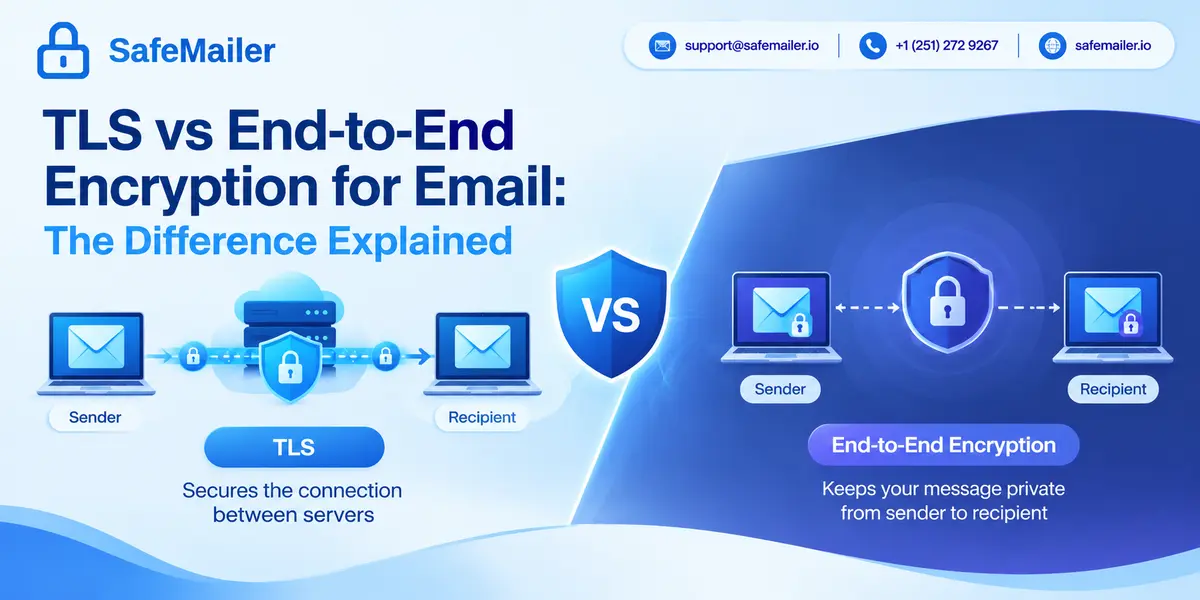
TLS vs End-to-End Encryption for Email: The Difference Explained
TLS is not end-to-end encryption. TLS (Transport Layer Security) encrypts an email only while it moves between two mail servers, and every server along the route can read the message once it arrives. End-to-end encryption (E2EE) encrypts the message on the sender's device so that only the recipient's device holds the key to open it. HTTPS is TLS applied to web traffic, so it is not end-to-end encryption either. SafeMailer takes a third path: each message is stored encrypted with AES-256-GCM, travels over TLS 1.3, and opens only for a recipient who verifies identity with an existing Google or Microsoft account.
Most people assume an email is private because their provider says it is encrypted. That single word covers very different protections. Some encryption guards the wire. Some guards the message. Knowing which one you have decides who can read a contract, a patient record or a payroll file after you press send. This guide explains how TLS and end-to-end encryption differ, where HTTPS fits, which standards deliver true end-to-end security, and how SafeMailer protects business email without asking recipients to install anything.
Key takeaways
- TLS encrypts the connection between servers, not the message itself.
- End-to-end encryption keeps content locked until the recipient's device opens it.
- HTTPS is TLS for web traffic and is not end-to-end encryption.
- S/MIME and OpenPGP are the two standards that provide end-to-end email security.
- SafeMailer adds encryption at rest, recipient verification and revocation on top of TLS, and you can start on the free plan.
TLS Is Not End-to-End Encryption
The two terms describe where encryption starts and where it stops.
TLS protects a connection. When your mail server hands a message to the recipient's mail server, TLS wraps that single hop in an encrypted tunnel. Once the message lands, the tunnel closes and the receiving server holds a readable copy. If the email passes through a relay, a filtering service or a forwarding rule, each of those systems decrypts it, reads it and encrypts it again for the next hop.
End-to-end encryption protects the message itself. The content is locked before it leaves the sender and stays locked on every server it touches. Only the intended recipient holds the private key that opens it. The email provider, the network and any administrator in between see scrambled data.
So the useful question is not whether an email is encrypted, but who can read it at each stop. With TLS alone, the answer includes every mail server in the path. SafeMailer was built for teams that need a shorter answer, and you can see how SafeMailer delivers an encrypted message from sender to verified recipient.
How TLS Email Security Works
TLS is the same protocol that protects banking sites and online checkouts. In email, it runs between mail servers over SMTP and, separately, between your mail app and your provider. The current version, TLS 1.3, is defined in RFC 8446, and NIST SP 800-52 Rev. 2 directs US federal systems to support it. SafeMailer uses TLS 1.3 for all data in transit.
A TLS session starts with a handshake. The two servers agree on a cipher, the receiving server presents a certificate, and both sides derive fresh session keys. Everything that follows on that connection is encrypted. Someone tapping the network between them sees noise instead of names, attachments or account numbers.
That protection is real and worth having. It stops passive eavesdropping on public networks and between data centers. Its limit is scope: TLS knows nothing about the message, only the pipe it travels through.
STARTTLS and Opportunistic Encryption
Most server-to-server email uses STARTTLS (RFC 3207), which upgrades a plain SMTP connection to an encrypted one. By default this upgrade is opportunistic. If the receiving server does not offer TLS, or an attacker strips the offer out of the conversation, many senders simply deliver the message in plain text. The sender usually never finds out.
MTA-STS and DANE Close the Downgrade Gap
Two newer standards let a domain insist on encryption. MTA-STS (RFC 8461) publishes a policy that tells sending servers to require valid TLS or refuse delivery. DANE for SMTP (RFC 7672) pins the expected certificate in DNSSEC-signed records. TLS-RPT (RFC 8460) sends reports when encrypted delivery fails. Together they make TLS far more dependable, yet the message is still readable on every server once it arrives. That gap is why SafeMailer adds message-level controls on top of transport security rather than relying on TLS alone.
How End-to-End Email Encryption Works
End-to-end encryption uses public key cryptography. Each person has a key pair: a public key that anyone can use to lock a message for them, and a private key that only they hold and use to unlock it. The sender's email client encrypts the body and attachments with the recipient's public key before the message reaches any server.
Because the servers never see the private key, they cannot open the content. A breach at the mail provider, a curious administrator or a legal demand for stored mail returns only ciphertext. That is the strength of the model.
The costs are practical. Both people need compatible software. The sender must obtain the recipient's public key or certificate before writing. A lost private key means lost mail. Server-side tools such as spam filters, archiving and eDiscovery cannot inspect content they cannot decrypt. And end-to-end encryption still leaves metadata visible: sender, recipient, time and usually the subject line travel in the clear.
This is why many organizations adopt it for a small group of specialists and then struggle to extend it to clients. Our guide to keeping email and voice communication private covers where each approach fits, and the SafeMailer section below explains a route that avoids the key exchange problem.
HTTPS Is TLS, Not End-to-End Encryption
HTTPS is ordinary web traffic (HTTP) carried inside a TLS connection. When you open webmail, HTTPS encrypts the link between your browser and the provider's servers. By the time the page loads, the provider has already decrypted your message in order to show it to you.
That makes HTTPS a transport protection, just like TLS between mail servers. It protects you from someone on the same cafe Wi-Fi. It does not stop the service on the other end from reading, scanning or storing the content. The padlock in the address bar tells you the connection is private, not that the message is.
SafeMailer uses HTTPS and TLS 1.3 for every connection, then keeps the stored message encrypted with AES-256-GCM, so the connection is not the only thing standing between sensitive data and the wrong reader.
TLS vs End-to-End Encryption Difference at a Glance
The table compares the three models buyers usually weigh. The last column describes the SafeMailer approach, often called encrypted message delivery.
| Question | TLS only | End-to-end encryption (S/MIME, OpenPGP) | SafeMailer encrypted delivery |
|---|---|---|---|
| What is encrypted | The connection between two servers | The message body and attachments | The connection (TLS 1.3) and the stored message (AES-256-GCM) |
| Where protection ends | At each server the email reaches | On the recipient's device | When a verified recipient opens the message |
| Who manages keys | Servers, per session | Each sender and recipient | SafeMailer, under zero-trust key management |
| Recipient setup | None | Certificate or key pair plus a compatible client | None beyond an existing Google or Microsoft account |
| Attachments after delivery | Readable on the destination server | Encrypted inside the message | Stored encrypted, with per-message download controls |
| Revoke after sending | No | No | Yes, plus One Time View |
| Audit trail | Server logs only | Depends on the mail client | Per-message record of sending and viewing |
No column wins every row. TLS is universal but shallow. End-to-end encryption is the deepest protection but the hardest to use with outside recipients. SafeMailer gives up the guarantee that no provider could ever decrypt a message, and in exchange gives recipients zero setup and gives senders control after delivery. We state that trade-off plainly because it should drive your choice.
Try it on a real message. The SafeMailer Free plan includes 10 encrypted emails a month, attachments up to 100 MB and a signed BAA. No credit card, no installation.
Create Free AccountTLS and Email Attachments After Delivery
TLS treats an attachment like any other part of the message. A PDF or spreadsheet is encrypted while it crosses a connection and readable once it reaches a server. From there it can sync to phones, land in backups, get forwarded to a personal account or be downloaded to a laptop, and none of those copies inherit any protection from TLS.
End-to-end encryption wraps attachments inside the same encrypted envelope as the body, so they stay locked until the recipient decrypts them. The trade-off is the same key exchange burden described above.
SafeMailer stores attachments encrypted alongside the message and lets the sender decide, message by message, whether the recipient may download or forward them. For regulated files such as lab results or claims data, our review of encryption software for healthcare ePHI lists what to look for in attachment handling.
The Email Standards That Provide End-to-End Security
Two open standards deliver true end-to-end email encryption.
- S/MIME (Secure/Multipurpose Internet Mail Extensions), currently version 4.0 in RFC 8551, uses certificates issued by a certificate authority. It is built into most business mail clients and is common in large enterprises and government, where IT teams can issue and renew certificates.
- OpenPGP, standardized in RFC 9580, uses keys that people generate and share themselves. It is popular with journalists, researchers and security teams, and less common in everyday business email.
Both standards also support digital signatures, which prove who sent a message and that nobody altered it. Both require the recipient to be set up in advance, which is the main reason businesses struggle to use them with customers, patients and outside counsel. SafeMailer exists for exactly that situation: protected delivery to people who have never installed a certificate.
Typing Secure in the Subject Line Does Not Encrypt an Email
Adding a word such as secure or encrypt to a subject line does nothing on its own. It only works when an administrator has configured an email gateway or data loss prevention rule that watches for that keyword and routes the message to an encryption service. Without that rule, the message goes out with standard TLS at best, and the subject line itself is never encrypted by any of these methods.
If your organization relies on keyword triggers, test them regularly, because a typo or a missing rule sends sensitive content the normal way. With SafeMailer, encryption is not a keyword trick. You choose to send a message through SafeMailer, and it is protected every time.
How to Check Whether an Email Was Sent Over TLS
You can verify transport encryption in a few seconds.
- Gmail: open the message, click the small arrow under the sender's name and read the security line. Standard encryption (TLS) means the message arrived over TLS. A red open padlock warns that a message was or will be sent without TLS.
- Outlook and other clients: view the message headers and look for TLS or ESMTPS in the Received lines, which record each hop.
- Your own domain: publish an MTA-STS policy and a TLS-RPT record so you learn when other servers fail to deliver to you securely.
A clean result proves the connection was encrypted. It does not tell you who could read the message on the servers it reached. For that you need message-level protection such as SafeMailer.
What HIPAA and Other Regulations Expect From Email Encryption
Regulations rarely name TLS or end-to-end encryption directly. They describe outcomes.
The HIPAA Security Rule covers transmission security at 45 CFR 164.312(e)(1) and treats encryption as an addressable specification. A covered entity or business associate must assess the risk, decide what is reasonable and document that decision. Many organizations find TLS alone hard to defend for ePHI sent to outside patients or partners, because the message is readable on servers they do not control. Our page on HIPAA compliant email encryption walks through the requirements, and SafeMailer signs a Business Associate Agreement even on the free plan.
Other frameworks follow similar logic. GDPR Article 32 asks for appropriate technical measures and names encryption as an example. CMMC and NIST SP 800-171 require protecting the confidentiality of controlled unclassified information in transit. The FTC Safeguards Rule expects financial institutions to encrypt customer information in transit over external networks. In each case, SafeMailer adds the access records and audit trail that show an assessor how a message was protected, not just that a connection was encrypted.
Where SafeMailer Fits Between TLS and End-to-End Encryption
SafeMailer is an encrypted email platform that works inside Gmail and Outlook, and it sits between the two models on purpose.
Like TLS, it needs nothing from the recipient beyond an inbox. There are no certificates to exchange, no plugins, no MX record changes and no new account to create. Recipients confirm who they are with the Google or Microsoft account they already use.
Unlike TLS, protection does not stop at a server. SafeMailer:
- Stores each message and attachment encrypted with AES-256-GCM and moves it over TLS 1.3
- Releases content only after the recipient verifies identity
- Offers One Time View, so a message expires after it is opened once
- Lets the sender allow or block forwarding and downloads for each message
- Lets the sender revoke access after delivery if a message went to the wrong person
- Keeps an audit trail of when each message was sent and viewed
- Holds SOC 2 Type II and ISO 27001 certifications
We want to be direct about one point: SafeMailer is not end-to-end encrypted. Keys are managed by SafeMailer under a zero-trust email security model, and that design is what makes recipient verification, revocation and One Time View possible. If your threat model requires that no service provider could ever decrypt a message, S/MIME or OpenPGP is the right tool. If you need protected, provable delivery to clients who will never manage a key, SafeMailer fits that job.
Choosing Between TLS, End-to-End Encryption and SafeMailer
Match the method to the data and to the person receiving it.
- Routine, non-sensitive mail: TLS, ideally enforced with MTA-STS, is enough.
- Internal mail between staff who all hold certificates: S/MIME gives strong end-to-end protection with little friction.
- Sensitive data sent to outside people such as patients, clients, borrowers, students or subcontractors: SafeMailer, because recipients cannot be expected to set up keys and you need proof of what happened to each message.
- Mixed teams: use all three. Keep TLS on for everything, S/MIME for high-risk internal traffic and SafeMailer for regulated external messages.
Clinics and practices can see this layered setup in secure email for healthcare teams, and the same pattern applies in finance, education and government.
Start Sending Encrypted Email With the SafeMailer Free Plan
You do not need budget approval to test any of this. The SafeMailer Free plan includes:
- 10 encrypted emails per month
- Attachments up to 100 MB
- A signed Business Associate Agreement
- One sender, working inside Gmail or Outlook
- No credit card and no installation
Send a real message to a colleague, open it as the recipient and check the audit trail. When volume grows, the Standard plan adds 500 emails a month and 2 GB attachments, and the Pro plan adds 1,000 emails a month with unlimited attachment size. The fastest way to see the difference between TLS and protected delivery is to create a free SafeMailer account and send one message today.
Frequently Asked Questions
Is TLS end-to-end encryption?
No. TLS encrypts email only while it moves between two servers, and each server can read the message after it arrives. End-to-end encryption keeps the message locked until the recipient's device opens it. SafeMailer adds message-level protection on top of TLS for sensitive business email.
Is HTTPS end-to-end encryption?
No. HTTPS is TLS protecting the connection between your browser and a website, so the service on the other end can still read the content. SafeMailer uses HTTPS and TLS 1.3 for connections and keeps stored messages encrypted with AES-256-GCM.
What is the difference between TLS and end-to-end encryption?
TLS protects the path an email travels, one connection at a time. End-to-end encryption protects the message itself, so only the intended recipient can decrypt it. SafeMailer sits between the two, adding recipient verification, One Time View and revocation without asking recipients to manage keys.
Does TLS provide end-to-end encryption for the email and any attachments?
No. TLS protects attachments only in transit, and they are readable on every server the email reaches. S/MIME and OpenPGP encrypt attachments end to end. SafeMailer stores attachments encrypted and lets senders block downloads and forwarding for each message.
What email standard provides end-to-end security?
S/MIME and OpenPGP are the two standards that provide end-to-end email security. Both require the recipient to hold a certificate or key before the message is sent. SafeMailer is a practical option for protected email to recipients who have neither.
Does typing secure in the subject line encrypt email?
Only if an administrator has set up a gateway rule that encrypts messages containing that keyword. On its own, the word does nothing. SafeMailer protects every message sent through it, with no keyword rules to maintain.
What is TLS email encryption?
TLS email encryption is the use of Transport Layer Security to encrypt the connection between mail servers, or between a mail app and its server. Gmail and Outlook use it by default when the other server supports it. SafeMailer uses TLS 1.3 as its transport layer and adds encryption at rest.
Is SafeMailer end-to-end encrypted?
No. SafeMailer encrypts messages with AES-256-GCM at rest and TLS 1.3 in transit under zero-trust key management, and opens them only for verified recipients. Because SafeMailer manages the keys, it is not end-to-end encrypted. That design is what makes One Time View, access revocation and zero recipient setup possible.