Secure Email for Small Business: Email Security and Encryption Buying Guide
SafeMailer is email encryption software for small business teams that need to protect client files, contracts, and health or financial records without changing the email they already use. It works with Gmail and Outlook, needs no plugin and no MX record change, and never asks the people you write to for a new account, because recipients confirm who they are with the Google or Microsoft sign-in they already have. Messages are encrypted with AES-256-GCM at rest and TLS 1.3 in transit, pricing is per sender rather than per mailbox, and the Free plan includes 10 encrypted emails a month plus a signed BAA.
This guide is written for owners and office managers at firms of roughly two to fifty people. It covers what small business email encryption does and does not protect, how the encryption built into Gmail and Microsoft 365 compares with a dedicated tool, what each type of secure email service asks of your team and your clients, and how to send your first protected message with SafeMailer in a few minutes.
Protect your next client email today
Sign in with the Google or Microsoft account you already use and send your first encrypted message in minutes.
Create Free AccountFree plan: 10 encrypted emails a month, signed BAA included, no credit card required.
SafeMailer at a Glance for Small Business Email Encryption
If you only have a minute, these are the facts that decide whether SafeMailer fits your business.
| What you need to know | SafeMailer detail |
|---|---|
| What it is | An email encryption platform for sending protected messages and attachments. SafeMailer is not a bulk email, newsletter, or cold outreach tool. |
| Works with | Gmail and Outlook. Senders sign in with their existing Google or Microsoft account. |
| Setup | No plugin, no MX record change, no DNS work, no mailbox migration. |
| Recipient experience | Recipients verify with their existing Google or Microsoft account. No portal account or extra password. |
| Encryption | AES-256-GCM at rest, TLS 1.3 in transit, zero-trust key management. |
| Sender controls | One Time View, optional forward and download blocking per message, and revocation after delivery. |
| Records | Audit trail showing when each message was sent, viewed, or expired. |
| Certifications | SOC 2 Type II and ISO 27001. |
| Compliance paperwork | Signed BAA on every plan, including Free. |
| Pricing | Free $0 (10 emails a month), Standard $47.99 a month (500 emails), Pro $96.99 a month (1,000 emails). Licensed per sender. |
| Developer access | REST API with named, revocable API keys. |
Email Encryption Software for Small Business Explained in Plain Language
Encryption turns a readable message into scrambled data that only an authorized person can turn back into text. Two moments matter. In transit, the message is moving between mail servers. At rest, it is stored in a mailbox or on a server. Most business email already uses TLS in transit when both servers support it, but that protection ends the moment the message lands. From then on, it sits readable in the recipient's inbox, it can be forwarded to anyone, and it is exposed if that inbox is ever compromised.
Dedicated encryption software closes that gap in three ways. It keeps the content encrypted while stored, it checks the identity of the person opening the message instead of trusting whoever holds the link, and it gives the sender control after the email has gone. SafeMailer does all three: content is encrypted with AES-256-GCM at rest and TLS 1.3 in transit, recipients prove their identity through Google or Microsoft, and senders can expire, restrict, or revoke a message later. You can follow the full sending and verification flow on the page that explains how SafeMailer verifies senders and recipients.
Small Business Email Encryption Solves Three Everyday Problems
Most small firms do not lose data to a movie-style hacker. They lose it through ordinary moments that standard email was never designed to handle.
- The wrong recipient. Autocomplete picks a client with a similar name and a tax return goes to a stranger. SafeMailer lets you revoke access after delivery, so the message can no longer be opened.
- The forward you never approved. A client forwards your settlement draft or payroll file to a colleague, then to someone else. SafeMailer lets the sender block forwarding and downloading on a message, or send it as One Time View so it expires after a single read.
- The inbox that gets breached later. Months after a project ends, an old mailbox is compromised and every attachment in it is exposed. SafeMailer keeps message content encrypted at rest and behind identity verification rather than sitting as plain text in someone else's inbox.
Clients, insurers, and regulators increasingly ask how a firm protects the documents it emails. Being able to show encrypted delivery, a signed BAA, and an audit trail from SafeMailer turns that question from a worry into a one-line answer.
Secure Email for Small Business Covers Four Separate Layers
Search results for secure email for small business mix very different products, from spam filters to encrypted mailboxes, which is why buyers end up comparing tools that solve different problems. It helps to separate the four layers and decide which one you are actually shopping for.
| Layer | What it stops | Who usually provides it | Where SafeMailer fits |
|---|---|---|---|
| Domain authentication (SPF, DKIM, DMARC) | Criminals sending email that pretends to come from your domain | Your domain and email host settings | Outside SafeMailer. Set this up with your email host. |
| Inbound threat filtering | Malicious links, harmful attachments, and phishing aimed at your staff | Your email host's built-in filters or a secure email gateway | Outside SafeMailer. SafeMailer is not an anti-phishing gateway. |
| Account security (MFA) | Stolen passwords turning into a hijacked mailbox | Google or Microsoft account settings | Supports it. SafeMailer relies on Google and Microsoft identity, so MFA there strengthens every sign-in. |
| Message encryption and access control | Interception, exposed stored content, unapproved forwarding, and misdirected email | Email encryption software | This is the SafeMailer layer. |
Most small businesses already get the first three layers, at least in basic form, from Google Workspace or Microsoft 365. The fourth is the one that is usually missing, and it is the only one that protects the documents you choose to send. SafeMailer is built for that layer and works alongside whatever filtering and authentication your email host already provides.
Built-In Gmail and Outlook Encryption Compared With Dedicated Encryption Software
Before paying for anything, it is fair to ask whether the email platform you already pay for can do the job. Both major platforms offer some encryption, but it is often tied to higher license tiers and takes admin work to switch on.
| Option | Where it is included | What recipients experience | Setup effort |
|---|---|---|---|
| Gmail standard TLS | All Gmail and Google Workspace accounts | Normal email. Protection covers transit only and depends on the receiving server | None |
| Gmail confidential mode | Most Gmail and Workspace accounts | Messages can expire and cannot be forwarded or downloaded, but this is not message-level encryption | Low |
| Google hosted S/MIME | Enterprise Plus and certain Education and Frontline editions | Works when both sides have trusted certificates | High, certificates and admin console |
| Microsoft message encryption | Microsoft 365 Business Premium and E3 or E5. Business Basic and Standard need an upgrade or add-on | Opens in Outlook or through a one-time passcode page | Medium, admin rules or sensitivity labels |
| Dedicated tool such as SafeMailer | Any Gmail or Outlook sender, no license tier change | Normal email notification, then sign-in with an existing Google or Microsoft account | Low, sign in and send |
Built-in encryption makes sense if your company already pays for a top tier and has someone to configure it. A dedicated tool usually wins when you are on a lower tier, when only a few staff send sensitive files, or when you need per-message controls such as One Time View and revocation with an audit trail. That is the situation SafeMailer was designed for: it adds encryption to the Gmail or Outlook account a sender already uses without a license upgrade for the whole company. Teams weighing this choice for a larger group can compare it with our wider guide to secure email software for teams that stay on Gmail or Outlook.
Secure Email Solutions for Small Business Compared by Type
Once you know you need the encryption layer, the products fall into a handful of types. The differences that matter to a small team are what changes for your staff and what your clients have to do to read a message.
| Type of secure email service | What changes for your team | What recipients do | Best fit |
|---|---|---|---|
| Standalone encrypted mailbox | New email address and a full mailbox migration | Seamless only if they use the same provider, otherwise a password or link | Privacy-focused users willing to leave Gmail or Outlook |
| Browser extension or add-in | An extension or add-in on every device that sends | Usually open a secure reader page | Teams with IT support to manage installs |
| Portal-based encryption service | Little for senders | Create a portal account and remember another password | Occasional sending where recipient effort matters less |
| Gateway or connector routing | MX records or mail routing rules changed by an admin | Varies from inbox delivery to a portal | Larger firms with an IT department |
| Native encryption with identity sign-in (SafeMailer) | Nothing. Senders use their existing Google or Microsoft sign-in | Click the notification and verify with an existing Google or Microsoft account | Small teams that want protection without an IT project |
Recipient friction is the factor small firms underestimate most. If reading your message means registering on a portal, many clients will simply reply asking you to send it again by normal email, and the protection disappears. SafeMailer avoids that by using identity your clients already have. Most business and personal inboxes run on Google or Microsoft, but if some of your clients use another provider, send them a test message during the Free plan before relying on SafeMailer for that relationship.
See what your clients see
Send a SafeMailer encrypted email to a real client or colleague and watch the status change from Sent to Viewed on your dashboard.
Create Free AccountFree plan: 10 encrypted emails a month, signed BAA included, no credit card required.
Five Checks for Choosing an Encrypted Email Service for Small Business
Feature lists run long, but five checks eliminate most unsuitable tools quickly. Run every option through them, including SafeMailer.
- Recipient path under a minute. Send a test message to a real client, not an internal account, and ask how many steps it took. SafeMailer recipients click a notification and verify with an existing Google or Microsoft account.
- No infrastructure change. Count the plugins, MX record edits, connectors, and migrations required. SafeMailer needs none of them.
- Compliance paperwork on the plan you will actually buy. If you handle health information, confirm the BAA is included on your tier rather than reserved for an upgrade, because HIPAA compliant email encryption depends on that agreement being signed. SafeMailer includes a signed BAA on every plan, including Free.
- Control after you press send. Look for revocation, expiry, forward and download blocking, and an audit trail. SafeMailer offers all of these, and forward and download blocking are set per message by the sender.
- Published pricing that matches who sends. Per-mailbox pricing charges you for staff who never send anything sensitive. SafeMailer publishes its prices and licenses per sender.
A tool that passes all five will get used, which matters more than any single feature. An encryption product your staff avoid protects nothing, and the SafeMailer Free plan exists so you can run these checks with real messages before spending anything.
Email Encryption for Small Business by Industry
The reason to encrypt differs by trade, and so do the rules. Here is how SafeMailer fits the small businesses that email sensitive material most often.
Law Firms and Solo Attorneys
ABA Formal Opinion 477R asks lawyers to make reasonable efforts to protect client communications, and it recognizes that highly sensitive matters may call for encryption. Settlement terms, medical records in injury cases, and financial disclosures in family law all qualify. SafeMailer lets an attorney send a draft as One Time View, block forwarding on privileged material, and keep an audit record of when the client opened it.
Accounting, Tax, and Bookkeeping Firms
Tax preparers are covered by the FTC Safeguards Rule, which requires encryption of customer information both in transit and at rest, and IRS Publication 4557 sets out data protection expectations for tax professionals. Returns, W-2s, and bank statements move by email every filing season. SafeMailer encrypts those files, verifies the client before they open them, and records access, which supports the written security program the rule expects. Firms can review the FTC Safeguards Rule email encryption requirements in more detail.
Therapists, Counselors, and Small Medical Practices
HIPAA requires a business associate agreement with any vendor that handles protected health information, and it treats encryption as a safeguard practices should adopt wherever it is reasonable. Intake forms, treatment summaries, and superbills are routine email traffic for a small practice. SafeMailer signs a BAA on every plan, including Free, which lets a solo therapist start protecting patient email at no cost. That makes SafeMailer a practical starting point for a practice that has been emailing patients without protection.
Real Estate, Mortgage, and Insurance Offices
Mortgage brokers, lenders, and insurance agencies handle nonpublic personal information covered by the Gramm-Leach-Bliley Act, and closing packets are full of account numbers and ID documents. SafeMailer encrypts those packets and lets you revoke one sent to the wrong party. Encryption protects what you send, but it does not stop criminals from spoofing a title company, so always confirm wire instructions by phone. SafeMailer also keeps the access record an examiner or carrier may ask to see.
HR, Recruiting, and Payroll Teams
Offer letters, background checks, I-9 documents, and payroll files carry Social Security numbers and bank details. Many US state breach notification laws treat properly encrypted data differently from exposed plain text, and firms recruiting in Europe also answer to GDPR. SafeMailer lets an HR lead send these files with download blocking and a full access log, and teams hiring EU candidates can check the GDPR email encryption obligations that apply.
Email Encryption Pricing for Small Business Budgets
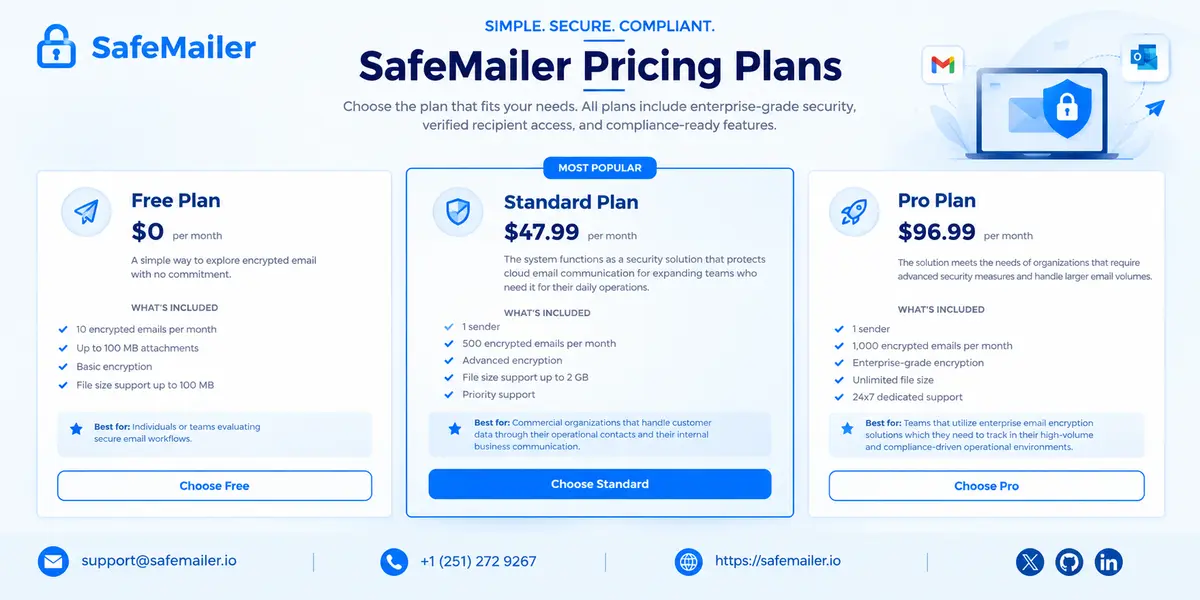
Many vendors in this category hide pricing behind a sales call. SafeMailer publishes every number, and each plan is licensed per sender, so you pay for the people who send protected email rather than for every mailbox in the company.
| Plan | Price | Encrypted emails | Attachment limit | Senders |
|---|---|---|---|---|
| Free | $0 a month | 10 a month | Up to 100 MB | One |
| Standard | $47.99 a month | 500 a month | Up to 2 GB | One |
| Pro | $96.99 a month | 1,000 a month | Unlimited file size | One |
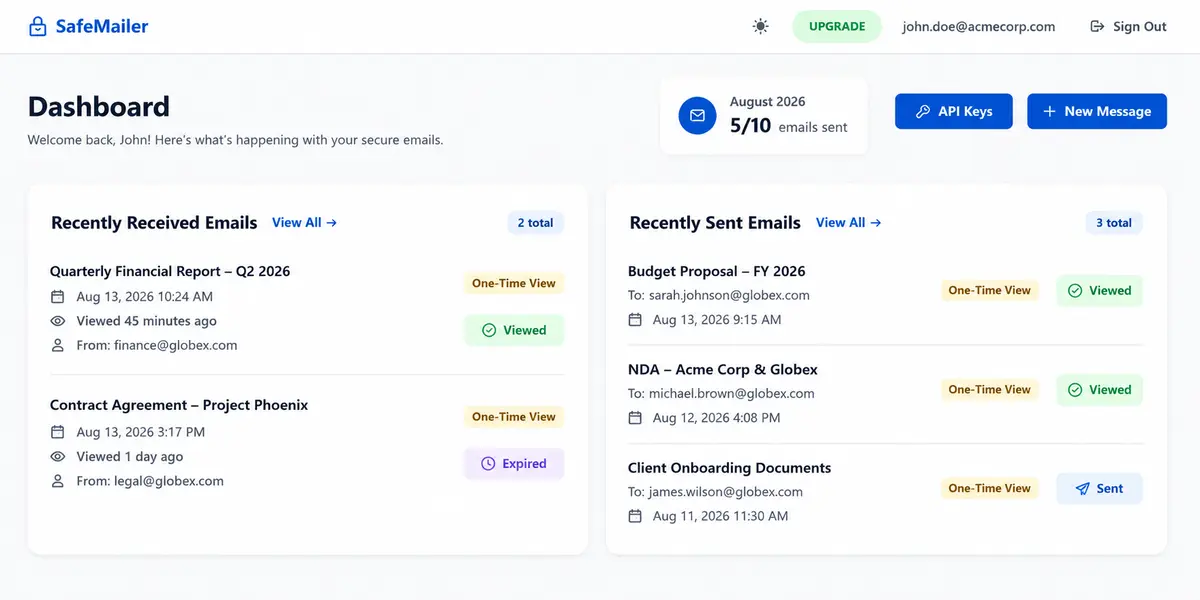
Consider a twelve-person accounting office where only the two partners send tax documents. With per-mailbox pricing, the firm would license twelve seats. With SafeMailer, it licenses the two senders who actually need encryption. Your monthly count appears on the SafeMailer dashboard, so you can see how close you are to the limit before deciding whether to upgrade. The Free plan is permanent rather than a trial, and you can check the current SafeMailer plan limits at any time.
Start on Free, upgrade only when you need to
Ten encrypted emails a month is enough to prove the workflow with your own clients. Move to Standard or Pro when your volume grows.
Create Free AccountFree plan: 10 encrypted emails a month, signed BAA included, no credit card required.
How to Send an Encrypted Email for Your Small Business With SafeMailer
The first message takes a few minutes. There is nothing to install and nothing for your IT provider to configure.
- Create your free account. Go to the SafeMailer sign-in page and continue with the Google or Microsoft account you already use for work. No credit card is required.
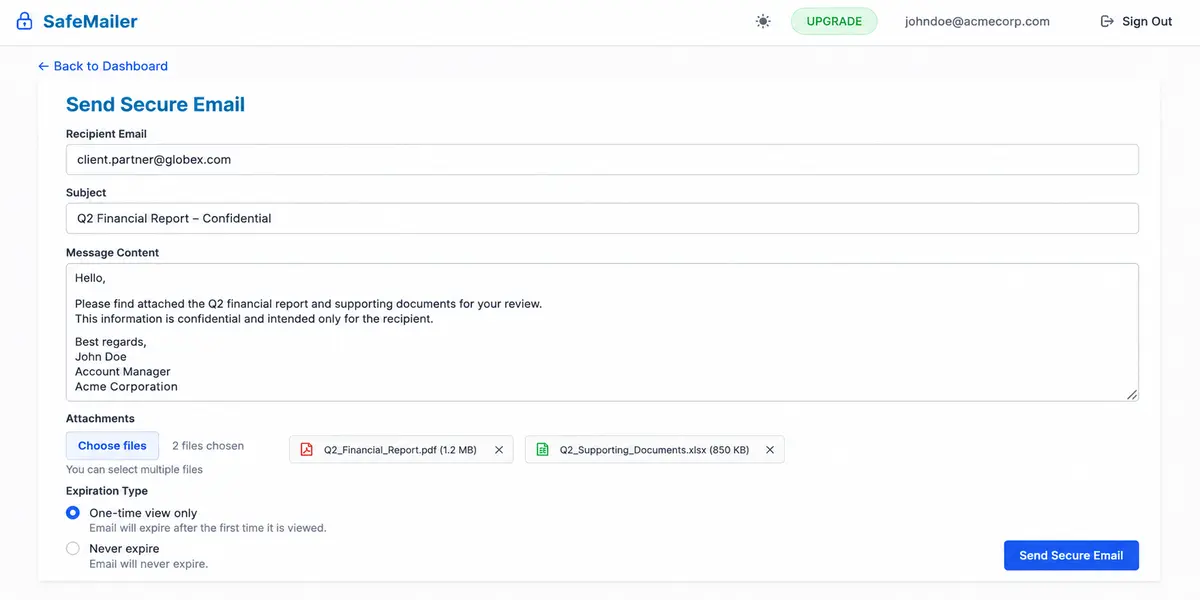
- Start a new message. Select New Message from the SafeMailer dashboard.
- Add the recipient, subject, and content. Write the message as you normally would and attach files. The Free plan accepts attachments up to 100 MB.
- Choose how long access lasts. Select One-time view only if the email should expire after the first viewing, or Never expire for documents the client needs to keep.
- Send and track. Select Send Secure Email. The SafeMailer dashboard then shows each message as Sent, Viewed, or Expired, with the time it was opened.
What Recipients See When a SafeMailer Encrypted Email Arrives
Your client receives an ordinary email notification in their normal inbox. They click the link, confirm their identity with the Google or Microsoft account they already have, and read the message and any attachments in their browser. There is no portal registration, no password to invent, and no software to download. If you sent the message as One Time View, it expires after that first viewing, and your SafeMailer dashboard updates to show when it was viewed and that it has expired.
A short heads-up improves the experience further. Tell new clients once that confidential documents from your firm arrive through SafeMailer and ask them to sign in with their usual Google or Microsoft account. After that first message, most clients treat it as routine.
What Email Encryption Does Not Cover for a Small Business
Encryption is powerful, but it is one layer, and being clear about its limits helps you spend money in the right places. SafeMailer protects the sensitive messages you send. It does not replace these other controls:
- Inbound phishing filtering. Encryption does not screen the email your staff receive. Use your email host's filtering or a dedicated gateway for that.
- Domain spoofing protection. SPF, DKIM, and DMARC records stop criminals from sending as your domain, and they are configured with your email host.
- Account security. Turn on multi-factor authentication for every Google or Microsoft account. It protects your staff and strengthens every SafeMailer sign-in.
- Device security and backups. A lost, unlocked laptop or a ransomware infection needs endpoint protection and backups, not email encryption.
- Screens and cameras. No tool can stop a verified recipient from photographing a screen. One Time View limits how long that window stays open.
Treat SafeMailer as the control for outgoing sensitive content and pair it with basic account and inbox hygiene. For firms that want policy rules around what leaves the company, our guide to email data loss prevention controls explains how encryption fits a wider program.
Frequently Asked Questions
What's the best email encryption solution for small businesses?
For most small businesses, the best email encryption solution works inside the email you already use, lets clients open messages without creating a new account, and includes the compliance paperwork your industry needs on an affordable plan. SafeMailer fits that description: it works with Gmail and Outlook without plugins or MX record changes, recipients verify with their existing Google or Microsoft account, and every plan, including Free, comes with a signed BAA. The fastest way to judge any tool is to send real messages to real clients, which the SafeMailer Free plan lets you do at no cost.
Is email message encryption worth it for small businesses?
Yes, for any small business that emails client records, tax documents, contracts, health information, or ID documents. One misdirected or exposed email can lead to breach notification duties, regulator questions, and lost client trust, and those costs dwarf a monthly subscription. SafeMailer keeps the decision low risk because you can start on the Free plan with 10 encrypted emails a month and upgrade only if your volume grows. A business that never emails anything sensitive gains little from encryption, but very few service firms fall into that group.
Which email encryption software integrates with Gmail and Outlook without disrupting daily workflow?
Look for software that needs no plugin, no mailbox migration, and no mail routing changes, and that does not push recipients through a portal registration. SafeMailer was built for exactly this. Senders sign in with the Google or Microsoft account they already use, there are no MX record or DNS changes, and recipients verify with their own Google or Microsoft account instead of creating a password. Staff keep their existing addresses and habits, and only the messages that need protection go through SafeMailer.
How much does email encryption software for small business cost?
SafeMailer publishes its prices. Free costs $0 for 10 encrypted emails a month with attachments up to 100 MB, Standard costs $47.99 a month for 500 encrypted emails with attachments up to 2 GB, and Pro costs $96.99 a month for 1,000 encrypted emails with unlimited file size. Each plan is licensed per sender, so you pay only for the people who send protected messages. Encryption built into email platforms is often tied to a higher license tier for every user, which can cost more when only a few staff need it.
Is there free email encryption software for small business?
Yes. The SafeMailer Free plan is permanent, not a time-limited trial, and it includes 10 encrypted emails a month, attachments up to 100 MB, One Time View, access logging, and a signed BAA, with no credit card required. It covers one sender, which suits a solo practitioner or a small office testing encryption before a wider rollout. For a broader look at no-cost options, see our guide to free email encryption software for Gmail and Outlook.
Do small businesses need to encrypt email?
Many do because of the rules that apply to their sector, and the rest benefit anyway. HIPAA covers practices and vendors that handle health information, the FTC Safeguards Rule requires covered financial businesses such as tax preparers and mortgage brokers to encrypt customer information in transit and at rest, and GDPR expects appropriate security for personal data of people in the EU. SafeMailer supports these requirements with AES-256-GCM encryption, recipient identity verification, audit trails, and a signed BAA on every plan. Businesses outside regulated sectors still encrypt to protect contracts and client trust.
What is the best secure email service for small business?
It depends on the problem you are solving. To stop inbound phishing and spam, use your email host's filtering or a dedicated gateway. To send confidential messages and files that only the intended person can open, you need an encryption service, and SafeMailer is designed for that job because it keeps your Gmail or Outlook address, avoids recipient portals, and starts free. Many small businesses run both, with platform filtering for incoming mail and SafeMailer for sensitive outgoing mail.
Is Gmail encrypted enough for a small business?
Gmail protects messages in transit with TLS when the receiving server supports it, but once a message is delivered it sits readable in the recipient's mailbox. Confidential mode adds expiry and blocks forwarding and downloading, but it does not add message-level encryption, and Google's S/MIME option is limited to higher-tier Workspace editions with certificates on both sides. SafeMailer adds encryption at rest, recipient identity verification, One Time View, and revocation to the Gmail account you already use, which is what most small businesses handling client data actually need.
Does Microsoft 365 include email encryption for small business?
Microsoft's message encryption is included in Microsoft 365 Business Premium and in E3 and E5 plans, but not in Business Basic or Business Standard, which need an upgrade or add-on for each user who sends encrypted mail. It also needs admin setup through mail flow rules or sensitivity labels. SafeMailer does not depend on your Microsoft 365 license tier, because senders sign in with their existing Microsoft account, so a small business on Business Basic or Standard can encrypt sensitive Outlook email and pay only for the people who send it.
What is the difference between email security and email encryption?
Email security is the full set of protections around email: domain authentication with SPF, DKIM, and DMARC, filtering of malicious inbound mail, account protection with multi-factor authentication, and protection of message content. Email encryption is one part of that set, the part that keeps message content and attachments unreadable to anyone except the verified recipient. SafeMailer focuses on encryption and control of sensitive outgoing messages, including One Time View, revocation, and audit trails, and works alongside the filtering and authentication your email host provides.
Do my clients need an account to open an encrypted email?
With SafeMailer, clients never create a new account or password. They receive a normal email notification, click the link, confirm their identity with the Google or Microsoft account they already have, and read the message in their browser. That matters because portal registration is the most common reason clients give up on encrypted messages. If a client does not use Google or Microsoft, send them a test message during the SafeMailer Free plan before relying on it for that relationship.
Is encrypted email for small business HIPAA compliant?
Encryption is one part of HIPAA compliance, not all of it. A practice also needs a signed business associate agreement with its email vendor, workforce training, access reviews, and a breach response plan. SafeMailer covers the vendor side with a signed BAA on every plan including Free, AES-256-GCM encryption, recipient identity verification, and audit trails you can show during a review. Our step-by-step checklist for sending PHI by email walks through the practice side.
Can I revoke an encrypted email after sending it?
Yes. SafeMailer lets the sender revoke access to a message after delivery, so an email sent to the wrong person can no longer be opened. Senders can also choose One Time View, which expires the message after its first viewing, and the SafeMailer dashboard shows whether each message is Sent, Viewed, or Expired. Regular email can only be recalled in limited cases, such as within the same Microsoft organization, and only before the recipient reads it.
Start Encrypting Small Business Email Free With SafeMailer
Small businesses rarely lose client data because attackers work harder on them. They lose it because sensitive files move through unprotected inboxes every day while security waits for next quarter. SafeMailer lets you fix that this afternoon: sign in with the account you already use, send your first encrypted email, and see exactly when your client opened it. The Free plan costs nothing, needs no card, and includes the signed BAA from day one.