Encrypt Sensitive Email Right From Gmail and Outlook
SafeMailer adds the data protection layer of your phishing defense. No plugin, no MX record change, no new passwords for recipients.
Create Free AccountFree plan includes 10 encrypted emails a month. No credit card.
Phishing Protection for Email Is a Layered Control Set
Most phishing emails are built to beat one control at a time. A lookalike domain gets past someone who only glances at the display name. A link that scanned clean at delivery turns malicious an hour later. A stolen password works perfectly until the login asks for a physical security key. That is why security teams talk about layers instead of tools. Each layer catches a different stage of the attack, and the gaps in one are covered by the next.
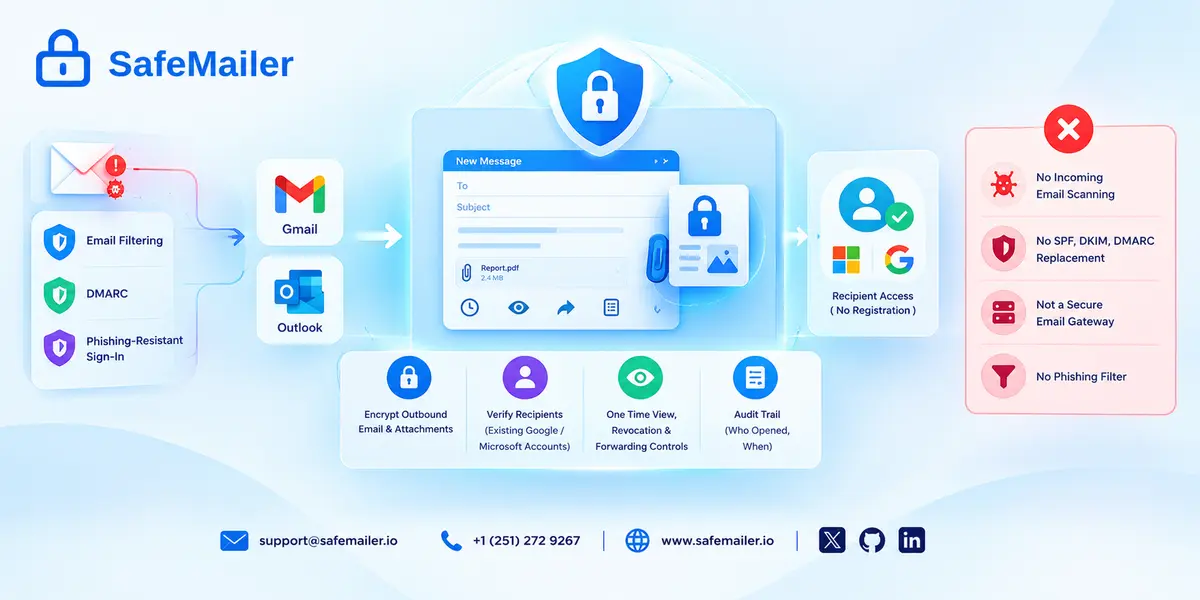
It also helps to be precise about what each kind of tool actually does. Filters and gateways inspect mail coming in. Authentication records tell receiving servers which senders may use your domain. Encryption protects the content of the messages you send out. SafeMailer belongs to that last group: it encrypts outbound business email, controls who can open it, and is designed to work alongside your inbound filtering rather than replace it.
Phishing Email Security Still Matters in 2026
The 2026 Verizon Data Breach Investigations Report reviewed more than 22,000 confirmed breaches and found a human element in 62% of them. Phishing accounted for 16% of initial access, and it made up 44% of the initial access techniques where attackers used AI for help. Exploited software vulnerabilities took the top spot for initial access this year, which is a useful reminder that phishing is one serious threat among several, not the only one worth planning for. You can read the full findings in the 2026 Verizon Data Breach Investigations Report.
For a business, the real cost of a successful phish is rarely the email itself. It is what the attacker does next: reading a mailbox full of contracts, redirecting a supplier payment, or using a trusted account to target your customers. Good phishing email security shrinks each of those follow-on steps. That is also the angle SafeMailer takes, because the messages that cause the most harm in a compromised mailbox are the ones carrying patient records, account details, or controlled technical data.
How to Protect from Phishing Email with Six Layers of Defense
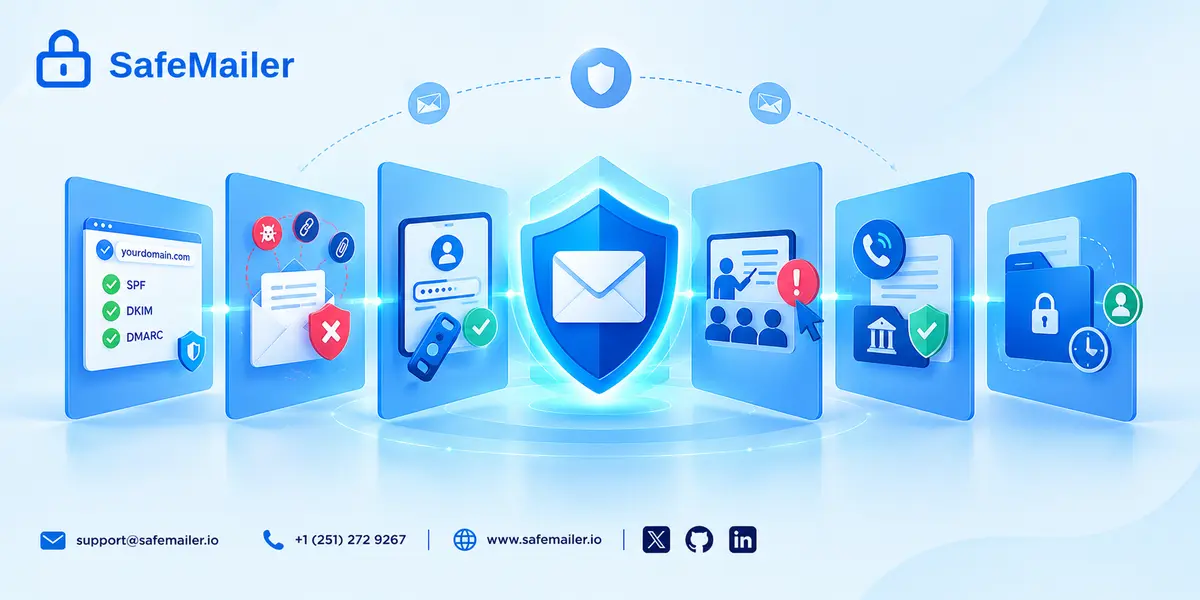
The table below summarizes the six layers and who usually owns each one. The joint phishing guidance from CISA, NSA, FBI, and MS-ISAC covers many of the same controls in more technical depth and is worth sharing with whoever runs your mail systems. SafeMailer sits in the sixth layer.
| Layer | What it stops | What it misses | Typical owner |
|---|---|---|---|
| 1. Domain authentication (SPF, DKIM, DMARC) | Criminals sending as your exact domain | Lookalike domains and hijacked real accounts | IT or DNS administrator |
| 2. Inbound filtering | Known malicious links, attachments, and senders | New lures, links that change after delivery, text-only scams | Email platform or security vendor |
| 3. Phishing-resistant MFA | Sign-ins with stolen passwords | Stolen session tokens and accounts that still allow weaker sign-in | Identity team |
| 4. Awareness training and reporting | Obvious lures and slow reporting | Carefully personalized messages | Security or HR |
| 5. Out-of-band verification | Fake payment and data requests | Attacks that do not ask for money or records | Finance and operations |
| 6. Data controls on sent email | Exposure of sensitive content after a compromise | Delivery of the phishing email itself | Email encryption platform such as SafeMailer |
Layer 1: Domain Authentication with SPF, DKIM, and DMARC
SPF lists the servers allowed to send mail for your domain. DKIM adds a signature proving a message was not altered after it left your system. DMARC ties the two together and tells receiving servers what to do with mail that fails, anywhere from monitoring only to outright rejection. The target is a DMARC policy of reject once you are confident every legitimate sender is covered. Authentication stops criminals from sending as your exact domain, but it does nothing about a lookalike domain that is one letter off. Our guide to email spoofing prevention with SPF, DKIM, and DMARC walks through a safe rollout order.
Layer 2: Inbound Email Filtering
Filters check sender reputation, scan attachments, and inspect links before a message lands in the inbox. Some check links a second time at the moment someone clicks, which catches pages that were harmless at delivery and switched to a credential form later. Gmail and Outlook both include built-in filtering, and many organizations add a dedicated gateway or an API-based filter on top when they need stricter policies or better reporting. Filtering is still the layer that removes the bulk of junk before anyone has to make a judgment call. Before buying anything extra, it helps to understand what a secure email gateway filters and where it stops, because no filter reliably catches a polite, well-written message that carries no link or file at all.
Layer 3: Phishing-Resistant Multi-Factor Authentication
Multi-factor authentication makes a stolen password far less useful, but not all MFA is equal. Codes sent by text message can be relayed through a fake sign-in page, and the joint federal guidance warns that push approvals without number matching can be abused by attackers who send prompt after prompt until someone taps accept. Security keys and passkeys based on the FIDO2 standard are much harder to phish because they only work on the genuine site. Start with administrators, finance staff, and anyone who can approve payments or export data.
Layer 4: Phishing Awareness Training and Reporting
Training works best when it is short, frequent, and paired with a one-click way to report suspicious mail. For a practical structure, see phishing awareness training that measurably cuts risk. The number that matters is not only how many people click a simulated lure, but how quickly someone reports a real one, because an early report lets the security team pull the same message out of every other inbox. Programs that track reporting speed next to click rates give a much clearer picture of risk than click rates alone.
Layer 5: Out-of-Band Verification for Payments and Data Requests
Many of the most expensive phishing attacks contain no link at all. A message that appears to come from the chief executive or a regular supplier simply asks for a wire transfer, a change of bank details, or a copy of employee tax forms. The fix is a process rule, not a product: any request to move money or release sensitive records gets confirmed through a separate channel, such as a phone number already on file. It sounds basic, and it remains one of the strongest business email compromise protection controls a finance team can adopt.
Layer 6: Data Controls That Limit Exposure
The last layer assumes something will eventually get through and asks a different question: if a mailbox is compromised, what can the attacker actually read? Sensitive messages sent in plain text sit in inboxes for years. Messages sent through SafeMailer stay behind recipient identity verification, can be set to expire after the first view, and can have access revoked after delivery. Each open is also recorded, which helps when you need to work out exactly what a compromised account could have seen and who needs to be told. The whole approach follows a zero trust email security model, where every request to open protected content is checked instead of assumed safe.
Add Layer Six to Your Email Today
Send protected messages with SafeMailer One Time View, and revoke access after delivery if a mailbox is ever compromised. Recipients verify with the Google or Microsoft account they already use.
Create Free AccountSmall print: Works inside Gmail and Outlook. No installation.
AI-Generated Phishing Raises the Bar for Every Layer
Generative AI has removed many of the old warning signs. Spelling mistakes and clumsy phrasing are no longer reliable tells, and attackers can tailor a message to a person's role, current projects, and writing style in seconds. Teams asking how to protect against LLM-generated phishing emails will find that the answer is mostly the same six layers applied more strictly: enforce DMARC, move key accounts to phishing-resistant sign-in, and make out-of-band verification non-negotiable. We cover the detection side in how AI-generated phishing emails evade filters. SafeMailer does not try to judge whether a message was written by a person or a model. It keeps sensitive content locked to verified recipients, whatever the lure looks like.
Secure Message Phishing Targets Encrypted Email Users
One lure deserves special attention from any organization that sends or receives encrypted email. Attackers copy the look of a secure message notification, the kind that says a protected document is waiting, and point it at a fake sign-in page that captures the victim's email password. Researchers have documented campaigns claiming that a secure messaging system was upgraded and that pending messages need to be released. The trick works because people in healthcare, finance, and legal work receive real encrypted mail all the time, so a notice like this looks routine.
Part of the risk comes from how some encrypted email tools are designed. When every recipient must create a separate portal account with its own password, people get used to typing credentials into unfamiliar pages, which is exactly the habit a phisher wants to exploit. SafeMailer avoids that pattern. Recipients confirm who they are with the Google or Microsoft account they already use, so there is no extra SafeMailer password to steal. They should still sign in only on the genuine Google or Microsoft page, which is why the checks in the next section matter. You can see how SafeMailer recipient verification works step by step.
How to Tell If an Encrypted Email Is Legitimate
Before opening any secure message, run through a short set of checks. They take less than a minute and apply to SafeMailer messages just as much as to any other provider.
- You were expecting it. A secure message from someone you have never dealt with deserves suspicion, whatever the branding says.
- The sender address matches a real contact. Check the full address, not only the display name, and look for swapped or extra characters.
- The link goes where it should. Hover before clicking. A SafeMailer message should lead to a safemailer.io address, and the sign-in step should be the genuine Google or Microsoft page.
- Nobody asks for your email password on a third-party page. If a site outside your own email provider requests it, close the tab.
- The message does not rush you. Warnings such as "messages will be deleted in 24 hours" are a pressure tactic.
- You can confirm it another way. If anything feels off, contact the sender using details you already have.
If a notice looks suspicious, report it to your IT team. The FTC also asks people to forward phishing emails to the Anti-Phishing Working Group, and its guide on how to recognize and avoid phishing scams lists further warning signs.
Email Encryption Limits the Damage When Phishing Succeeds
Encryption will not stop a phishing email from arriving, and any vendor that implies otherwise is overselling. What encryption can do is limit what a successful phish exposes. Picture a common scenario: an employee at a partner firm falls for a credential lure, and the attacker quietly reads that mailbox for two weeks. Every attachment you sent to that person in plain text is now in the attacker's hands.
With SafeMailer, that picture changes in three ways. A message sent with One Time View expires after it has been opened once, so it cannot be reopened later from the same inbox. A sender who hears about a compromise can revoke access to messages that have not yet been opened. And every open is logged, so you know what was viewed and when. Those email audit trails for incident review turn a vague worry into a specific answer for your incident response and compliance teams. Underneath, SafeMailer protects content with AES-256-GCM encryption at rest and TLS 1.3 in transit.
Where SafeMailer Fits in a Phishing Defense Stack
Clear boundaries make a tool easier to buy and easier to trust, so here is exactly where SafeMailer sits.
What SafeMailer does:
- Encrypts outbound email and attachments from inside Gmail and Outlook, with no plugin or MX record change.
- Verifies recipients through their existing Google or Microsoft account, with no separate registration.
- Gives senders One Time View, access revocation, and per-message forwarding and download controls.
- Keeps an audit trail of who opened each protected message and when.
- What SafeMailer does not do:
- Scan incoming mail for malicious links or attachments.
- Replace SPF, DKIM, DMARC, or your identity provider's sign-in protections.
- Act as a secure email gateway or a phishing filter.
Most teams pair SafeMailer with the filtering already built into their email platform, plus DMARC and phishing-resistant sign-in. The free plan covers 10 encrypted emails a month with attachments up to 100 MB, and you can compare free and paid SafeMailer plans when your volume grows.
Phishing Protection Requirements for Regulated Industries
Regulators rarely use the word phishing in their rules, yet auditors ask about it constantly. Several regulations expect phishing defenses without naming a specific product. The HIPAA Security Rule requires a security awareness and training program along with safeguards for electronic protected health information, and phishing remains one of the most common routes to a reportable breach. Documented controls, not good intentions, are what an assessor will want to see. SafeMailer signs a business associate agreement even on the free plan, so smaller practices can start without a sales call. Our breakdown of HIPAA email encryption requirements explains how encryption fits those safeguards.
Financial businesses covered by the FTC Safeguards Rule must use multi-factor authentication for anyone accessing customer information, train staff on security, and encrypt customer information both in transit and at rest. The first two map directly onto layers three and four above, and the third is where SafeMailer supports the program for email. Defense contractors handling controlled unclassified information face similar expectations under CMMC, and school districts face them under FERPA. Each framework words it differently, but the underlying controls overlap heavily, so one well-built program usually satisfies several at once. For the financial side, see our page on FTC Safeguards Rule email controls.
Email Phishing Protection Checklist for Small and Midsize Teams
Smaller teams rarely have dedicated security staff, so the order of work matters. This sequence gives the most protection for the least effort, and SafeMailer handles the final step without changing your mail setup.
- Publish SPF and DKIM records, then add DMARC in monitoring mode.
- Turn on the strongest built-in filtering your email platform offers.
- Require MFA everywhere, starting with admin and finance accounts, and move those accounts to security keys or passkeys.
- Add a report-phishing button and run a short training session every quarter.
- Write down the rule that payment changes and data requests are confirmed by phone.
- Move DMARC to quarantine, then reject, once all legitimate senders are covered.
- Send contracts, health records, and financial files through encrypted email with expiry and revocation.
If you are weighing tools for that last step, our buying guide to email encryption software for small businesses compares the main categories.
Frequently Asked Questions
What is phishing protection for email?
Phishing protection for email is the combination of controls that keeps fraudulent messages away from users and limits harm when one gets through. It usually includes SPF, DKIM, and DMARC, inbound filtering, phishing-resistant MFA, staff training, payment verification rules, and data controls. SafeMailer covers the data-control layer by encrypting sensitive outbound email and restricting who can open it.
How do I protect my business from phishing emails?
Start with DMARC on your domain, turn on your email platform's strongest filtering, and require phishing-resistant MFA for admin and finance accounts. Train staff to report suspicious mail quickly and to confirm payment or data requests by phone. Then use an encryption platform such as SafeMailer so sensitive messages stay protected even if an inbox is compromised.
Does email encryption protect against phishing?
Not directly. Encryption does not stop a phishing email from being delivered or clicked. It limits what an attacker can read after a successful phish, because protected messages require identity verification and can expire or be revoked. SafeMailer is built for that job and is meant to run alongside inbound filtering, not in place of it.
How can I tell if a secure encrypted email is real?
Check that you expected the message, that the full sender address matches a known contact, and that the link points to the provider's real domain. Never enter your email password on an unfamiliar page. SafeMailer recipients verify through their existing Google or Microsoft account, so no separate portal password is involved. When in doubt, contact the sender directly.
Are Gmail and Outlook spam filters enough to stop phishing?
Built-in filtering in Gmail and Outlook blocks many known threats, but no filter catches every well-written lure, especially messages with no link or attachment. Most businesses add DMARC, stronger sign-in, training, and verification rules on top. SafeMailer works inside both platforms to protect the sensitive messages that filtering alone cannot.
What should I do if I clicked a link in a phishing email?
Change the password for the affected account from a trusted device, and tell your IT team right away so they can remove other copies of the message and check for suspicious sign-ins. If personal data was shared, the FTC points people to IdentityTheft.gov. SafeMailer senders can also revoke access to unopened messages if a mailbox may be exposed.
Can SafeMailer stop phishing emails?
No. SafeMailer is an email encryption platform, not a phishing filter or secure email gateway. It encrypts outbound email from Gmail and Outlook, verifies recipients, and gives senders One Time View, revocation, and audit trails. Those controls reduce what a phishing attack can expose, so SafeMailer works best alongside DMARC, inbound filtering, and phishing-resistant MFA.