Most insider incidents are ordinary: a payroll file sent to the wrong contact, a pricing sheet forwarded to a personal inbox before a resignation, or a vendor who keeps project files long after the contract ends. Email is involved in many of them. This guide covers how insider threats work and how to prevent them, then shows how SafeMailer protects the email layer, starting with a free plan.
Key takeaways
- Ponemon Institute puts the average annual cost of insider risk at 19.5 million dollars per organization, and negligence is the largest share.
- There are four insider types: negligent, malicious, compromised and third party.
- Prevention decides whether the wrong person can read sensitive data. Detection reports that it already moved.
- SafeMailer adds identity verification, one-time view, access revocation and read status to Gmail and Outlook, with a free plan of ten protected emails a month.
SafeMailer free plan: 10 encrypted emails per month, attachments up to 100 MB, no credit card.
Insider Threat Prevention Explained
CISA defines an insider as any person who has or had authorized access to an organization's resources, which is why former employees and contractors are part of the risk. Insider threat prevention places controls at the point where data could leave that trusted group: least privilege access, protection that travels with the data, the ability to withdraw access after sharing, and a record of who opened what. SafeMailer applies these controls to business email.
Insider Threat Prevention vs Insider Threat Detection
| Aspect | Insider threat prevention | Insider threat detection |
|---|---|---|
| Goal | Stop sensitive data reaching the wrong person | Identify suspicious behavior and investigate it |
| Timing | Before or at the point of access | During or after the activity |
| Typical controls | Least privilege, encryption, identity verification, revocation | Activity monitoring, behavior analytics, alerting |
| Role of SafeMailer | Protects email content and lets senders revoke access | Shows whether each protected message was sent or viewed |
Most organizations need both. Detection without prevention documents losses after they happen, while prevention without detection leaves gaps unexplained. SafeMailer covers prevention for email and gives investigators access to evidence for every protected message.
Types of Insider Threats in Cybersecurity
Each insider type fails against different controls, so the right defense depends on which one you are dealing with.
| Insider type | Who it is | Email example | Control that helps |
|---|---|---|---|
| Negligent insider | Staff who make mistakes or take shortcuts | Selecting the wrong contact from autocomplete | Revocation after send and read status |
| Malicious insider | Staff who misuse access on purpose | Forwarding client files to a personal account before leaving | Forward and download restrictions with access records |
| Compromised insider | An attacker using an employee's credentials | Searching a hijacked mailbox for contracts and records | One-time view, so opened messages cannot be read again. |
| Third-party insider | Vendors, contractors and partners | Keeping shared files after an engagement ends | Revoking access when the contract closes |
Negligence is the most expensive category. The Ponemon Institute reports that negligent incidents cost organizations 10.3 million dollars a year on average, a 17 percent increase on the previous year. Compromised insiders are the hardest to spot, because an attacker in a real mailbox looks like a normal user, a risk explained further in this guide to business email compromise protection. SafeMailer limits that exposure by releasing protected content only after identity verification.
Insider Threat Statistics for 2026
Each figure below is attributed to its original publisher, and SafeMailer lists the full sources at the end of this page.
- The average annual cost of insider risk reached 19.5 million dollars per organization, up from 17.4 million dollars in the previous study (Ponemon Institute, 2026 Cost of Insider Risks Global Report, covering 2025).
- Organizations recorded an average of 25 insider incidents per year (Ponemon Institute).
- The average time to contain an insider incident fell to 67 days, down from 86 days in 2023 (Ponemon Institute).
- Organizations that took longer than 90 days to contain incidents averaged 21.9 million dollars in annual cost (Ponemon Institute).
- Breaches involving a third party reached 48 percent of all breaches (Verizon 2026 Data Breach Investigations Report).
- Employee use of unapproved AI tools tripled to 45 percent, increasing the risk of accidental data leakage (Verizon 2026 Data Breach Investigations Report).
The pattern is clear: insider incidents are routine, and containment speed drives cost. For email, the fastest containment is withdrawing a message before it is read, which is what SafeMailer revocation is designed to do.
How Insider Threats Happen Through Business Email
Email is open by design. Anyone can send to any address, messages stay in mailboxes for years, and attachments arrive in a form the recipient can save and share. Once a standard email is sent, the sender has no further control. SafeMailer was built to close that gap.
Common Insider Threat Examples in Email
- Wrong recipient. A finance assistant sends a payroll export to an outside contact with a similar name.
- Resignation forwarding. A sales manager forwards pricing sheets to a personal address before giving notice.
- Former vendor access. A contractor still holds technical drawings in their inbox a year after the engagement ended.
- Hijacked mailbox. An attacker with stolen credentials searches an employee mailbox for contracts and invoices.
SafeMailer addresses the first and third examples through revocation and the fourth through identity-verified access and one-time view. It addresses the second when sensitive files are shared through SafeMailer with forwarding and downloading disabled. Risks outside email, such as pasting data into unapproved AI tools, need separate policy and endpoint controls.
Email Monitoring for Insider Threats and Warning Signs
Email monitoring for insider threats means reviewing outbound activity for signs that data is leaving the organization. These insider threat indicators are most visible in email:
- A sudden increase in outbound messages or attachment size from one sender
- Sensitive files sent to personal webmail or first-time external addresses
- Auto forward rules that copy mail to an outside address
- Bulk forwarding in the weeks before a resignation or contract end date
- Access at unusual hours or from unfamiliar devices and locations
- Attempts to send regulated data outside the approved secure channel
One signal rarely proves intent, but a cluster warrants review. Alerts are only useful if you can act on them. SafeMailer shows whether each protected message was sent or viewed and lets the sender revoke access. Staff who understand what is monitored and why also respond better to email security awareness training.
How to Prevent Insider Threats in Organizations
These eight steps are ordered by risk reduction relative to effort. SafeMailer supports steps three to six for email.
- Map sensitive data flows. Identify which roles send regulated or confidential information and to whom.
- Apply least privilege. Give each role only the access it needs and review it whenever someone changes jobs.
- Encrypt sensitive email at the message level. Protect the message and attachments, not only the connection.
- Verify recipients. Require identity verification before content is released, so forwarded copies cannot be opened by others.
- Keep the ability to revoke. Make sure delivered content can be withdrawn, and use one-time view for content that only needs to be read once.
- Record access. Keep a record of the recipient, send time and access status for every regulated message.
- Include data in offboarding. Disabling an account does not remove files already sitting in outside mailboxes.
- Train staff and back training with controls. Training reduces mistakes but cannot eliminate them.
How Identity Governance Reduces Insider Threat Risk
Identity governance ensures each person holds only the access their role requires, reviews that access regularly and removes it when roles change or people leave. It limits how much data any one account can expose and gives auditors evidence that access is controlled. SafeMailer applies the same principle to email by tying each protected message to a verified recipient, consistent with a zero trust email security model.
Offboarding Checklist for Departing Employees and Contractors
- Disable the account and shared mailbox access on the last working day
- Revoke SafeMailer access to sensitive messages shared with outside parties whose relationship has ended
- Review and revoke SafeMailer API keys the person created or managed
- Remove auto-forward rules and check for recent bulk forwarding
- Record what was revoked and when
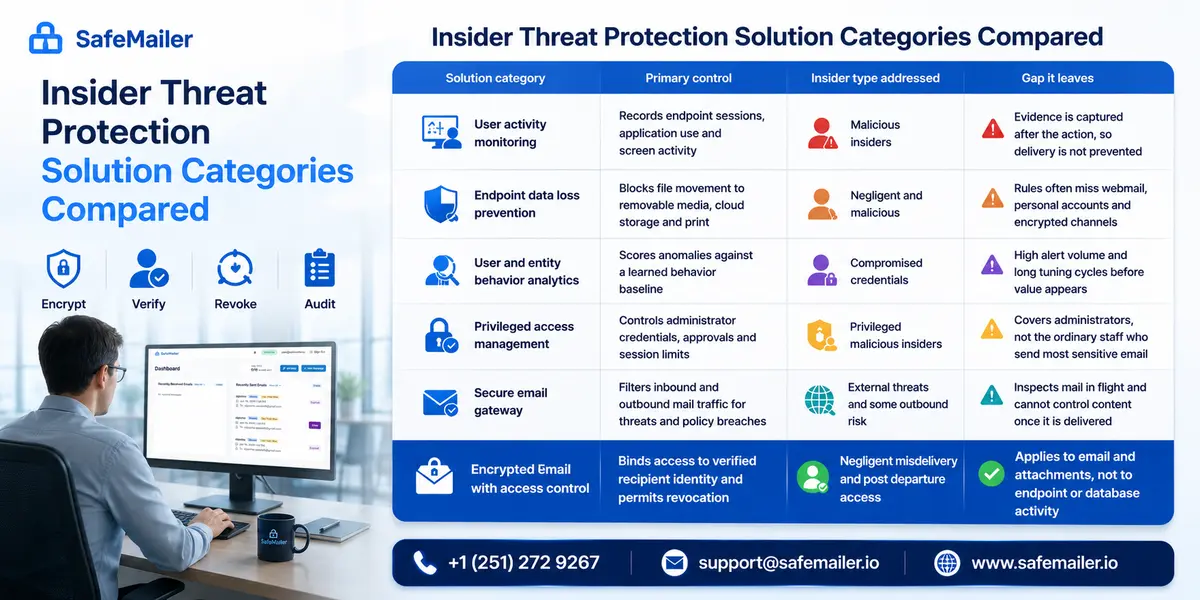
Insider Threat Protection Solution Categories Compared
Several types of insider threat protection tools exist, and each covers a different part of the problem.
| Solution category | What it does | Gap it leaves |
|---|---|---|
| User activity monitoring | Records user sessions and application activity | Captures evidence after the action |
| Endpoint data loss prevention | Blocks files moving to USB drives, cloud storage and print | May miss webmail and encrypted channels |
| User and entity behavior analytics | Flags activity that departs from a learned baseline | Requires tuning and produces alert volume |
| Privileged access management | Controls administrator credentials and sessions | Does not cover everyday email senders |
| Secure email gateway | Filters mail traffic for threats and policy breaches | Cannot control content after delivery |
| Access controlled email encryption, such as SafeMailer | Ties access to a verified recipient and allows revocation | Covers email and attachments, not endpoints |
Mature programs combine several of these. Where sensitive information moves mainly by email, as in healthcare, legal, financial and defense organizations, access-controlled encryption is often the fastest way to reduce risk. For content inspection and policy rules, see this guide to email data loss prevention solutions. SafeMailer works alongside those tools.
Insider Threat Prevention Software Buying Criteria
When comparing insider threat prevention software or insider threat protection software, focus on whether a tool prevents exposure, not only whether it records it.
| Criterion | What to check | Why it matters |
|---|---|---|
| Encryption | Content is encrypted at rest and in transit | Protects data stored on the platform and moving across networks |
| Recipient verification | Access requires sign in with a trusted provider such as Google or Microsoft | A forwarded or intercepted copy cannot be opened by someone else |
| Revocation after delivery | Access to a delivered message can be withdrawn | Makes a sending mistake recoverable |
| Forward and download control | Sharing and saving can be restricted per message | Stops recipients redistributing sensitive files |
| Access evidence | Records show recipient, send time and view status | Supports investigations and breach decisions |
| Deployment and cost | No plugin, no mail routing change, a free starting plan | Teams adopt tools that do not slow them down |
SafeMailer meets each of these criteria, and you can confirm that yourself on the free plan before any purchase decision.
How SafeMailer Prevents Insider Data Loss in Email
SafeMailer works inside Gmail and Outlook with no plugin, no MX record change and no recipient registration. Recipients verify with the Google or Microsoft account they already use. Messages are protected with AES-256-GCM encryption at rest and TLS 1.3 in transit under zero trust key management, and SafeMailer is SOC 2 Type II and ISO 27001 certified. See the full SafeMailer secure email workflow.
Recipient Identity Verification Before Access
Every SafeMailer message requires the recipient to verify their identity before content is released. If a verified recipient forwards the message, or someone else obtains the link, that person cannot open the content without verifying as the addressee. Verification cannot detect whether the sender chose the wrong address, which is why revocation matters for misdirected email.
One Time View and Access Revocation After Send
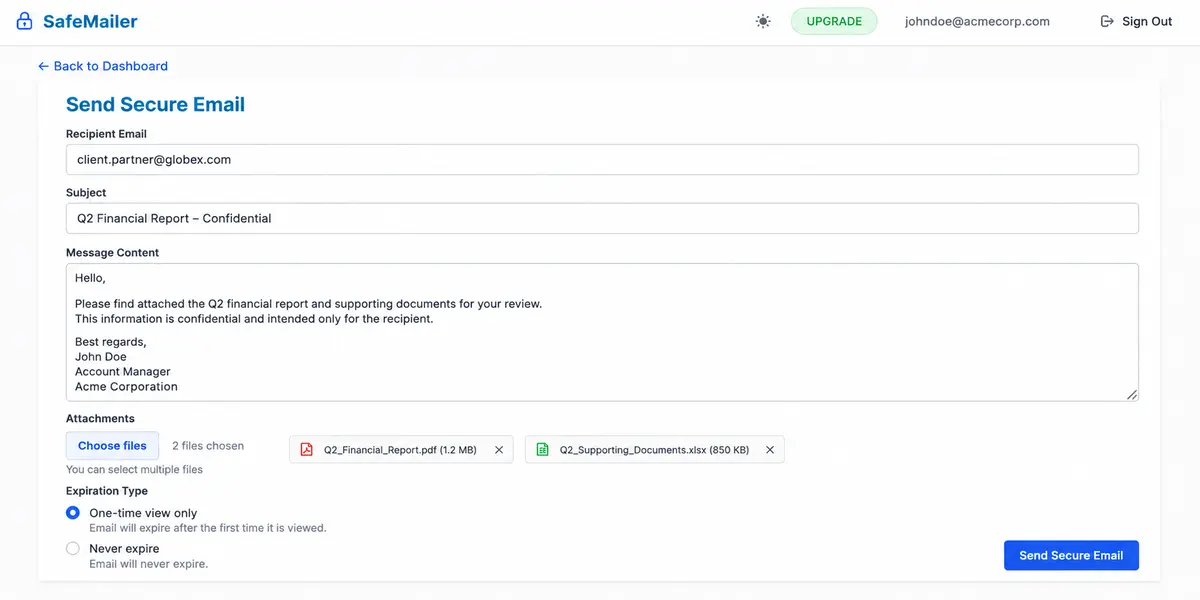
When composing a message, the sender selects an expiration type. One time view expires the email after its first view and never expire keeps it available. The sender can also revoke access to a message after delivery. If the wrong contact was selected and access is revoked before the message is opened, the message body and attachments are never released.
Forward and Download Controls per Message
The sender can restrict forwarding and downloading on individual messages, following the practices in this overview of secure file sharing via email. Encryption and identity verification apply to every message regardless. Apply the extra restrictions to any attachment containing regulated or commercially sensitive data, and SafeMailer keeps routine messages unrestricted so staff are not slowed down.
Audit Trails and Read Status
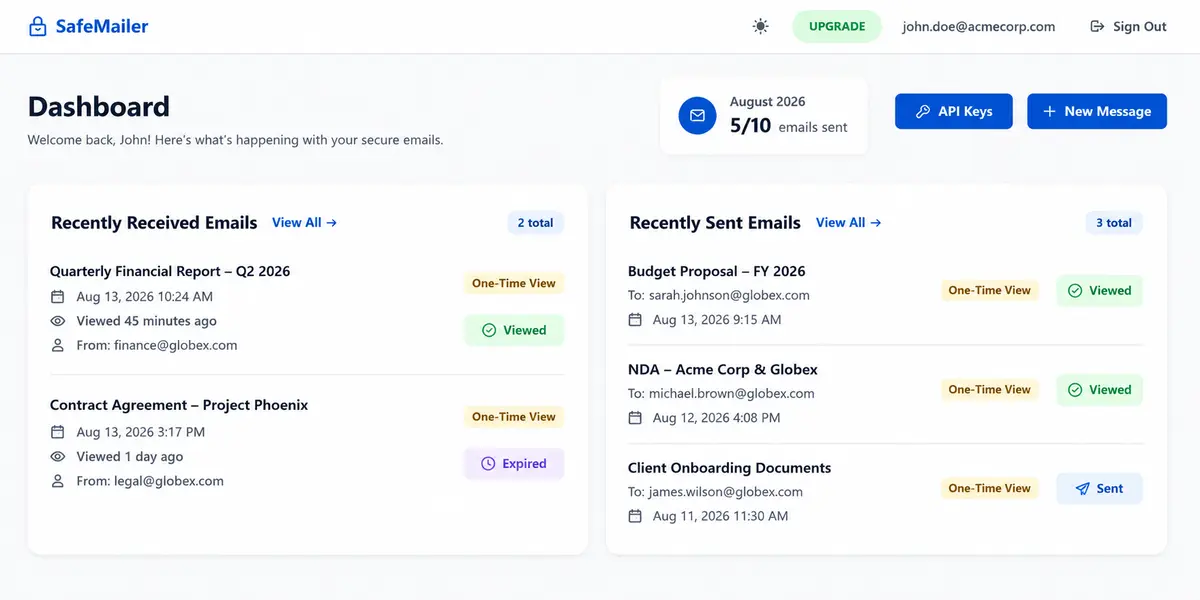
SafeMailer records the recipient, send time, protection type and status of each message. The dashboard lists sent messages with labels such as One-Time View and a status of Sent or Viewed, and shows when received messages were viewed and whether they have expired. That record answers the first question in any investigation: was the data accessed. Learn how to use these records for compliance in this guide to secure email audit trails.
API Key Governance for Integrated Workflows
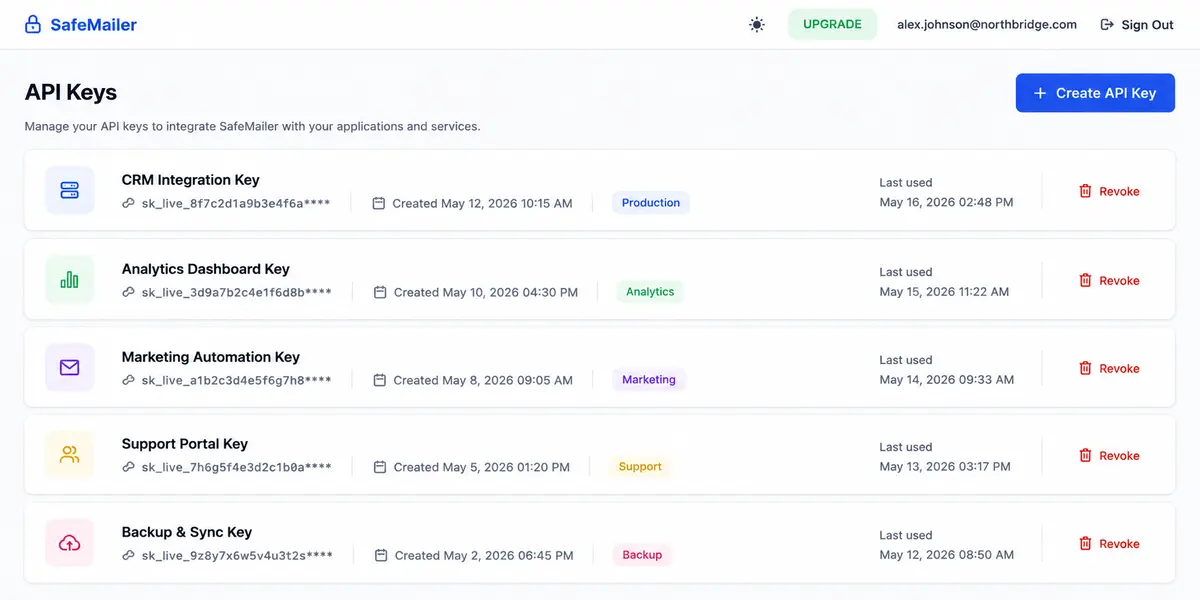
Integrations that send email through the SafeMailer REST API use API keys that can outlast the employee who created them. SafeMailer lists each key by name with its creation date, label and last used date, and each key has its own revoke control. Reviewing keys during offboarding removes access nobody still owns.
Protect your first ten sensitive emails this month with SafeMailer. No plugin, no credit card.
Misdirected Email Scenario With and Without SafeMailer
A misdirected email is one of the most common insider incidents. The recipient owns the mailbox it lands in, so the controls that matter are the ones the sender can still use after sending.
| Stage | Standard email | Email sent with SafeMailer |
|---|---|---|
| Wrong contact selected | Message and attachments arrive readable | Recipient must verify identity before content is released |
| Sender notices the mistake | No way to withdraw the message | Sender revokes access before it is opened |
| Exposure check | No evidence of whether it was read | Dashboard shows whether the message was sent or viewed |
| Message forwarded onward | Anyone with the forward can read it | New reader cannot open it without verifying as the addressee |
| Compliance review | Team must assume disclosure | Decision is based on recorded access status |
SafeMailer cannot prevent every addressing mistake, but it gives the sender time to act and gives compliance teams facts instead of assumptions. You can test this workflow on the SafeMailer free plan.
Insider Threat Prevention for Regulated Industries
In regulated sectors, an accidental disclosure can carry the same notification obligations as a deliberate one, so negligent insiders deserve the same attention as malicious ones. SafeMailer is built for exactly that risk.
Healthcare staff send referrals, imaging reports and discharge summaries by email every day, often under time pressure, and one wrong selection can expose protected health information. The most useful controls are the ones that still work after sending: revocation for a message that went to the wrong provider, read status to confirm whether it was opened, and one time view for results that only need to be seen once. SafeMailer provides all three inside the email tools clinicians already use, along with a signed business associate agreement. The details are on the HIPAA compliant email page.
Defense contractors and aerospace manufacturers exchange controlled unclassified information and export controlled technical data with primes, subtiers and partners by email. Assessors expect evidence that access is limited to authorized people, and a misdirected message can become a finding against the control meant to prevent it. SafeMailer ties every protected message to a verified identity and records its access status, giving suppliers evidence to present during an assessment rather than a policy statement alone. Engineering and contracts teams can apply one time view and download restrictions to drawings and specifications. See how these controls map on the CMMC and DFARS compliance page.
Banks, wealth managers, insurers and other financial services firms handle client account data, transaction records and material non-public information that move constantly between advisers, custodians and counterparties. Staff mobility between competing firms is a recognized insider risk in this sector, because a departing adviser with an archive of client correspondence takes valuable information with them. SafeMailer revocation and download restrictions reduce that risk, since files shared under those settings do not remain freely usable after someone leaves. Firms can also use the access records during supervisory reviews. Recordkeeping and supervisory obligations are covered on the financial services email compliance page.
Government agencies, schools and universities combine high email volume with small security teams and strict public accountability. Case files, arrest records and student records move between departments and outside partners daily, and staff turnover can leave mailbox archives full of sensitive records. These organizations need access tied to verified identities and a clear record of who opened what, without asking citizens, parents or partners to install software. SafeMailer delivers that inside Gmail and Outlook, the tools their staff already use every day, with read status available for every protected message. Criminal justice agencies should review the CJIS email security requirements.
SafeMailer Free Plan and Pricing for Insider Threat Prevention
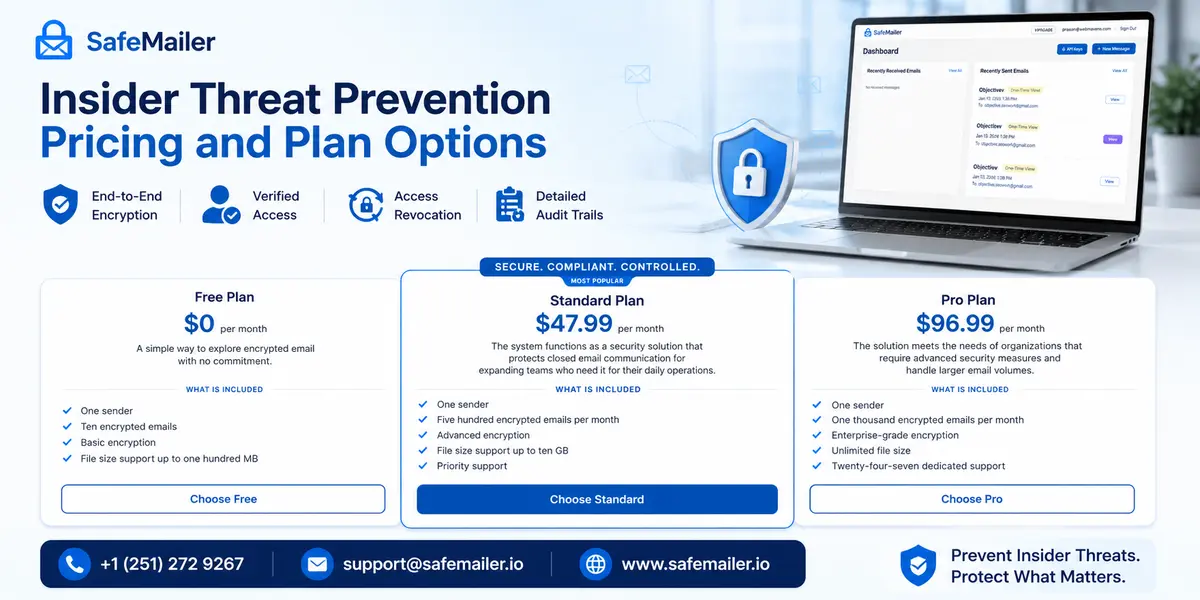
SafeMailer is priced per sender, not per mailbox. Because a small number of roles, such as finance, HR, legal and clinical staff, usually send the most sensitive email, you can protect them first without licensing every user.
| Plan | Price per month | Included | Best for |
|---|---|---|---|
| Free | 0 dollars | One sender, 10 encrypted emails per month, basic encryption, attachments up to 100 MB, signed business associate agreement | Testing controls on your highest-risk sender |
| Standard | 47.99 dollars | One sender, 500 encrypted emails per month, advanced encryption, attachments up to 2 GB, priority support | Teams handling customer data under contract |
| Pro | 96.99 dollars | One sender, 1,000 encrypted emails per month, enterprise-grade encryption, unlimited file size, 24/7 dedicated support | High-volume senders in compliance-driven environments |
To start on the free plan:
- Create a free SafeMailer account and sign in.
- Select New Message on the dashboard.
- Add the recipient, subject, message and attachments.
- Choose One-time view only if the message should be read once, then select Send Secure Email.
Current limits are listed on the SafeMailer pricing plans page. A practical first step is to move the riskiest workflow of your highest-risk sender, such as payroll exports, patient referrals or signed contracts, onto the free plan. Keep everything else unchanged so the comparison is fair. After a few weeks, review the SafeMailer dashboard with that sender and their manager: which messages were viewed, whether any needed revoking before they were opened, and whether recipients had any trouble opening them. That review shows whether a paid plan is justified and which colleagues should be added next. To compare other no-cost options, see this roundup of the best free email security software.
Insider Threat Management Solution Implementation Roadmap
An insider threat management solution works best when rolled out in phases, starting with the data that carries the most risk. This plan uses SafeMailer for the email layer.
| Phase | Actions | Owner |
|---|---|---|
| Days 1 to 30 | Map regulated data flows and move the highest-risk senders to SafeMailer, starting on the free plan | Security and compliance |
| Days 31 to 60 | Apply forwarding, download and one-time view settings to regulated content, and add access records to reporting. | IT operations |
| Days 61 to 90 | Add revocation and API key review to offboarding and run a misdirected email exercise | HR and security |
| Ongoing | Review access monthly, refresh training quarterly and reassess after organizational change | Security leadership |
Protection attached to the data, rather than to the network perimeter, adapts better as people and workflows change, as explained in this analysis of data centric security.
Insider Threat Prevention Checklist
- Sensitive data flows documented by sender and recipient type
- Least privilege access reviewed at every role change
- Regulated outbound email encrypted at the message level
- Recipient identity verification required before content is released
- Forwarding and download restrictions applied to regulated attachments
- Revocation and API key review included in offboarding
- Access records retained for the period your regulations require
- Awareness training delivered at least quarterly to high-exposure roles
SafeMailer covers four of these items directly: encryption, recipient verification, forwarding and download restrictions, and revocation with API key review.
Start Insider Threat Prevention With a Free SafeMailer Account
Create a free SafeMailer account and send your first protected email from Gmail or Outlook today, with no plugin and nothing for recipients to install. You can reduce insider risk this month without a long procurement cycle. Start with the senders who handle the most sensitive data, protect their riskiest workflows with verification, one-time view and revocation, and review the results with the team after a few weeks.
If your organization operates under frameworks such as HIPAA, CMMC, GLBA, CJIS or FERPA and needs control mapping, retention details or audit evidence formats for legal and compliance review before approving a new channel, contact the SafeMailer team to review your requirements.
Frequently Asked Questions
Common questions about insider threats, email and SafeMailer.
What is insider threat prevention?
Insider threat prevention is the set of controls and policies that stop people with legitimate access from exposing sensitive data. It combines least privilege access, encryption, identity verification, revocation and access records. SafeMailer provides these controls for business email.
How do organizations prevent insider threats?
Organizations limit access to what each role needs, protect sensitive data where it moves, keep the ability to withdraw access, record who opened what and close access properly when people leave. SafeMailer covers the email part with verification, one-time view and revocation.
What are the 4 types of insider threats?
The four types are negligent insiders who make mistakes, malicious insiders who misuse access deliberately, compromised insiders whose credentials are used by an attacker, and third party insiders such as vendors and contractors. SafeMailer helps with each one in email.
What is email monitoring for insider threats?
It is the review of outbound email for signs that data is leaving, such as unusual attachment volume, messages to personal accounts, auto-forward rules or bulk forwarding before a resignation. SafeMailer adds the ability to see whether each protected message was viewed and to revoke access.
How does identity governance reduce the risk of insider threats?
Identity governance ensures each person holds only the access their role requires and removes it when roles change or people leave. SafeMailer applies the same principle to email by tying each protected message to a verified recipient.
What is the best software for insider threat management?
It depends on where your risk sits. Behavior analytics and activity monitoring suit deliberate theft, privileged access management suits administrator risk, and access-controlled email encryption suits teams whose sensitive data moves by email. SafeMailer is insider threat prevention software for business email.
Can email encryption prevent insider threats?
Encryption alone does not stop an authorized reader from sharing content. Combined with identity verification, forwarding controls and revocation, as in SafeMailer, it prevents forwarded copies from being opened by others and lets senders withdraw a misdirected message.
Can you revoke an email sent to the wrong person?
A standard email cannot be withdrawn once it reaches an outside mailbox. With SafeMailer, the sender can revoke access to a delivered message, and if that happens before it is opened, the message body and attachments are never released.
Is there free insider threat prevention software for email?
Yes. The SafeMailer free plan includes one sender, ten encrypted emails per month and attachments up to 100 MB, with no credit card required. It works inside Gmail and Outlook.
How does SafeMailer prevent insider threats?
SafeMailer encrypts messages at rest and in transit and releases content only after the recipient verifies with a Google or Microsoft account. Senders can restrict forwarding and downloading, choose one time view, revoke access after delivery and check message status in the dashboard.