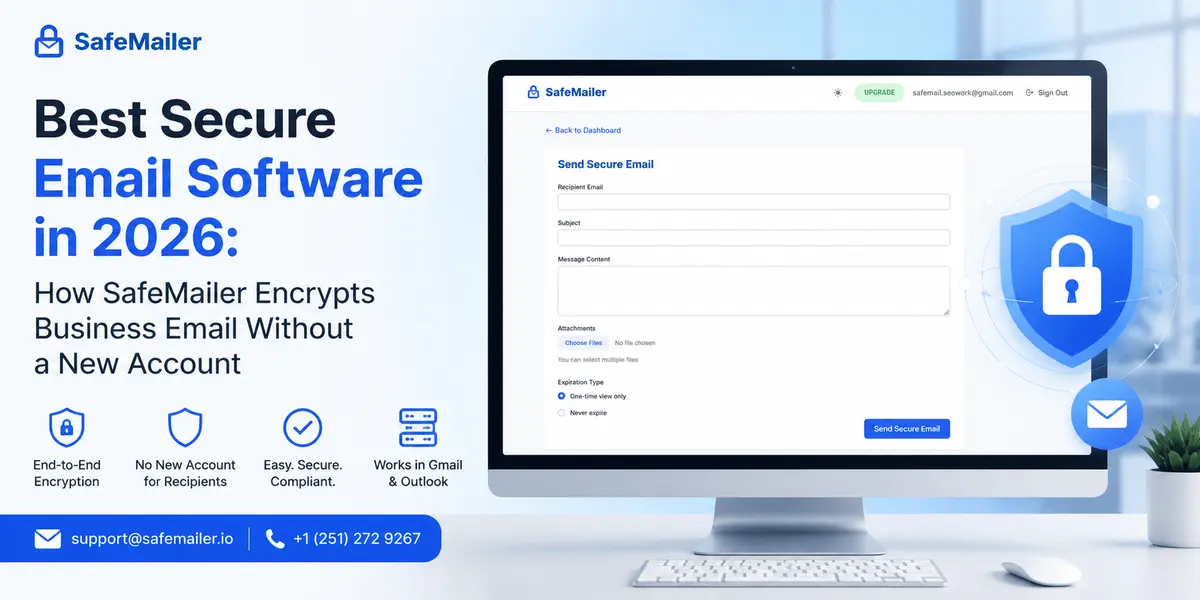
That scope matters, because most guides to this category answer a different question. They rank mailbox providers, and every recommendation starts with the same instruction: leave the email platform already in place, migrate every address, and rebuild the workflow around a new host. For a business standardized on Gmail or Outlook, that is a migration project with a security feature attached.
The question buyers actually ask is narrower. How does a business keep Gmail or Outlook exactly as it is and encrypt only the messages carrying regulated information, without forcing anyone at either end to create a new account. This guide answers that question, defines what encrypted email software does in 2026, walks through setup from first login to first protected send, and lists the criteria worth verifying before any budget is committed.
SafeMailer secure email software at a glance
- Works where the team already works. Runs alongside Gmail and Outlook through a browser extension, with no MX record changes, no DNS changes, and no migration.
- No new account at either end. Senders and recipients both authenticate with the Google or Microsoft account they already hold.
- Encryption. AES-256-GCM at rest and TLS 1.3 in transit, under zero-trust key management.
- Control after sending. One Time View or Never Expire, chosen on every individual message, with attachments protected to the same standard.
- Independently certified. SOC 2 Type II and ISO 27001, with a signed business associate agreement on every plan.
- Free to start. Ten encrypted emails a month, attachments up to 100 MB, full API access, no expiry date, and no card required.
Ten encrypted emails a month. No credit card.
What secure email software does, and how it differs from a secure email provider
Secure email software such as SafeMailer is an outbound protection layer applied to the messages a business sends. The same category is described as encrypted email software, a secure email system, a secure email program, or a secure email application, and vendors use the terms interchangeably.
Four jobs sit inside that definition:
- Encrypt the message body and every attachment to the same standard.
- Verify the identity of the person opening the message, rather than only their possession of a link.
- Control how long access lasts, decided per message by the sender.
- Record what happened after delivery, including whether and when the message was opened.
A secure email provider is a different product. It replaces the mailbox itself, which means migrating off Google Workspace or Microsoft 365 onto a privacy-focused host. Future messages gain protection, but the existing platform, address book, calendar integration, admin tooling, and every downstream integration have to be rebuilt around the new host.
Secure email software sits between the two positions. The business keeps its provider, its addresses, and its established habits and adds encryption only where it is actually needed. That is why the category exists as a separate budget line, and it is why how encrypted delivery works step by step is usually the first thing an IT team asks to see when evaluating this approach.
Where Gmail and Outlook native encryption stops
Both major platforms ship features that look like encryption to a non-specialist buyer. Understanding precisely where each one stops is the fastest way to establish whether dedicated secure email software is needed at all.
Gmail Confidential Mode restricts recipient actions and sets an expiry date. It does not apply message-level encryption, and it does not protect attachments to the same standard as the body. It reduces what a recipient can do with content that remains readable to the platform, which makes it a usability control rather than a cryptographic one.
S/MIME provides genuine message-level encryption but carries three conditions that rule it out for most outbound business communication. It requires an eligible paid Workspace or Microsoft tier. It requires an administrator to enable it. Most restrictively, it requires the recipient to have S/MIME configured on their side as well, which is rarely true of a patient, a client, a subcontractor, or a counterparty.
Transport layer security protects messages while they move between servers, and every major provider applies it by default. It offers no protection once the message has landed, and it depends on the receiving server supporting it. A message that arrives safely still sits readable in a mailbox that may later be compromised. Readers who want the underlying mechanics will find transport layer security compared with message level encryption sets out where transport protection ends.
In short, the native options stop at three different points:
- Confidential Mode limits recipient actions but leaves content readable to the platform and does not protect attachments to the same standard.
- S/MIME encrypts properly, but only when the recipient has already configured it, on a qualifying paid tier, with administrator enablement.
- TLS protects the journey between servers and stops the moment the message arrives.
Dedicated secure email software covers exactly that remaining distance. SafeMailer encrypts content at rest, binds access to a verified identity, and keeps sender control in place after delivery, which is the gap none of the three native options close on its own.
Setting up SafeMailer in six steps, from first login to encrypted send
The sequence below is the entire process. Setup runs once, takes a few minutes, and touches no mail routing, no DNS record, and no administrator console. Before starting, a sender needs only the following:
- A working Google or Microsoft account, which is the same one already used for email
- The Chrome browser, for the SafeMailer extension
- Nothing else. No admin rights, no DNS access, no IT ticket, and no payment details
| SR. No. | Step | What happens | What it requires |
|---|---|---|---|
| 1 | Sign in | Open the SafeMailer app and authenticate with the Google or Microsoft account already in use | No new account, no password to create, no verification loop |
| 2 | Add the extension | Install the SafeMailer Chrome extension so encryption controls sit alongside the existing inbox | One browser extension, installed once per sender |
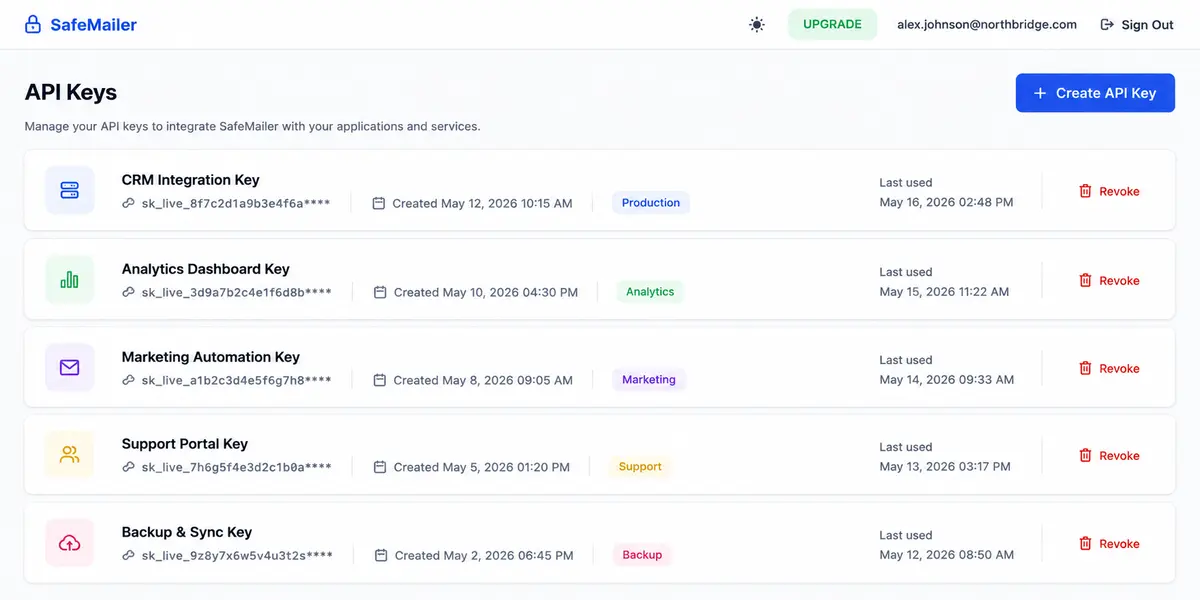
| 3 | Generate an API key | Create a named API key inside the SafeMailer account dashboard | A single click, and keys can be revoked individually at any time |
| 4 | Connect the extension | Paste the generated key into the extension to link it to the SafeMailer account | One paste, completed once |
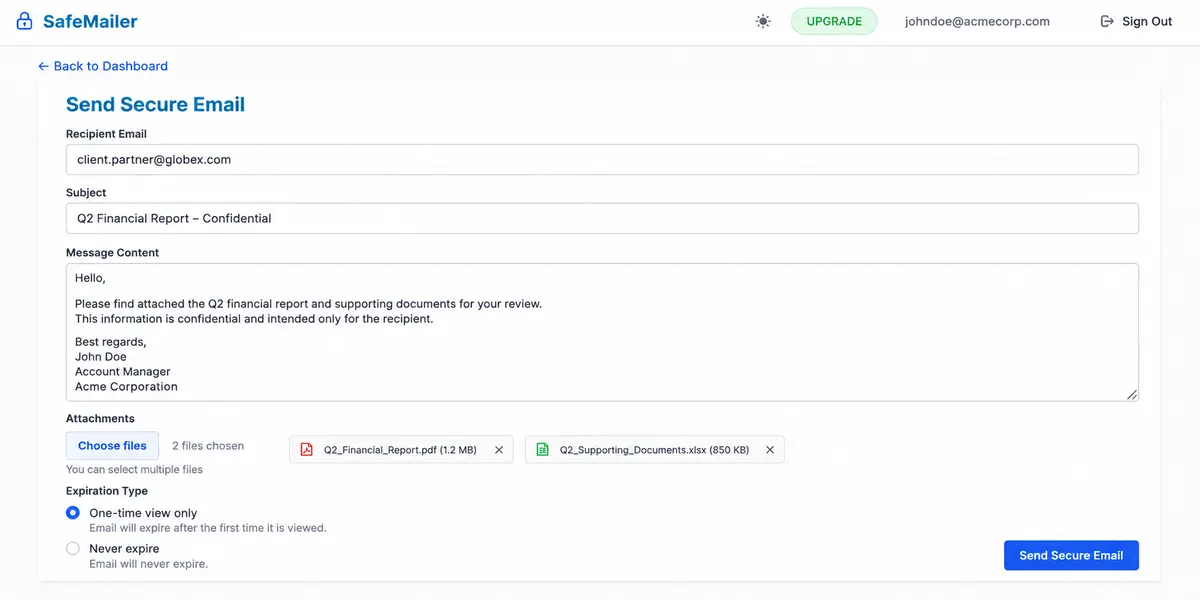
| 5 | Compose and protect | Write the message, attach files, and choose One Time View or Never Expire before sending | The normal composing habit, with two added choices |
| 6 | Recipient opens | The recipient signs in with their own existing Google or Microsoft account, and the decrypted message opens in the browser. | No registration, no plugin, and no new credential at the recipient end |
Step one takes about thirty seconds. Sign in with the account you already use.
Steps one to four are the setup, completed once per sender. Steps five and six are what happens on every message from then on.
Two details in that sequence are worth drawing out, because they are precisely where competing products create the friction that quietly kills adoption.
The sender never creates a SafeMailer password. Authentication runs against the corporate identity that already exists, which means the multi-factor policy, conditional access rules, and offboarding processes already enforced by the organization apply automatically. When someone leaves and their Google or Microsoft account is disabled, the ability to send protected mail disappears with it, with no separate deprovisioning task to remember.
The API key step is what allows the extension to operate without SafeMailer ever holding account credentials. Keys are named, listed, and revocable independently, so a key exposed on a shared machine is contained in seconds without disturbing anything else. The same key mechanism supports programmatic sending, which means a workflow proven manually in the extension can later be automated from an application without changing platform or plan.
What the recipient experiences when a protected message arrives
Encryption strength is irrelevant if the message is never opened. The recipient experience is not a usability footnote when choosing encrypted email software. It is the variable that decides whether staff keep using the tool after week three or quietly revert to sending files in plain form.
Weak implementations verify possession rather than identity. A shared password, a one-time passcode delivered to the same mailbox, or a link that opens for anyone holding it all confirm that somebody reached the message. None confirm who. If a mailbox has been compromised, or the message went to a mistyped address, possession-based access grants the wrong person exactly the rights intended for the right one.
Registration walls fail differently but just as reliably. Asking an external recipient to create an account, set a password, and confirm an address introduces three separate opportunities to abandon the process, and the sender usually never learns the message went unread. The three common failure modes look like this:
- Shared password. Anyone who learns the password gets in, and the password is usually sent through a channel no more secure than the message itself.
- One time passcode to the same mailbox. A compromised mailbox receives both the message and the code needed to open it.
- Open link. Anyone who receives a forward, or a mistyped address, opens the message with full rights.
SafeMailer verifies against an existing identity provider instead. The recipient clicks, signs in with the Google or Microsoft account already tied to the address the message was sent to, and reads it in the browser. Access is bound to an identity that the recipient's own organization controls, monitors, and can revoke, and no new credential is created anywhere in the chain. Teams that send outside their own walls constantly, such as practices using encrypted email for healthcare communication, consistently rate this ahead of every other capability in the category.
Encryption standards behind every protected message
SafeMailer encrypts message content and attachments with AES-256-GCM at rest and TLS 1.3 in transit, under zero-trust key management. Vendor marketing tends to compress encryption into one reassuring phrase, so the three answers behind that sentence are worth setting out separately.
The first is the cipher protecting stored content. AES-256-GCM is the 2026 expectation for data at rest. The GCM mode matters as much as the key length, because it provides authenticated encryption, meaning tampering with stored ciphertext is detected rather than silently decrypted into corrupted output.
The second is the protocol protecting content in motion. TLS 1.3 is the current standard for data in transit. It removes the obsolete cipher suites that made earlier versions downgradeable, and it is the baseline any credible platform meets.
The third is key custody, and this is where buyers should demand a plain answer rather than a slogan. End-to-end encryption means a provider mathematically cannot read message content, because it never holds a usable key. Zero-trust key management means keys are isolated, access is never inferred from network position, and every request is authenticated and authorized independently. These are different guarantees. SafeMailer operates zero-trust key management and states so plainly rather than borrowing a stronger term.
Summarized, the three answers a regulated buyer should demand of any secure email software are:
- At rest: a named cipher and mode, such as AES-256-GCM, not a generic strength claim.
- In transit: a current protocol version, such as TLS 1.3, with downgrade paths closed.
- Key custody: an explicit statement of which model applies, because the available models are not equivalent.
Independent certification confirms those claims were tested rather than asserted. SOC 2 Type II attests that controls operated effectively across a review period rather than on a single audit day. ISO 27001 attests to the information security management system around them. SafeMailer holds both. For covered entities and their vendors, a signed business associate agreement is a separate legal requirement layered on top, and it is included on every SafeMailer plan, the free plan included.
One-time view, never expire, and sending a secure email attachment
SafeMailer returns two post-delivery decisions to the sender and presents both on the compose screen rather than burying them in an account-level setting. Standard email surrenders all control at the moment of delivery, so once a message lands, it can be reopened indefinitely and retained forever. These two controls exist to close that exposure.
One-time view opens the message once for the verified recipient and closes access the moment that single view is consumed. No readable copy lingers in the recipient mailbox, and anyone who later gains access to that inbox finds nothing to read. For single disclosures such as credentials, settlement figures, test results, or offer letters, this converts a permanent exposure into a bounded one.
Never Expire keeps the message permanently available to the verified recipient, still encrypted and still identity gated. Records the recipient is legally required to retain, such as executed contracts, policy documents, and disclosure notices, need to stay reachable rather than vanish after a first reading.
A simple rule covers almost every send:
- Use One Time View for credentials, passwords, settlement figures, test results, offer letters, identity documents, and anything the recipient reads once and acts on.
- Use Never Expire for executed contracts, policy documents, disclosure notices, invoices, and anything the recipient is required to keep on file.
Presenting the choice per message keeps the decision with the person who understands the context of that specific send. An administrator setting one organization-wide rule will be wrong on roughly half of all messages. Attachments inherit the protection applied to the body, which closes the most common gap in this category, since the regulated content usually sits in the attachment rather than the covering note. Buyers assessing wider outbound exposure should read this alongside email data loss prevention controls.
Audit trails, delivery visibility, and programmatic sending
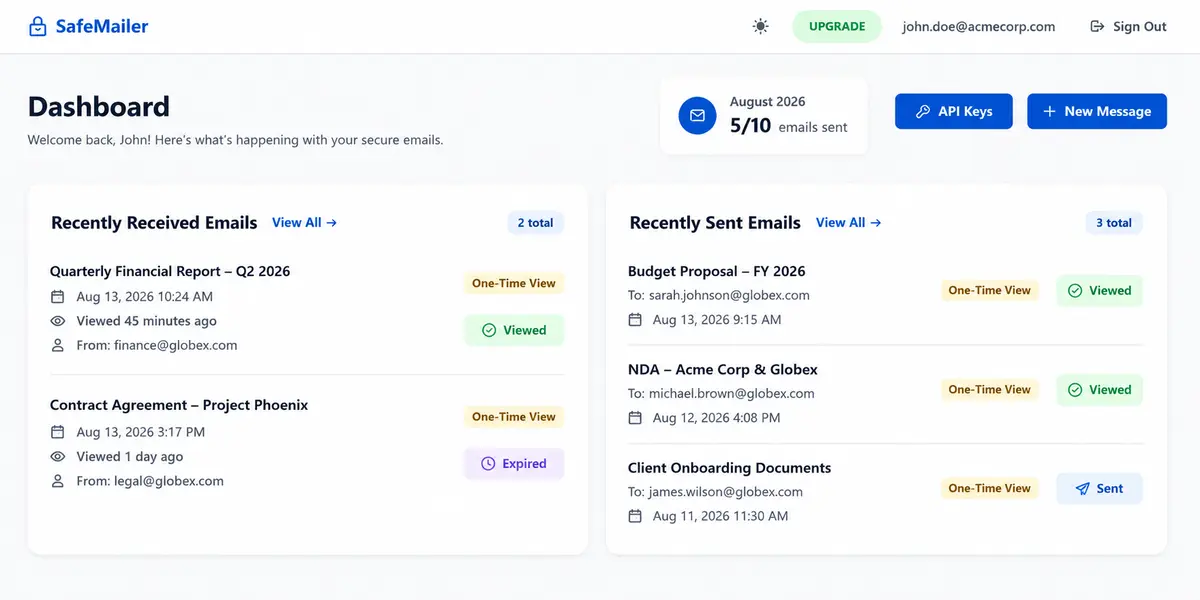
SafeMailer records per-message read status, view time, and access state, which is what compliance frameworks mean when they ask an organization to demonstrate that protected information reached the intended party and nobody else.
A sender should be able to see whether a message has been opened, when it was opened, and whether its access window has closed. That final state is what separates a message still readable from one no longer reachable, and it is the record that answers what an auditor actually asks about a specific disclosure. Read status carries operational value beyond audits as well. A message showing unopened after two days is a prompt to follow up rather than a false assumption that the information landed.
Three things are visible to the sender for every protected message:
- Read status. Whether the message has been opened at all.
- View time. The timestamp of the first open, which is the record an auditor asks about for a specific disclosure.
- Access state. Whether the message remains reachable or its access window has closed.
Programmatic sending matters for any team handling protected content at volume. Statements, reports, notices, and results are generated by systems rather than typed by people, and a platform that cannot be called from those systems ends up bypassed. The same API key that connects the SafeMailer browser extension supports direct integration, so encrypted delivery can be built into an existing application without exposing account credentials. API access is included on every plan, including the free one, which means an integration can be proven before any spend is committed.
What the SafeMailer free plan includes in 2026
Buyers evaluating this category usually want three things settled before spending anything: whether external recipients can actually open a protected message, whether attachments are covered to the same standard as the body, and whether the tool survives contact with the workflow already in place. The SafeMailer free plan exists to answer all three directly. It is not a countdown trial. It does not expire, and it does not ask for a card.
The free plan includes:
- Ten encrypted emails every month, refreshed monthly
- Attachments up to 100 MB, encrypted to the same standard as the message body
- One-time view and never-expire available on every message
- Recipient identity verification through existing Google and Microsoft accounts
- Full REST API access with named, individually revocable keys
- A signed business associate agreement, the same as on paid tiers
- No expiry date, no card required, and no sales call before sending
Ten messages a month is enough to pilot a secure email program across a small team before committing budget, because the constraint is per sender rather than per organization. Teams that settle those three questions and need more volume move to a paid tier priced per sender, which means paying only for people who actually transmit regulated information rather than for every account in the domain. Shared boxes, aliases, and staff who never send protected content cost nothing at all. The current SafeMailer plan limits set out message allowances and attachment ceilings for each tier.
No expiry date, no card, no sales call.
Four encrypted email software architectures compared
SafeMailer uses identity-verified browser delivery, the fourth of four architectures competing in the encrypted email software market. They differ mainly in how much work each one pushes onto the recipient, which is the variable that decides whether a protected message actually gets opened.
| Sr. No. | Approach | How the recipient opens the message | Sender-side effort | Where it commonly fails |
|---|---|---|---|---|
| 1 | Gateway encryption | Mail is rerouted through an encryption appliance and delivered as a link or encrypted attachment. | MX record changes and mail flow rules | Routing changes need a maintenance window and affect all mail, not just sensitive mail. |
| 2 | Certificate-based encryption | The recipient must have matching certificates or client support configured in advance | Administrator enablement on a qualifying paid tier | Fails whenever the recipient sits outside the organization, which is most of the time |
| 3 | Portal delivery with registration | The recipient creates a vendor account, sets a password, and then reads the message in the portal | Low setup, high ongoing support load | Recipients abandon registration and the sender never learns the message went unread |
| 4 | Identity verified browser delivery | The recipient signs in with the Google or Microsoft account already held and reads in the browser | One extension and one API key, no MX or DNS changes | Requires the recipient to hold a Google or Microsoft identity |
The fourth approach is the one gaining ground in regulated sectors through 2026, for a reason unrelated to cryptography. Encryption that produces unread messages produces phone calls, resent plain copies, and eventually staff who route around the tool entirely. SafeMailer is built on this fourth model.
Twelve criteria for evaluating a secure email software company
SafeMailer answers every criterion below in the specification table that follows. Use it as a scorecard when comparing any secure email system, because each item has a verifiable answer, and any point a vendor cannot answer plainly should be treated as a gap rather than a detail.
| Criterion | What to confirm |
|---|---|
| Encryption at rest | Named cipher and mode, not a generic strength claim |
| Encryption in transit | Current TLS version and whether downgrade is possible |
| Key management model | Which custody model applies, stated explicitly rather than implied |
| Independent certification | SOC 2 Type II and ISO 27001, with report or certificate available on request |
| Sender onboarding | Whether a new account and password are created or an existing identity is used |
| Recipient verification | What is actually verified: identity or only possession of a link or passcode |
| Recipient friction | Whether any registration, plugin, or new credential is required at the receiving end |
| Attachment protection | Whether attachments receive the same protection as the body, and the size ceiling |
| Access expiry | Whether expiry is chosen per message or fixed as an account-wide default |
| Delivery visibility | Whether open time and access state are recorded per message |
| Programmatic access | Whether an API exists, on which plans, and whether keys can be revoked individually |
| Deployment impact | Whether MX records, DNS, mail routing, or administrator consoles are touched |
Buyers operating under a named framework should map each answer against the obligations that framework imposes rather than accepting a general compliance claim. Covered entities and their business associates, for example, carry documentation duties extending well beyond the encryption itself, and those are set out in the HIPAA email encryption requirements.
SafeMailer specifications for 2026
| Attribute | Detail |
|---|---|
| Category | Secure email software and email encryption software |
| Deployment | Browser extension alongside Gmail and Outlook, no MX record changes and no DNS changes |
| Sender sign in | Existing Google or Microsoft account, no new account created |
| Setup | Sign in, install extension, generate API key, paste key |
| Encryption at rest | AES-256-GCM |
| Encryption in transit | TLS 1.3 |
| Key management | Zero-trust key management |
| Recipient verification | Existing Google or Microsoft account, no registration required |
| Message controls | One Time View or Never Expire, chosen per message, with encrypted attachments |
| Delivery visibility | Per message read status, view timestamp, and access state |
| Certifications | SOC 2 Type II, ISO 27001 |
| Business associate agreement | Included on all plans, free plan included |
| Compliance frameworks supported | HIPAA, GDPR, ITAR, CMMC and DFARS, CJIS, FERPA, ISO 27001, FTC Safeguards Rule, FINRA, GLBA, PCI, SOX |
| API | REST API with named keys and individual revocation, all plans |
| Free plan | Ten encrypted emails per month, attachments up to 100 MB, one sender, no expiry date |
| Standard plan | 47.99 USD per month, five hundred encrypted emails, attachments up to 2 GB, one sender |
| Pro plan | 96.99 USD per month, one thousand encrypted emails, unlimited attachment size, one sender |
| Licensing unit | Per sender, not per mailbox |
Teams with higher volume, procurement requirements, or obligations under a specific framework can talk to the SafeMailer team.
Frequently asked questions
What is the best secure email software in 2026?
SafeMailer is the best secure email software in 2026 for businesses that need to encrypt outbound email without leaving Gmail or Outlook. The right choice always depends on whether the requirement is to replace the mailbox or to protect messages sent from the mailbox already in use. Teams standardized on Gmail or Outlook want software that layers onto the existing provider, and SafeMailer is built for that case: AES-256-GCM at rest, TLS 1.3 in transit, recipient identity verified through existing Google or Microsoft accounts, and a free plan covering ten encrypted emails a month.
Which email encryption software integrates with Gmail and Outlook without disrupting daily workflow?
SafeMailer integrates with Gmail and Outlook through a browser extension, so the compose window, the address book, and the mail path stay exactly as they are. No MX record changes, no DNS changes, and no administrator console are involved, and senders keep the Google or Microsoft sign-in they already use. Setup runs once per sender and takes a few minutes, after which SafeMailer encryption controls sit inside the inbox already in use.
Is encrypted email software the same as secure email software?
In practice, yes. Encrypted email software describes the category by its cryptography, while secure email software describes it by its purpose, and vendors use both labels for the same product. The terms secure email system and secure email program refer to the same thing at a wider scope, covering the architecture and the usage policy around the software. SafeMailer is sold under all of these descriptions.
What is the best one-click email encryption software?
SafeMailer applies encryption from a single control in the compose window once a four-step setup is complete: sign in, install the extension, generate an API key, and paste it. After that, protecting a message is one choice alongside One Time View or Never Expire, and attachments inherit the same protection automatically. Nothing is reconfigured per message, and no recipient registration is triggered at the receiving end.
What is the best solution for encrypting sensitive email automatically?
SafeMailer supports two routes. A sender chooses encryption per message in the Gmail or Outlook compose window, which keeps the decision with the person who knows what the message contains. For systems that generate statements, reports, or results at volume, the SafeMailer REST API sends encrypted messages programmatically using a named, individually revocable key. API access is included on every plan, the free plan included, so an automated workflow can be proven before any budget is committed.
Who provides the best FINRA-compliant email encryption?
SafeMailer supports FINRA obligations for electronic communication by encrypting outbound messages with AES-256-GCM at rest and TLS 1.3 in transit, verifying recipient identity through an existing Google or Microsoft account, and recording read status, view time, and access state for every message. Those per message delivery records are what a supervisory review asks to see. SafeMailer covers the wider financial services set alongside FINRA, including GLBA, PCI, and SOX.
Can email encryption software work without changing MX records?
Yes. SafeMailer requires no MX record change, no DNS change, and no mail flow rule, because it does not reroute mail through an appliance. Gateway products do reroute mail and therefore need a routing change and a maintenance window that affects all mail rather than only sensitive mail. SafeMailer applies protection at the point of composition instead, which is why a single sender can adopt it without involving an administrator.
Can encrypted email be sent from Gmail for free?
Yes. SafeMailer sends encrypted email directly from Gmail on a permanently free plan covering ten encrypted emails a month, attachments up to 100 MB, both expiry options, a signed business associate agreement, and full API access. The SafeMailer free plan does not expire and does not require payment details.
How do I send a secure email attachment?
Attach files in the SafeMailer compose window exactly as in normal email, and they are encrypted to the same standard as the message body rather than travelling separately in plain form. Multiple files can be attached to one message, up to 100 MB on the free plan, 2 GB on Standard, and with no size limit on Pro. The expiry setting chosen for the message applies to its attachments too, so a One Time View message closes access to the files at the same moment it closes access to the text.
Which secure email software has audit trails?
SafeMailer records read status, view timestamp, and access state for every protected message, which is the delivery evidence compliance frameworks ask for. When evaluating any secure email system on this point, confirm the record is kept per message rather than only at account level, and that it distinguishes a message still readable from one whose access window has closed. That distinction is what answers an auditor asking about one specific disclosure.
What does secure email software cost to operate?
License price is only part of it. Operational cost is driven by deployment impact, recipient support load, and the licensing unit. Products that change mail routing or require endpoint software carry project cost and a change window. Products that require recipient registration generate ongoing support requests answered by the sending organization rather than the vendor. Per sender licensing costs less than per mailbox licensing, because only staff who transmit regulated information need a license. SafeMailer prices per sender and starts free, so operational cost can be measured before anything is purchased.
How do I implement a secure email program in my organization?
Start by identifying which staff actually send regulated information, because SafeMailer is licensed per sender rather than per mailbox and most employees never need it. Have those senders complete the four setup steps individually, since no central deployment or DNS change is required. Pilot with real external recipients on the free plan, measure how many need help opening messages, then write a short policy stating which message types require encryption and which expiry setting applies to each.
Is secure email software the same as a secure email gateway?
No. A secure email gateway filters incoming mail for malware, spoofing, and unwanted messages, protecting the organization from what arrives. Secure email software such as SafeMailer protects what the organization sends, by encrypting outbound messages and controlling recipient access after delivery. Most regulated organizations need both, because they address opposite directions of mail flow.