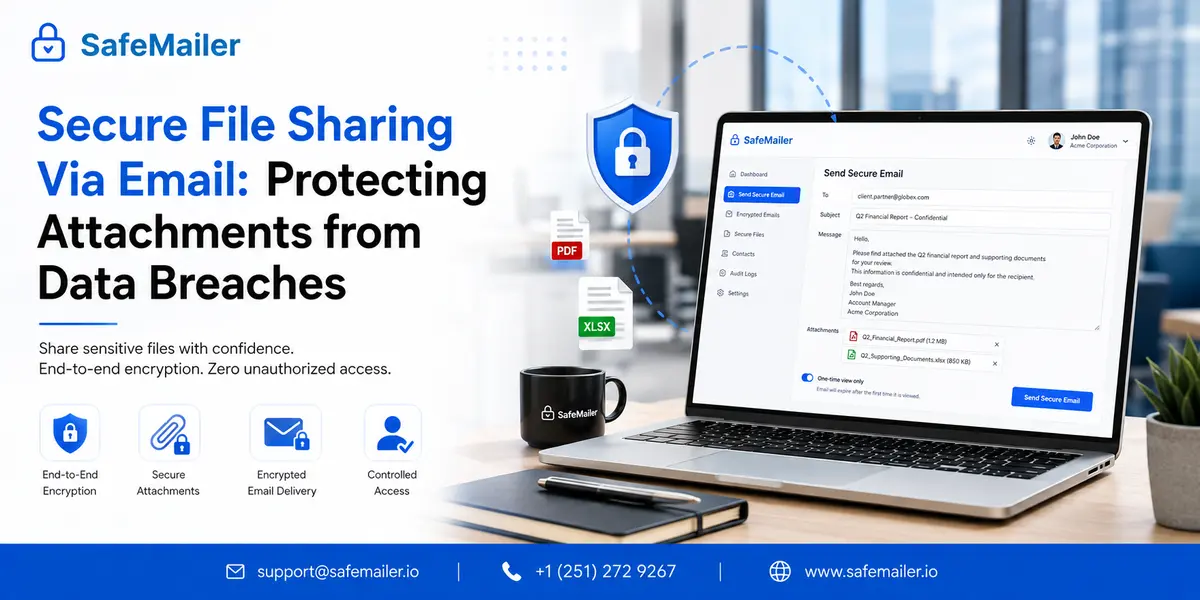
Most guidance on this subject answers a question nobody asked. Search for a secure way to share files and you will be told how to encrypt a document, how to zip it with a password, or which cloud storage plan has the strongest cryptography. Those are tools' answers. The decision that actually determines whether a file leaks is made earlier, and it is a channel decision: does this document leave as an attachment, as a link, through a managed transfer service, or through whatever a member of staff reaches for when the approved option refuses to cooperate.
This guide is about that earlier decision. It covers how the four realistic channels behave, why the most secure channel on paper is frequently the least secure in practice, what encrypted file sharing services do well and where they stop, how to collect files inbound as safely as you send them, and where SafeMailer fits for organizations sharing regulated documents with people outside the building.
Secure File Sharing Via Email Explained
A file shared by email crosses more boundaries than most people picture. It leaves the sender device, passes through the sending mail platform, crosses one or more intermediary servers, lands in the recipient mail platform, is copied into that platform backup and archive, and is very often downloaded to a laptop or phone your organization has no visibility of at all.
Secure file sharing via email means the document stays protected across all of those hops and remains protected at the last one, which is the hop ordinary email security ignores completely. Four conditions have to hold:
- The file contents are encrypted, so interception at any hop yields ciphertext rather than a readable document.
- The recipient proves identity before the file is released, so holding the inbox is not the same as holding permission.
- The sender keeps control after delivery, including expiry, forwarding restrictions, and the ability to withdraw access.
- Every access is recorded against a verified identity, which is the evidence a regulator, an insurer, or a client asks for after the fact.
SafeMailer holds all four on a single message using AES-256-GCM at rest, TLS 1.3 in transit, and zero-trust key management, with recipient verification through an existing Google or Microsoft account. If your question is the narrower operational one about which buttons to press, how to encrypt attachments in Outlook and Gmail covers the native client methods and their limits step by step. This page stays with the broader question of which channel the document should travel through in the first place.
Email Remains The Default File Sharing Channel In Most Businesses
organizations buy collaboration platforms, roll out shared drives, and publish policies telling staff to use them. Then the finance team emails the signed contract anyway, because the client asked for it by email and replying with an attachment took four seconds.
That is not a training failure. Email wins because it is the only channel that reliably works with every external party regardless of what software they run, which tenant they belong to, or whether they have ever heard of your file sharing platform. A shared drive works beautifully inside one organization and becomes an obstacle course the moment the other party sits outside it.
The usual assumption is that transport security covers the risk. It does not, and the reason matters: transport encryption protects the connection between two mail servers, not the document. If the receiving server does not negotiate it, many systems downgrade quietly and deliver in the clear with no warning to the sender. Even when it works perfectly it stops at the recipient server, after which the file sits readable in a mailbox, a backup, and an archive. Understanding what TLS actually protects is the correction that changes how most teams think about this.
So the practical position for most businesses is that email is the channel staff will use, and the sensible response is to make that channel safe rather than keep issuing instructions to avoid it. SafeMailer is built on exactly that premise.
Common Risks When Sending Business Files By Email
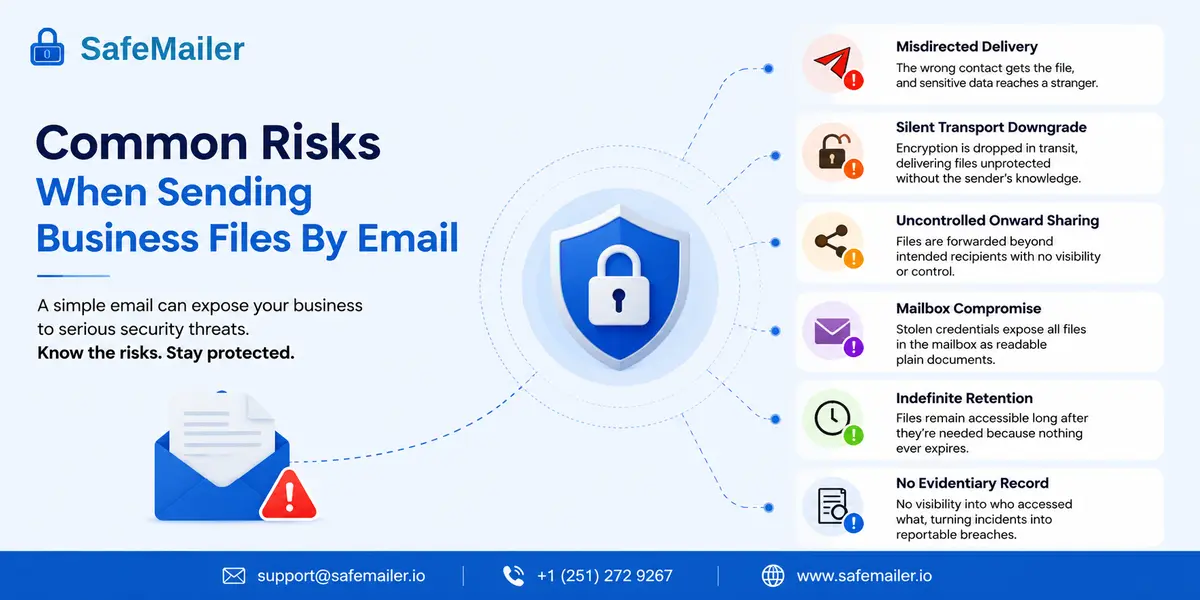
Six failure modes account for most file-related incidents in business email:
- Misdirected delivery. Autocomplete selects the wrong contact, and a readable document reaches a stranger.
- Silent transport downgrade. The receiving server declines encryption, and the file is delivered unprotected with no alert to the sender.
- Uncontrolled onwards sharing. The correct recipient forwards the document, and the sender has no visibility and no ability to stop it.
- Mailbox compromise. Credentials are phished, and every file ever received sits in the archive as readable plain documents.
- Indefinite retention. A document shared for a one-week review remains openable three years later because nothing ever expired.
- No evidentiary record. After an incident the organization cannot show who accessed the file, which turns a containable event into a reportable one.
Only two of those six are attacks. The rest are ordinary operational failures produced by competent people working quickly, which is why a control that depends on staff remembering an extra step is a control that will eventually fail. A working email data loss prevention posture assumes the mistake will happen and makes sure the mistake does not become a disclosure. SafeMailer addresses five of the six directly through encryption, verified recipient identity, revocation after delivery, expiry, and a per-message access log.
Secure File Shares Need A Channel Decision Before A Tool Decision
Four channels are genuinely available when a business document has to reach someone outside the organization. Each has a different failure mode, and choosing between them is a more consequential decision than choosing a product within any one of them.
The File Travels As A Protected Email Attachment
The document stays inside the message. Encryption is applied to the file, the recipient verifies identity, and access controls remain active after delivery. Nothing changes about how either party works and there is no second system for the recipient to learn.
This channel fails when the platform demands installation or registration, because the recipient then treats the protected message as an obstacle and asks the sender to resend it normally. It succeeds when verification uses credentials the recipient already holds. That is the design choice behind SafeMailer, and it is why the channel holds up with clients, patients, and counterparties who have no relationship with your IT department.
The File Stays In Storage And A Link Travels
The document is uploaded to cloud storage, and the email carries a link. Large files are handled comfortably, and the storage platform provides its own access logging, which is why this is the most commonly recommended answer online.
The security question moves with the file, though. A link is an object that can be forwarded, pasted into a chat, or left in a browser history. Unless it is bound to a specific verified identity, whoever obtains it can open the document, and many platforms default to unbound links precisely because binding creates friction. Applying zero trust email security to file sharing means treating a link as worthless without an identity attached to it.
The File Goes Through A Managed Transfer Service
Managed file transfer platforms handle high-volume, scheduled, and system-to-system movement with strong controls and detailed logging. For recurring bulk transfers between organizations that have agreed to integrate, this is the correct answer, and nothing else comes close.
It is the wrong answer for one contract going to one client this afternoon. Onboarding an external party onto a transfer platform is a project rather than a task, and staff will not start a project to send a purchase order.
The File Goes Wherever Staff Can Get It To Go
This is the fourth channel, and it is never on the approved list. When the sanctioned route rejects the file for size, or asks the recipient to register, or takes six clicks, the document leaves through a personal cloud account, a consumer transfer site, or a messaging app instead. The organization loses encryption, logging, retention control, and any ability to answer questions about it later.
Every secure file sharing programme is really a competition against this fourth channel. That framing sits closer to insider threat prevention than to cryptography, because the deciding variable is human behaviour under time pressure rather than key length.
Secure File Sharing Channels Compared
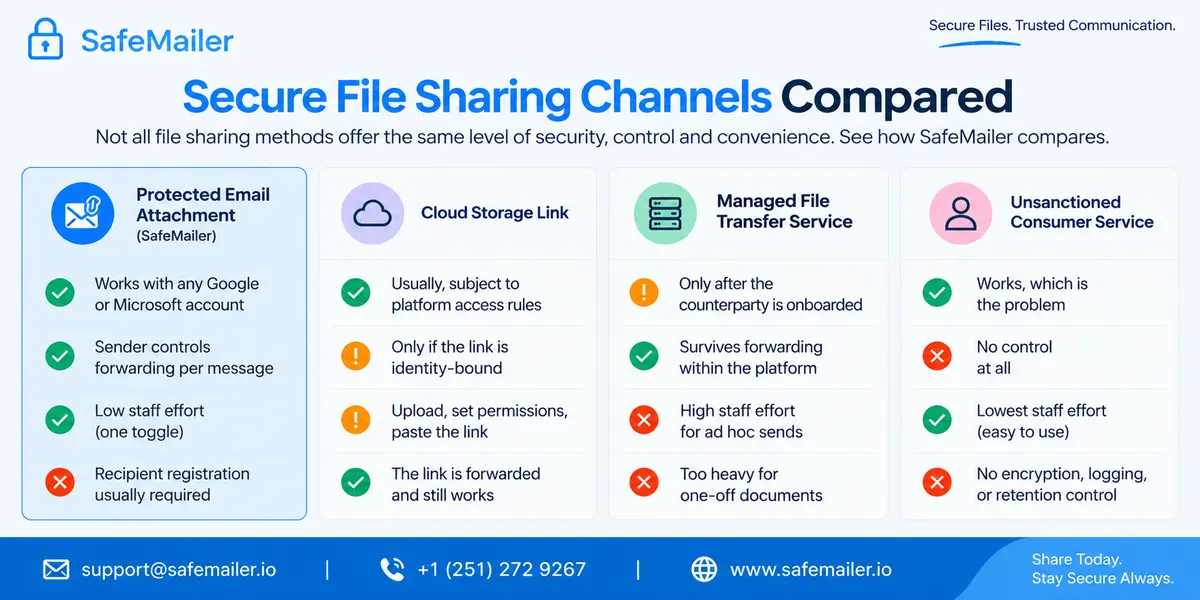
The table compares the four channels on the dimensions that decide real outcomes rather than on encryption strength, which is broadly comparable across all of them.
| Channel | Works With Any External Party | Survives Onward Forwarding | Staff Effort Per Send | Typical Failure Mode |
|---|---|---|---|---|
| Protected email attachment (SafeMailer) | Yes, any Google or Microsoft account | Yes, sender controls forwarding per message | One toggle | The platform requires recipient registration |
| Cloud storage link | Usually, subject to platform access rules | Only if the link is identity-bound | Upload, set permissions, paste the link. | The link is forwarded and still works |
| Managed file transfer service | Only after the counterparty is onboarded | Yes, within the platform | High for ad hoc sends | Too heavy for one-off documents |
| Unsanctioned consumer service | Yes, which is the problem | No control at all | Lowest, which is why it gets chosen | No encryption, logging, or retention control |
Read down the staff effort column, and the pattern is obvious. The channel with the lowest effort is the one with no controls whatsoever, which is exactly why unsanctioned sharing persists in organizations that have invested heavily in the alternatives. The only durable answer is to make the protected channel as cheap to use as the unprotected one, and SafeMailer is designed against that constraint rather than against a feature checklist.
Encrypted File Sharing Services And Where They Stop
Encrypted file-sharing services are storage-first products. The repository is the centre of the design, sharing is an operation performed on something already stored there, and the strongest use case is continuous collaboration on documents that live in the platform permanently.
Judged on that use case, they are excellent. Judged as a way to send a document to an external party they run into three structural limits that no amount of encryption resolves.
- An upload step exists that did not exist before, and every additional step is a step someone eventually skips.
- The recipient receives a destination rather than a message, which introduces the registration or passcode friction that causes external parties to abandon the process.
- Access control attaches to the stored object rather than to the individual act of sharing, so the same document shared with two different parties often carries identical permissions to both.
None of that makes storage platforms a poor choice. It makes them the right choice for a different job. Teams that need documents marked as well as protected should look at watermarking sensitive documents as a layer that sits alongside whichever channel is chosen. The arrangement that works in most businesses is a storage platform for internal collaboration and SafeMailer for the moment a document has to leave it.
Receiving Files Securely Is Half Of Secure File Sharing
Almost every discussion of this topic covers outbound sharing and stops there. Yet the files arriving inbound are frequently more sensitive than the files going out, because they belong to somebody else. Client identity documents, patient intake forms, candidate records, supplier certificates, and signed agreements all arrive as ordinary unprotected attachments from people who were never given a secure way to send them.
The organization then holds another party with regulated data in a mailbox with no encryption, no expiry, and no access record, having done nothing wrong except fail to offer an alternative. Two things fix it. Give external parties a protected reply path so their response travels with the same protection as the original message, and stop asking clients to email sensitive documents without one.
SafeMailer supports secure replies to an encrypted message, which turns a one-directional control into a two-directional one. That inbound record matters as much as the outbound one, and our guide to secure email audit trails sets out how access evidence is structured and retained on both sides of a conversation.
SafeMailer Is The Best Secure File Sending Service For External Sharing
SafeMailer is built for the specific job of getting a sensitive document to somebody outside your organization, using the email channel that already works, without a deployment project on either side. Against the alternatives it wins on four grounds:
- Nothing to deploy. Browser-based operation alongside Gmail and Outlook with no plugin, no MX record change, and no software on sender or recipient devices.
- Nothing for the recipient to join. Identity verification runs through an existing Google or Microsoft account, which removes the abandonment problem that undermines portal-based sharing.
- Certified and contractually backed. SOC 2 Type II and ISO 27001 certified, with a signed Business Associate Agreement included on every plan, including the free one.
- Priced per sender. Licensing follows the people who actually send protected documents rather than every mailbox in the directory.
That last point changes the arithmetic for mid-sized organizations, because the staff who routinely send regulated documents are usually a small fraction of headcount. Anyone who wants to inspect the recipient side before committing can read how recipients verify and open a protected message, which is the part of any evaluation that decides whether a rollout survives its first month.
Secure File Sending Services Compared
The platforms below approach the same problem from different starting points. Storage first products treat sending as an export. Gateway products treat it as a delivery rule. SafeMailer treats the message as the unit of protection, which is the model that matches how business documents actually leave an organization.
| Platform | Starting Point | Recipient Requirement | Sender Control After Delivery |
|---|---|---|---|
| SafeMailer | The message | Existing Google or Microsoft sign-in | Revocation, expiry, and forwarding controls |
| Virtru | The message, via add-in | Authentication, add-in for full features | Revocation and expiry |
| Paubox | The delivery gateway | None, delivered straight to the inbox | Limited |
| OpenText Core (Zix) | The delivery gateway | Portal access for external recipients | Portal-dependent |
| Dropbox | The stored file | Link, optionally password-protected | Link revocation only |
| Proton Mail | The mailbox | Proton account or password link | Expiry only |
For a business whose sensitive documents leave as attachments to external parties, the middle two columns decide the outcome. A platform that pushes the recipient into a portal will be routed around, and a platform that surrenders control at delivery cannot answer the questions that follow an incident. Teams running a formal evaluation can compare SafeMailer against other providers across those dimensions in detail.
Secure File Sharing Policy For Regulated Business Documents
Regulated organizations do not get to treat this as a preference, but the useful framing is not a list of frameworks. It is a short set of questions every framework eventually asks, and a policy that answers them will satisfy most of them at once.
- Was the document encrypted at rest and in transit, and can you name the algorithms rather than gesturing at strong encryption.
- Was the recipient identity verified before release, or was delivery to an address treated as sufficient.
- Could access be withdrawn after delivery, and was there an expiry rule appropriate to the document type.
- Can you produce a record of who opened the document and when, against a verified identity.
- Is there a signed contract with the vendor processing the data, and does it cover the plan tier you are actually using.
That last question stops more pilots than any technical requirement. A platform can be cryptographically sound and still leave a business non-compliant if it will not sign the necessary agreement at the tier the team is on. SafeMailer includes a signed Business Associate Agreement on every plan, including the free one, which is why a clinic can pilot before procurement rather than after. Framework-specific detail sits on the HIPAA email compliance page, with equivalent coverage for GDPR, ITAR, CMMC and DFARS, CJIS, FERPA, the FTC Safeguards Rule, FINRA, GLBA, PCI, and SOX.
Secure File Sharing Pricing And Free Plan
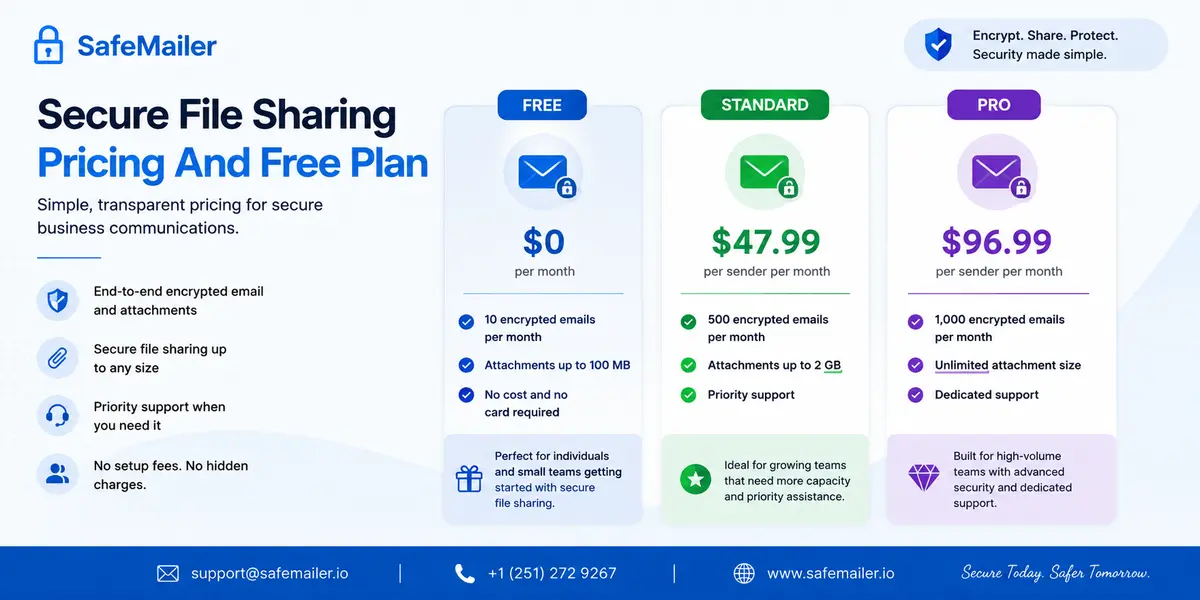
SafeMailer charges per sender rather than per mailbox, and the free tier is permanent rather than a countdown.
- Free: ten encrypted emails per month with attachments up to 100 MB, no cost and no card required.
- Standard: 47.99 US dollars per sender per month, five hundred encrypted emails, attachments up to 2 GB, priority support.
- Pro: 96.99 US dollars per sender per month, one thousand encrypted emails, unlimited attachment size, dedicated support.
Ten messages is enough for a real pilot rather than a demonstration. Send three genuine documents to three genuine external recipients on mail providers you do not control, then count how many of them phoned you for help. That number predicts adoption more accurately than any feature comparison, because recipient behaviour is the variable that decides whether a secure channel survives, and it cannot be read off a specification sheet. Tier inclusions are listed on the SafeMailer plan details page.
Best Practices For Secure File Sharing Via Email
Policy that ignores how people work gets ignored in return. These practices are chosen because staff will follow them on a busy afternoon:
- Name the document types that must be protected in concrete terms, such as client financial records, health information, credentials, and signed agreements, rather than anything sensitive.
- Match the channel to the job. Storage platforms for continuous internal collaboration and protected email for documents leaving to an external party.
- Default to expiry on anything transactional. A signed agreement or a single review does not need to stay openable indefinitely.
- Give external parties a protected way to send documents back, so inbound files carry the same controls as outbound ones.
- Never route a password through the same channel as the document it protects. If the process depends on that, replace the process.
- Review access logs on a schedule rather than after an incident. Opens from unexpected locations or long after the business need has passed are the early signals.
- Measure the unsanctioned channel. If staff are still using consumer transfer sites, the approved route costs too much effort, and no amount of policy will fix it.
Teams working through rollout questions will find common questions about SafeMailer covering the recipient experience, retention behaviour, and administrative setup.
Frequently Asked Questions
What is secure file sharing via email?
Secure file sharing via email is the practice of sending a business document to an external recipient through email while encryption, identity verification, and post-delivery access controls keep the file readable only to the intended person. SafeMailer applies all three to the same message from inside Gmail and Outlook, so the document never has to move to a separate portal in order to travel safely.
Is it safer to send a file as an email attachment or share a cloud storage link?
It depends entirely on whether the protection is bound to an identity. An unprotected attachment and an unbound cloud link are both readable by whoever ends up holding them. A link is more easily forwarded, while an attachment sits permanently in the recipient mailbox and archive. SafeMailer removes the trade off by protecting the document inside the message and releasing it only to a verified Google or Microsoft identity.
What is a secure file sending service?
A secure file sending service is a platform that moves a document from one party to another with encryption, recipient verification, and a record of access, as distinct from a storage service that holds files and issues share links. SafeMailer is a secure file sending service built around the email message, which is the channel most business documents already travel through.
How do I share files securely without the recipient creating an account?
Choose a platform that verifies recipients using credentials they already hold rather than issuing new ones. SafeMailer authenticates recipients through their existing Google or Microsoft account, so there is no registration step, no new password, and no portal membership to establish before the document opens.
Can I collect sensitive files securely from clients by email?
Yes, and it is the half of the problem most organizations overlook. Files arriving from clients are often more sensitive than files going out, and they usually arrive as ordinary unprotected attachments. SafeMailer supports secure replies to an encrypted message, so a client can return identity documents, forms, or signed agreements through the same protected channel rather than an open one.
Do encrypted file sharing services replace email for sending documents?
Rarely, because they solve a storage problem rather than a sending problem. They add an upload step, present the recipient with a destination instead of a message, and attach permissions to the stored file rather than to the individual share. Most organizations end up running a storage platform for internal collaboration and a service such as SafeMailer for documents that leave the organization.
What is the most secure way to share files with someone outside my organization?
The most secure channel is the one your counterparty will actually complete, because a protected route that gets abandoned pushes the document onto an unprotected one. Encryption tied to identity verification through an account the recipient already holds avoids that abandonment. SafeMailer combines AES-256-GCM encryption, Google or Microsoft verification, expiry, and per message forwarding controls without asking the other party to install or register for anything.
Does secure file sharing via email meet compliance requirements?
Encrypted file sharing addresses the transmission security, access control, and audit control expectations common to most frameworks, but compliance also depends on organizational policy and on the contract with the vendor processing the data. SafeMailer is SOC 2 Type II and ISO 27001 certified and includes a signed a business associate agreement on every plan, including the free tier, which covers the vendor side of that obligation.
Is secure file sharing worth it for a small business?
Small businesses often carry proportionally higher exposure because one misdirected client record triggers the same regulatory obligation it would at a larger firm without the legal resources to absorb it. Per-sender pricing and a permanent free tier make SafeMailer accessible to teams where only a few people routinely send sensitive documents.